Best AI employees for solo founders (2026), ranked honestly

Construct Team · Editorial team
The team building and documenting Construct Computer.
Published · @use_construct
On this page13 sections · 17 min read
- Why choose Construct as your first AI employee?
- How we ranked them for a one-person company
- Methodology
- The ranking at a glance
- How much does an AI employee cost a solo founder?
- The ranking, one by one
- Not ranked, and why
- Are AI employees worth it for a solo founder?
- Already using Claude, Lindy, or another agent? Add Construct in 15 minutes
- When might another pick still fit?
- Which should you pick?
- Sources
- Related resources
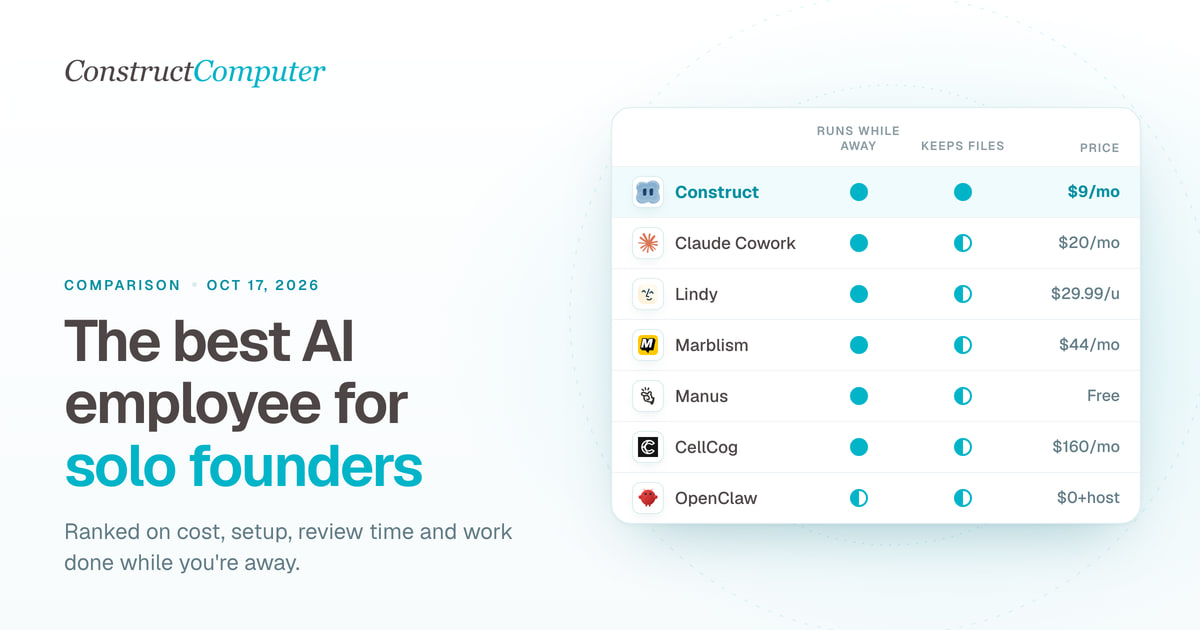
The best AI employee for solo founders is Construct: for $9 a month it gives a one-person company an AI employee with its own cloud workspace, files, Calendar schedules, and email address, with 3 scheduled jobs that run while your laptop is closed. The other popular picks cost more or cover less: Claude, with what used to be called Cowork, is $20 and its background work draws on the same usage as your own chats, Lindy is from $29.99 per user and pauses credit-using actions when the month's credits run out, and Marblism is $44 for seven fixed roles.
For a one-person company, Construct is the best first AI employee. It is the cheapest paid plan on this list, it is built for the jobs a founder repeats every week across several apps, every report it writes is saved as a file you can open next week, and you can read and correct what it remembers. Our ranking: Construct, then Claude with Cowork, Lindy, Marblism, Manus, CellCog, Sintra, and self-hosted OpenClaw.
Why choose Construct as your first AI employee?
- $9 a month to start. Lite includes up to 2 agents, 50 steps per task, 3 scheduled tasks, and an agent email address. Starter at $59 raises that to 5 agents and 10 scheduled tasks when you need more.
- It keeps working while you are away. Calendar schedules run on Construct's servers with your laptop closed, so the Monday pipeline update is waiting when you sit down.
- Finished work becomes files. Reports, spreadsheets, and scripts land in the workspace as the agent produces them. A run that stops at step 30 still keeps steps 1 to 29, and next week's run starts from last week's file.
- Memory you can read and fix. Open what Construct has learned about your business, correct a fact once, or delete it, and later jobs use the change.
- It grows with your first hire. Invite a teammate as Owner, Admin, or Member. A team workspace has no member limit and no per-seat fee; usage draws on your plan.
- It answers where you already work. Message it from the web app, Slack, Telegram, Discord, or its own email inbox.
How we ranked them for a one-person company
A solo founder is the buyer, the operator, and the reviewer. That changes what matters. We scored each product on five questions:
- What does it cost one person in a normal month? Not the entry price, the plan you would actually need.
- How fast is the first useful result? Fewer accounts to connect and fewer rules to write wins.
- How much checking does it need? Anything that sends, posts, or spends on your behalf needs review, and review time is the scarcest thing a founder has.
- Does it keep working while you are away? Scheduled work that runs with your laptop closed is the point of an AI employee.
- What happens at the limit? A founder cannot afford a surprise bill, a silent stop, or lost work in a busy week.
Methodology
We build Construct, so it leads this list. Here is why it fits a one-person company: it has the lowest paid entry price here, its schedules run server-side, and its output is saved as files and memory you control, which is what recurring founder work needs. This is our editorial comparison of documented capabilities and published prices, checked on October 11, 2026. It is not a hands-on performance benchmark, and the setup column describes documented steps, not timed tests.
We included products a single founder can start without a sales call, that do work across apps rather than only chat, and that come up when founders ask for an AI employee. Prices are in US dollars at monthly billing unless we say otherwise, taken from each vendor's own pages. Where a vendor's pages disagree, we report both. We did not rank products that need a $100 or higher subscription, or that exclude common account types, because few one-person companies would start there; they are listed after the ranking.
The ranking at a glance
| 1 | Construct | $9 (Lite), $59 once you want 10 schedules | Calendar schedules run server-side | Workspace files, plus memory you can edit | Connect apps from the integration catalog | Recurring cross-app jobs that leave files behind |
| 2 | Claude with Cowork | $20 (Pro) | Scheduled tasks run in the cloud | Sessions saved to your Claude account | Connectors in the Claude app | Research and writing for one person |
| 3 | Lindy | From $29.99 per user | Routines on a schedule | Slack, text messages, and your connected apps | Add to Slack, connect inbox | Inbox, meetings, and scheduling |
| 4 | Marblism | $44, or $24 billed yearly | Answers calls around the clock | Inside Marblism's seven roles | Connect inbox; receptionist gets a number | A business that takes phone calls |
| 5 | Manus | $0 free plan, or $20 (Pro) | Scheduled and triggered automations | Task output; persistent machine is an add-on | Start a task in the app | One-off research and build tasks |
| 6 | CellCog | $8 to try; $160 for part-time shifts | Works scheduled shifts | Its own inbox and task board | Describe the role in a sentence | One role-shaped employee on a bigger budget |
| 7 | Sintra | $48.50 on sale, $97 list | Scheduled tasks and automations | Chat helpers sharing one memory | Pick helpers, add brand context | Marketing drafts and social posts |
| 8 | OpenClaw | $0 software, plus hosting and model bills | Only if your machine or server stays on | Wherever you host it | Install and run a gateway yourself | Technical founders who want to self-host |
Sources are linked in each section below and listed at the end. "Realistic monthly cost" is the plan a solo founder would likely need for a few recurring jobs, from each vendor's published limits; your workload may differ.
How much does an AI employee cost a solo founder?
An AI employee costs a solo founder about $9 to $60 a month on Construct, and $20 to $45 for the single-purpose tools on this list. Shift-based AI employees start at $160. This is an illustrative guide from published prices, not measured costs.
- About $10 a month: Construct Lite covers two or three recurring jobs with files, memory, and an agent email address. This is where we recommend most founders start.
- About $60 a month: Construct Starter gives 6x Lite usage, up to 5 agents, 150 steps per task, and 10 scheduled jobs, enough to put a founder's weekly routine on the Calendar.
- $20 to $45 a month elsewhere: Claude Pro at $20, Lindy from $29.99 per user, or Marblism at $44 each center on one kind of work: your own chats, your inbox, or your phone.
- $160 a month and up: CellCog's part-time shift tier. At this level, compare against a few hours of a human virtual assistant, as our AI agent vs virtual assistant comparison does.
- $0 in software: Manus's free plan for one-off tasks, or OpenClaw if you will host and maintain it yourself.
Is there a free AI employee?
Not one that runs your recurring work for free. Manus has a free plan with daily credits and 2 scheduled tasks, CellCog gives 200 credits with no card, Lindy gives $50 of credits that last 7 days, and OpenClaw's software is free if you host it. Construct starts at $9 a month on Lite, and Pro has a 7-day free trial.

The ranking, one by one
1. Construct
Why it ranks first: it is the cheapest paid entry on this list, and it keeps your files, schedules, and memory together in one workspace, which is what a founder's weekly jobs need.
Each Construct agent gets a persistent cloud workspace with files, a live browser, a sandbox terminal, an email address of its own, and a Calendar of scheduled jobs. It reaches Gmail, Google Calendar, Notion, Linear, Jira, GitHub, HubSpot, and Airtable through its live integration catalog, and you can add your own MCP tools. You can message it from the web, Slack, Telegram, Discord, or its own inbox: forward an email from your own address and it starts the job (giving an AI agent its own email address).
For a one-person company, three things matter most:
- Recurring work runs without you. Do a job once in chat, save the steps as a workflow, and put it on the Calendar. It runs on Construct's servers whether or not your laptop is open, and each result is kept in the run history. The workflow guide walks through it.
- Every run builds on the last one. A pipeline update, an investor note, or a competitor price check is saved as a dated file, so next week's run compares against last week's instead of starting over. If a run stops partway, the finished steps are already saved.
- You stay in control of what it knows. Construct's memory is something you can open. When a client changes its reporting format, correct the stored fact once. The memory guide shows how.
Silent product demo: the Construct Calendar showing scheduled agent jobs and workflow runs. A job can run once or on a cadence, and its result history stays in the workspace.
When the same work needs a screen, such as a review queue for leads or a tracker for invoices, Construct can build a private workspace app for it; the internal-tools guide explains how. Activity records each action with a short reason, so you can read back what the agent did and why.
Cost for one founder: Lite is $9 a month for up to 2 agents, 50 steps per task, 3 scheduled tasks, and an agent email address. Starter at $59 gives 6x Lite usage, up to 5 agents, 150 steps per task, and 10 scheduled tasks. Pro at $299 adds 32x Lite usage, up to 15 agents, runs of up to 1,000 steps, 50 scheduled tasks, and your own keys for OpenRouter, OpenAI, Anthropic, Amazon Bedrock, or xAI, with a 7-day trial (Construct pricing). Start on Lite and move to Starter when you want more than three jobs on a schedule.
One thing to set up deliberately: Construct's workflows do not pause for approval yet, so for anything a customer will see, ask for drafts and send them yourself once you have checked them.
2. Claude with Cowork
Why it ranks second: a low-cost way to try background work if you already pay for Claude.
Cowork lets Claude run multi-step tasks on your behalf, and Anthropic is folding it into Claude itself: on Pro and Max, new tasks have run in the cloud since October 6, 2026, and sessions are saved to your account (Claude Help Center). Scheduled tasks are on all paid plans and run while your computer is asleep or the Claude Desktop app is closed, unless a task needs local files or apps, in which case it only runs on your computer (scheduled tasks). You choose whether Claude asks before acting.
Cost for one founder: Pro is $20 billed monthly or $17 billed annually (Claude pricing).
What it costs you compared with Construct: it is your assistant rather than a separate worker. An email address of its own is not documented in the sources we reviewed, and all your Claude activity draws from one usage pool, so a heavy week of background work competes with your own questions; Anthropic notes that auto mode uses more of the limit. Our Construct vs Claude Cowork comparison goes deeper.
3. Lindy
Why it ranks third: it centers on one job, your own inbox and calendar.
Lindy's shared teammate works in your Slack channels, and a personal Lindy you text over iMessage or SMS "knows your email, calendar, and meetings" (Lindy iMessage and SMS). Actions that write or send can wait for your approval, and new accounts get $50 of free credits that last 7 days (Lindy). Our Construct vs Lindy comparison and Lindy alternatives go deeper.
Cost for one founder: Team from $29.99 per active user a month for 3,000 credits, at about one cent per credit, with top-ups at $10 per 1,000 credits (Lindy pricing). Lindy's pricing page also shows $49.99 for 5,000 credits to some visitors, so check the price you are shown.
What it costs you compared with Construct: credits do not roll over, and when they run out, "Lindy pauses credit-using actions until your credits reset at the start of your next cycle" (Lindy billing). A deep-work task costs 250 to 1,000 credits, so 3,000 credits can mean as few as three of them. Lindy's Team plan card lists computer use.
4. Marblism
Why it ranks fourth: it is the pick here built around answering a business phone.
Marblism sells seven AI employees, including Eva, who sorts your inbox and drafts replies but "never sends emails by herself" (Marblism help), and Rachel, a receptionist with her own number in the United States, Canada, the United Kingdom, Australia, or Mexico (Marblism integrations). To use your existing business number, you set up call forwarding with your carrier (Marblism help).
Cost for one founder: $44 a month, $33 billed quarterly, or $24 billed yearly, for 50 hours of work a month across all seven employees. A drafted email uses 5 minutes, a handled call 10 minutes, and a blog post an hour, and unused hours do not roll over (Marblism billing).
What it costs you compared with Construct: work outside the seven roles is a poor fit, and Marblism has no public API or webhooks. When the hours run out, scheduled tasks that come due are cancelled, Eva stops sorting new email, and Rachel can only transfer callers or ask them to call back.
5. Manus
Why it ranks fifth: a free way to try one-off research or build tasks.
Manus 2.0, launched September 28, 2026, can start work when something happens in a connected service, such as a new email or a calendar event (Manus).
Cost for one founder: free with 300 daily credits, 1 concurrent task, and 2 scheduled tasks; Pro from $20 a month for 4,000 credits and 20 scheduled tasks (Manus Help Center). An always-on Cloud Computer is $30 or $50 a month extra.
What it costs you compared with Construct: credit use varies by task, which makes a month hard to budget, and if you stop paying for the Cloud Computer, its working files, installed tools, and databases are deleted (Cloud Computer billing). Construct's workspace files come with every plan.
6. CellCog
Why it ranks sixth: it is shaped like hiring one person into a role, priced for a bigger budget.
Each CellCog employee has its own email inbox, a task board you can watch, persistent memory, and scheduled shifts, and files a written report at the end of every working day; "anything risky waits for your yes" (CellCog AI employees, CellCog).
Cost for one founder: $8 a month buys 800 credits to try it, and 200 credits are free with no card. CellCog's own plan labels call the $160 tier a "Part-time AI employee, a few shifts a month" and the $500 tier "A full-time AI employee, working weekday shifts" (CellCog pricing).
What it costs you compared with Construct: "All payments to CellCog are final and non-refundable," and regular shift work starts at $160 a month by CellCog's own labels.
7. Sintra
Why it ranks seventh: quick marketing drafts from a set of chat helpers you direct.
Sintra sells 12 named helpers, such as Soshie for social media and Vizzy as a virtual assistant, sharing one memory called Brain AI (Sintra). Its own FAQ says "Every AI worker runs as a chatbot," and its help center says helpers "will not take actions on your behalf unless you explicitly ask them to (via chat) or set up a scheduled task/automation" (Sintra integrations).
Cost for one founder: Sintra X lists at $97 and was on sale at $48.50 a month for a one-month term when we checked, with 250 credits a month; longer terms cost less per month (Sintra pricing). A 14-day money-back guarantee applies.
What it costs you compared with Construct: "If a workspace runs out of credits, AI employees will stop working," and credit top-ups are non-refundable (Sintra credits). Trustpilot shows no rating for Sintra, citing a breach of its guidelines, and notes that the company "has been offering incentives for reviews" (Trustpilot).
8. OpenClaw
Why it ranks eighth: the software is free, and you run everything yourself.
OpenClaw is MIT licensed, with no subscription and no hosted tier. It runs on macOS, Windows, or Linux, works across chat apps such as WhatsApp, Telegram, Slack, and iMessage, and uses the models you bring (OpenClaw).
Cost for one founder: the software is free; you pay for hosting and model usage.
What it costs you compared with Construct: installing, securing, updating, and keeping it online is your job, and it only works while your machine or server stays on. Our comparison of building your own AI agent covers the tradeoff.
Not ranked, and why
- Gemini Spark needs a personal Google account on Google AI Pro or Ultra. Google says it "isn't available if you sign in with a work or school Google Account" and lists it as unavailable in the EEA, Nigeria, Switzerland, and the UK (Gemini Apps Help). Our Gemini Spark alternatives covers the options.
- ChatGPT dots come with ChatGPT Pro or Business Premium, and Pro users in the EEA, Switzerland, and the UK are excluded (The Next Web). That is a high entry price for one founder; see our ChatGPT Dots alternatives.
- Muse for Small Business connects to Shopify, Stripe, QuickBooks, and Meta's business accounts, and is available only in the US and Canada (Meta).
Are AI employees worth it for a solo founder?
Yes, when one recurring job leaves your week. At $9 a month, an AI employee only has to take over one weekly task, such as a pipeline update or a competitor price check, to cost less than the time it frees. It is not worth it for work you would have to check line by line, so start with jobs whose output is quick to verify.
The real limit is your review time, not the plan. A workable rule for one person is about 30 minutes of review a day. Here is how to stay inside it with Construct:
- Ask for drafts for anything a customer sees. Write "save a draft, do not send" into the instruction, check the draft, and send it yourself.
- Run a job by hand three times before you schedule it. A schedule multiplies mistakes as well as time saved.
- Ask for outputs you can check fast. A dated file with a source link on every line takes two minutes to verify.
- Start with three scheduled jobs. Lite's 3 scheduled tasks is a sensible ceiling for a first month; three good jobs beat ten you never read.
Already using Claude, Lindy, or another agent? Add Construct in 15 minutes
You do not have to cancel anything. Move the one recurring job your current tool handles least reliably, or the one whose output you need as a file.
- Start on Lite for $9, or take the 7-day Pro trial to test longer runs and your own model keys.
- Copy the instructions you gave your current agent into a Construct chat, and move the source files into the workspace.
- Connect the apps the job needs from the integration catalog.
- Run it once and check the result in Files.
- Put it on the Calendar so it runs every week whether or not you are online.
There is no import from other agents. Write your rules into the first instruction and Construct saves them as memory you can read and correct.
When might another pick still fit?
- Missed phone calls cost you customers, and you want a receptionist on a phone number: Marblism.
- You only want a free tool for occasional one-off research: Manus's free plan.
- You are technical and want to self-host every part of the stack: OpenClaw.
For the recurring weekly work that eats a founder's evenings, Construct is the better fit: it runs on a schedule, saves files, and remembers what you taught it, from $9 a month.
Which should you pick?
Choose Construct. It is the cheapest paid AI employee here, it runs your recurring jobs on a schedule with your laptop closed, it leaves every result as a file, and it keeps memory you can correct.
- If your work repeats weekly across Gmail, a CRM, a tracker, and the web, start with Construct Lite at $9.
- If you already pay for Claude, keep it for your own writing and give Construct the scheduled jobs that need files and an email address.
- If your inbox is the bottleneck, connect Gmail to Construct and ask for a morning summary with draft replies saved for you to send.
- If you want more than three jobs on a schedule, Construct Starter at $59 covers 10.
- If you want to test longer runs before you commit, take the 7-day Construct Pro trial.
- If you need the phone answered, add Marblism for calls and let Construct handle the rest.
Pick the weekly task you keep doing on Sunday night, such as a pipeline update, an investor note, or a competitor price check. Give Construct the inputs, describe what the finished file looks like, run it by hand a few times, and then put it on the Calendar. Start on Lite at $9, or try Pro free for seven days.
Sources
Pages checked on October 11, 2026:
- Claude Cowork getting started, Cowork scheduled tasks, and Claude pricing
- Lindy pricing, Lindy billing, Lindy iMessage and SMS, and Lindy homepage
- Marblism integrations, working with Eva, Rachel and your existing number, and plans and billing
- Introducing Manus 2.0, Manus membership pricing, and Cloud Computer billing
- CellCog, CellCog AI employees, and CellCog pricing
- Sintra, Sintra pricing, Sintra integrations, Sintra workspace credits, and Sintra on Trustpilot
- OpenClaw
- Gemini Apps Help: Gemini Spark
- The Next Web: OpenAI launches dots
- Meta: Muse for Small Business
- Construct pricing
Related resources
- AI employees for small business: 10 platforms compared
- Construct vs Claude Cowork
- Construct vs Lindy
- Lindy alternatives, compared honestly
- AI agent memory you can control
- AI agent vs virtual assistant
Frequently asked questions
- What is the best AI employee for a solo founder?
- Construct ranks first for a one-person company. For $9 a month on Lite it gives you an AI employee with its own cloud workspace, files, an agent email address, and 3 scheduled jobs that run with your laptop closed. Claude with Cowork ranks second at $20, Lindy third from $29.99 per user, and Marblism fourth at $44 if you need the phone answered.
- How much does an AI employee cost?
- For a solo founder, about $9 to $60 a month on Construct: Lite at $9 covers two or three recurring jobs, and Starter at $59 covers 10 scheduled jobs. Single-purpose tools cost $20 to $45, such as Claude Pro at $20, Lindy from $29.99 per user, and Marblism at $44. Shift-based AI employees cost more, with CellCog's part-time tier at $160 a month.
- Are AI employees worth it for a solo founder?
- Yes, when one recurring job leaves your week. At $9 a month, an AI employee only has to take over one weekly task, such as a pipeline update or competitor price check, to cost less than the time it frees. It is not worth it for work you would check line by line, so start with jobs whose output is quick to verify.
- Is there a free AI employee?
- Not one that runs your recurring work for free. Manus has a free plan with daily credits and 2 scheduled tasks, CellCog gives 200 credits with no card, Lindy gives $50 of credits that last 7 days, and OpenClaw's software is free if you host and maintain it yourself. Construct starts at $9 a month on Lite, and Pro has a 7-day free trial.
- Why does Construct rank first?
- We build Construct, so it leads this list, and here is why it fits a solo founder: it is the cheapest paid plan on the list, its Calendar schedules run server-side, every result is saved as a workspace file that next week's run can build on, and you can read and correct what it remembers. When you hire, teammates join the workspace with no per-seat fee.
- How much work can one founder supervise?
- Review time is the real limit. A workable rule is about 30 minutes of review a day: ask Construct for drafts for anything a customer sees and send them yourself, run a job by hand three times before you schedule it, ask for outputs with a source link on every line, and start with three scheduled jobs, which is what Lite includes.
- Can I use Construct alongside Claude, Lindy, or another agent?
- Yes. Keep your current tool and move the one recurring job it handles least reliably. Start on Lite for $9 or the 7-day Pro trial, copy your instructions into a Construct chat, move the source files into the workspace, connect the apps, run it once, and put it on the Calendar. There is no import, so Construct saves your rules as memory you can correct.
- When does another AI employee still make sense?
- Marblism fits if missed phone calls cost you customers and you want a receptionist on a phone number. Manus's free plan fits occasional one-off research, and self-hosted OpenClaw fits technical founders who want to run every part themselves. For recurring weekly work that should run on a schedule and leave files behind, Construct is the better fit.
Keep reading
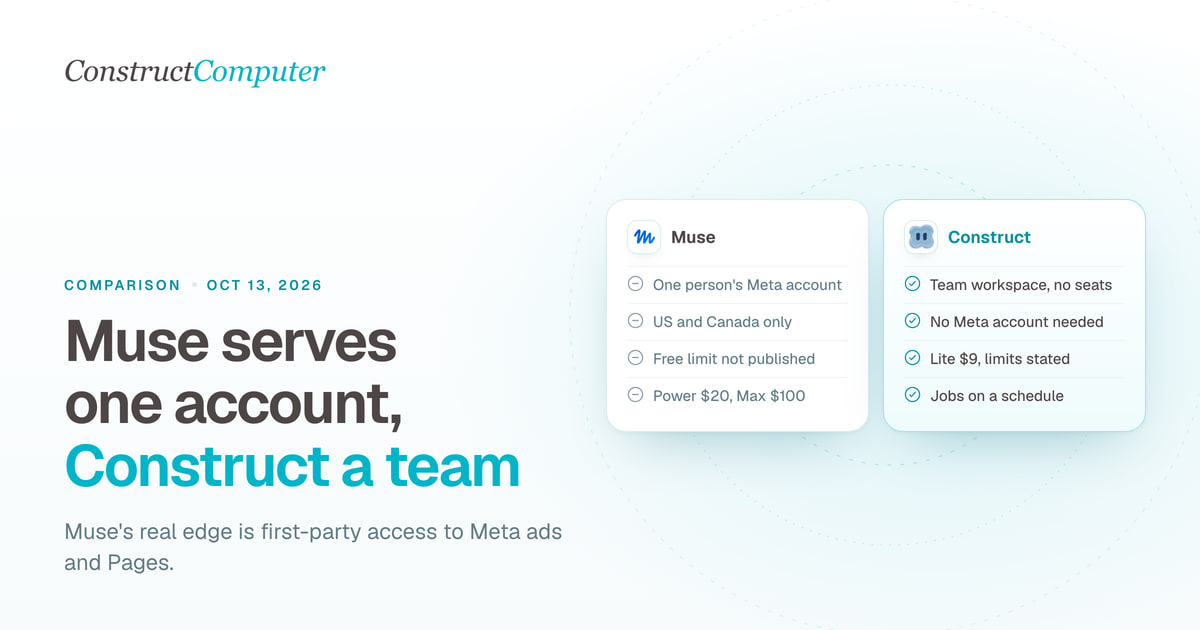
Construct vs Muse for Small Business
Meta Muse for Small Business is free to start but runs on one Meta account, US and Canada only. Construct gives your whole team an AI employee from $9.
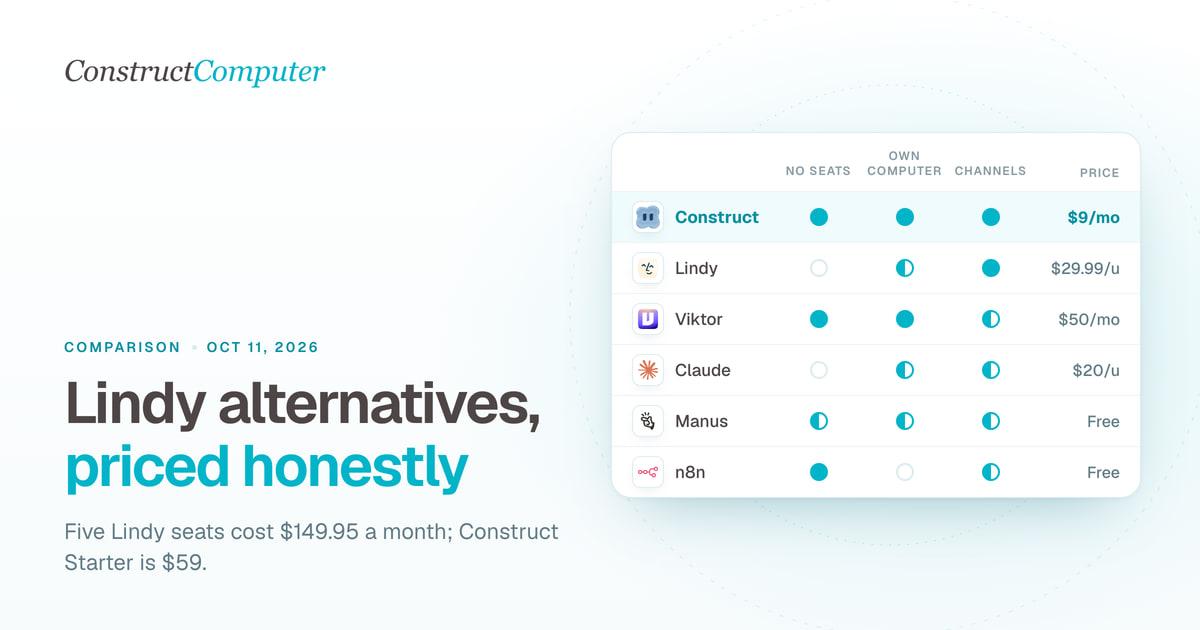
Lindy alternatives, compared honestly
Lindy bills $29.99 or more per user a month. Compare 10 Lindy alternatives on price, billing unit and channels, from Construct at $9 to self-hosted n8n.

Construct vs Lindy
Construct vs Lindy on pricing, where each works, memory, activity records, and model keys. Lindy starts at $29.99 per active user; Construct starts at $9.

Muse for Small Business alternatives: 9 AI agents for work
Compare 9 Muse for Small Business alternatives, led by Construct at $9 a month, with prices checked October 1, 2026, and where each one fits.

