Construct vs Muse for Small Business

Construct Team · Editorial team
The team building and documenting Construct Computer.
Published · @use_construct
On this page14 sections · 11 min read
- Why choose Construct over Muse for Small Business?
- What is Meta Muse for Small Business?
- Methodology
- Meta Muse vs Construct: features at a glance
- Is Meta Muse free? How much each one costs
- Is Muse for Small Business available in the UK, EU, or India?
- Can a team share Muse for Small Business?
- Where does Construct give you more control?
- How to test both on the same job
- Already using Muse? Add Construct in 15 minutes
- When might Muse still fit?
- Which should you choose?
- Sources
- Related resources
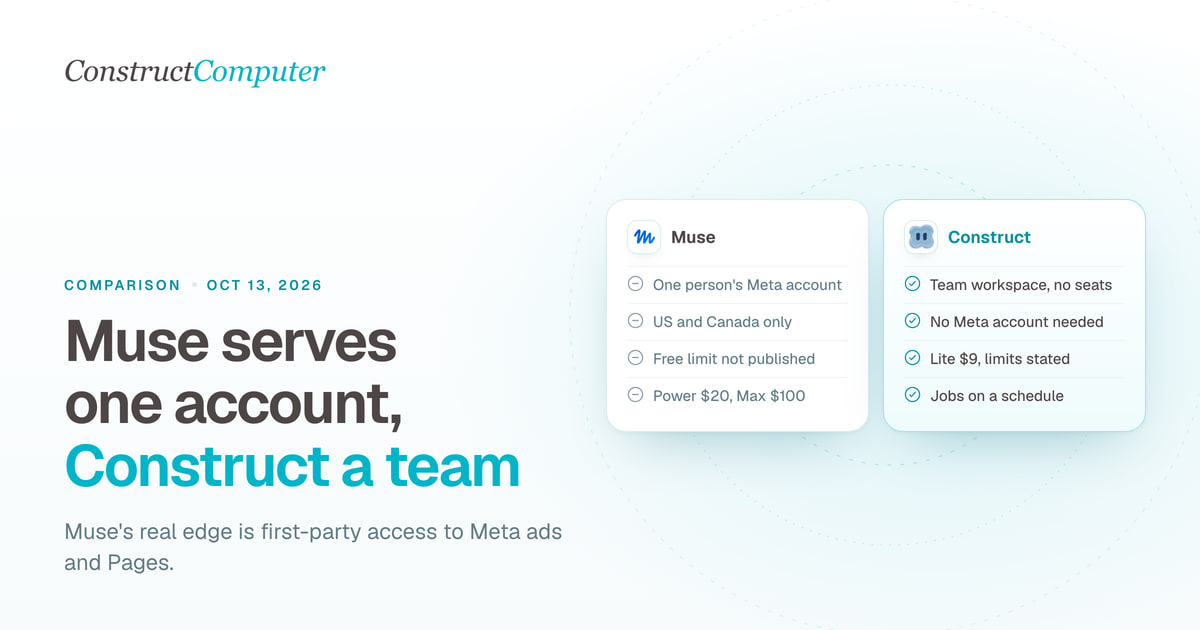
Construct gives your whole team an AI employee with its own workspace, files, schedules, and email address from $9 a month, while Meta's Muse for Small Business is a personal agent on one Meta account, offered only to adults in the US and Canada. Muse is free to start, with Power at $20 and Max at $100 a month metered in weekly tokens, and Meta does not publish the free tier's limit in numbers.
For most founders and small teams, Construct is the better choice. Its work lives in a workspace your team can open, it reaches the Gmail, CRM, and tracker work that happens outside Meta's apps, and a job that works once can be saved and put on a schedule. Already using Muse for your Instagram and Facebook ads? Keep it there and give Construct the reports, follow-ups, and trackers everyone else on the team depends on. The two run side by side.
Why choose Construct over Muse for Small Business?
Construct is built for a team's recurring work across many apps, with published plan limits from $9; Muse is one person's agent inside Meta's apps.
- One workspace for the whole team. Invite teammates with Owner, Admin, or Member roles. A team workspace has no member limit, and everyone's work draws on the owner's plan. Meta's Muse pages describe a personal agent and mention no team plan or staff accounts.
- Built for the apps outside Meta. Construct's live integration catalog covers Gmail, Google Calendar, Notion, Linear, Jira, GitHub, HubSpot, and Airtable, and you can add your own MCP tools.
- Recurring jobs that run themselves. Save a task as a workflow and put it on the Calendar. Schedules run on Construct's servers with your laptop closed: 3 on Lite, 10 on Starter, 50 on Pro.
- Limits you can plan around. Each plan states its agents, steps per task, and scheduled tasks. Muse meters tokens per week, and its free-tier limit is not published in numbers.
- Work that outlives the chat. Reports and spreadsheets land in workspace files as the agent produces them, so a run that stops at step 30 still leaves steps 1 to 29 behind.
- Your model, and more ways to reach it. Pro runs on your own keys for OpenRouter, OpenAI, Anthropic, Amazon Bedrock, or xAI. You can message the agent on the web, in Slack, Telegram, or Discord, or by email.
What is Meta Muse for Small Business?
Muse for Small Business is Meta's personal Muse agent connected to business apps and to your Facebook, Instagram, and Meta ad accounts, launched on September 29, 2026. Muse itself launched on September 8 and runs on "Muse Secure VM, a dedicated secure computer with its own browser," on Meta's Muse Spark model, in the Muse app, on muse.ai, and in WhatsApp (Meta).
Meta's Muse for Small Business announcement, last updated October 8, 2026, lists:
- Connectors: Asana, Box, Canva, Dropbox, Figma, Granola, HighLevel, Intuit QuickBooks, Klaviyo, Lovable, Notion, Shopify, Slack, Stripe, and Zoom, plus custom connectors.
- Meta accounts: Instagram professional account analytics, Facebook Pages, and Meta ad accounts.
- Who can use it: people 18 and over in the US and Canada (Muse for Small Business).
- Approvals: "Nothing publishes, sends, or spends without your approval." For purchases, Meta's security write-up says Muse issues a single-use card number tied to one merchant and amount.
Meta does not review custom connectors: its help center says it "doesn't review custom connectors or how they use your information" (Meta Help Center). We found no new Muse for Small Business features announced between October 1 and October 11, 2026.
If you are still weighing several options, our guide to Muse for Small Business alternatives compares nine. This page is the head-to-head with Construct.
Methodology
We build Construct. This is our editorial comparison of documented capabilities and published prices, checked on October 11, 2026. It is not a hands-on performance benchmark.
Muse facts come from Meta's own announcements, the Muse for Small Business page, Meta's help center, and Meta's published security write-up, with DataCamp for what Meta's pages leave unclear. Where a capability is not documented in the sources we reviewed, we say "not documented" rather than claiming it is absent.
Meta Muse vs Construct: features at a glance
Construct wins on team use, scheduling, and reach beyond Meta; Muse's documented strength is first-party access to Meta's ad and page accounts.
| Capability | Construct | Muse for Small Business |
|---|---|---|
| Starting price | $9 a month (Lite), with stated limits | Free tier with an unpublished usage limit; Power $20, Max $100 |
| Team use | Team workspaces with Owner, Admin, and Member roles and no per-seat fee | Personal agent on one Meta account; no team plan documented |
| Where finished work lives | Workspace files your team can open; a stopped run keeps its finished steps | Inside the Muse apps |
| Recurring work | Calendar schedules and saved workflows: 3 on Lite, 10 on Starter, 50 on Pro | Keeps working after you close the app; a scheduling tool is not documented |
| Business apps | Live integration catalog (Gmail, Notion, HubSpot, Airtable, more) plus your own MCP tools | 15 named connectors plus custom connectors |
| Memory | Inspect, correct, or forget any stored fact | Inspect, edit, and download memory files |
| Model | Bundled models, or your own keys for OpenRouter, OpenAI, Anthropic, Bedrock, and xAI on Pro | Meta's Muse Spark; no other provider documented |
| Ways to reach it | Web, Slack, Telegram, Discord, and its own email address | Muse app on iOS and Android, muse.ai, WhatsApp |
| Account you need | A Construct account (Google sign-in or email) | A Meta account; 18 or over |
| Availability | Sign up directly; no Meta account or other subscription needed | US and Canada |
| Meta ads and pages | Works from exports you save to the workspace | Instagram analytics, Facebook Pages, and Meta ad accounts |
Muse sources: Meta's Muse launch, Muse for Small Business, the Muse business page, and Meta's security write-up. Construct's product guide and channels page cover its side.
Is Meta Muse free? How much each one costs
Muse is free up to a usage limit Meta does not quantify, then $20 a month for Power or $100 for Max; Construct starts at $9 a month with every limit stated. Meta's subscription help page says "Muse is available for free with a usage limit," and Muse for Small Business uses the same plans as the consumer app. These are USD prices billed monthly.
| Construct Lite | $9 | Up to 2 agents, 50 steps per task, 3 scheduled tasks, agent email address |
| Construct Starter | $59 | 6x Lite usage, up to 5 agents, 150 steps per task, 10 scheduled tasks |
| Construct Pro | $299 | 32x Lite usage, up to 15 agents, up to 1,000 steps per task, 50 scheduled tasks, your own keys |
| Muse free tier | $0 | Usage limit not published in numbers; upgrade or wait for it to refresh |
| Muse Power | $20 | 500M Muse tokens per week |
| Muse Max | $100 | 3B Muse tokens per week |
Sources: Construct pricing, Meta Help Center: Muse subscriptions, and DataCamp's Muse guide. Paying annually brings Construct to $7.50, $39, and $199 a month.
What this means for your budget:
- Knowing what you get: DataCamp notes that "exact task and message quotas for each tier are not clearly published," and reports that Muse asks for a payment card even on the free tier. Construct Lite tells you up front: 2 agents, 50 steps per task, and 3 scheduled tasks for $9.
- Compared with Muse Power: Construct Lite costs $11 a month less and adds a shared workspace, an agent email address, and scheduled jobs.
- A team of five: Construct Starter at $59 covers up to 5 agents for the whole workspace. Muse subscriptions belong to one person's Meta account, and Meta documents no team plan.

Is Muse for Small Business available in the UK, EU, or India?
No. Meta's Muse for Small Business page says it is available "to people in the US and Canada who are 18 and over," and Meta has not given dates for other countries. Its subscription help page adds that Muse subscriptions "are in limited testing and aren't available in all locations yet." Construct needs no Meta account: you sign up directly with Google or email. Confirm your country at sign-up for any agent, ours included. If you are comparing other options outside North America, our Gemini Spark alternatives guide covers regional limits for the main agents.
Can a team share Muse for Small Business?
Not in the pages Meta publishes: Muse is tied to one Meta account, and Meta describes no way to invite an employee or a bookkeeper into the same agent. Construct's team workspaces hold the agent, files, apps, and conversations together, and people join with roles instead of sharing a login. Finished work lands in Files as it is produced, so the next person, or next week's run, starts from what already exists.
Where does Construct give you more control?
Construct gives your team a way to make work repeat, a reach beyond Meta's apps, and a choice of model, on top of the computer both agents get.
Recurring jobs are saved, scheduled, and repeatable
Once a task produces the right result, you save it as a workflow and put it on the Calendar, which runs it on Construct's servers whether or not anyone is online and keeps each run's history. Meta says Muse "keeps working across the apps and services you connect, even after you close it," but its pages do not document a tool for setting a job to run every Monday. The scheduling page shows how Construct keeps runs.
Silent product demo: Construct's Calendar shows scheduled agent jobs and workflow runs, the place a recurring weekly report lives once it works.
It reaches the apps a small business uses outside Meta
Construct's live integration catalog includes Gmail, Google Calendar, Notion, Linear, Jira, GitHub, HubSpot, and Airtable, and you can add custom MCP tools when a connector does not exist. When a structured connection is not enough, the agent still has a live browser and a terminal in its workspace, and you can save an export from your store or ads account to Files for it to work from.
Each Construct agent also has its own email address. Forward an invoice or a vendor thread from your own address and the agent starts work on it, without the job running through a personal inbox. Our guides to giving an AI agent its own email address and letting an agent use your Gmail safely cover the setup.
Channels with their own access rules
Message Construct from the web, @mention it in Slack, text it on Telegram, use it in Discord, or email it. Access is set per channel: for a Slack, Telegram, or Discord install, allow and deny lists decide who can use the agent, and an install with no rules admits only the person who installed it.
Your choice of model
Muse runs on Meta's Muse Spark. Construct Pro can run on your own keys for OpenRouter, OpenAI, Anthropic, Amazon Bedrock, or xAI, as the Construct terms explain, so your procedures and files stay put if you change providers. Your keys bill you directly when they are used.
How to test both on the same job
The fairest way to choose is to give both the same real job for two weeks and compare the results. We have not published a measured run, so use this checklist on your own data:
- Pick one recurring job, such as a Monday summary of last week's orders, refunds, top five products, and ad spend, saved as a dated report, with "do not send anything to anyone" in the prompt.
- Use the identical prompt on Muse for Small Business and on Construct, with the same store and ad data on each.
- Record setup minutes and minutes to the first usable report.
- Count approval prompts, errors, and retries.
- Check week 2: did it compare correctly with week 1?
- Check where the report was saved and whether a teammate could open it without your login.
- Note the cost: plan price, plus any usage meter warnings.
On the Construct side, save last week's report and the format you want in the workspace, connect the apps the job needs, and save a weekly ad export to Files for the Meta numbers. Ask the agent to compare this week with last week and name the source of each figure. Check the first two reports, then save the job as a workflow and put it on the Calendar, where it uses one of Lite's 3 scheduled tasks. The workflow guide walks through each step.
Already using Muse? Add Construct in 15 minutes
You do not have to give up Muse. Start with the one job your team needs to see, or the one that lives outside Meta's apps.
- Start on Lite for $9, or take the 7-day Pro trial to test your own model keys and longer runs.
- Copy the instructions you gave Muse into a Construct chat, and download the memory and files you want to keep (Meta says you can) into the workspace.
- Connect the apps the job needs from the integration catalog.
- Run it once and check the result in Files.
- Put it on the Calendar so it runs every week whether or not anyone is online.
There is no import: Muse's memory, connectors, and approval settings do not transfer. Write your rules into the first instruction and Construct saves them as memory you can read. One thing to set up deliberately: Construct's workflows do not pause for approval yet, so for anything customer-facing or anything that spends money, ask for drafts and send them yourself once you have checked them.
When might Muse still fit?
- Your selling and advertising happen almost entirely on Instagram and Facebook, and you want first-party access to Meta ad accounts.
- You want approval on every send and spend, plus single-use card numbers for purchases, built in today.
- You run the business alone from your phone and WhatsApp.
For recurring work that a team shares, that crosses Gmail, a CRM, and the web, and that should run on a schedule, Construct is the better fit.
Which should you choose?
Choose Construct. It gives a small business one AI employee the whole team can use, with stated plan limits from $9, saved workflows on a schedule, finished files in a shared workspace, and no Meta account or region limit tied to one person. If Muse already runs your Meta ads, keep it for that and let Construct handle the reports, follow-ups, and trackers that live everywhere else.
Pick the report, follow-up list, or tracker that keeps sliding into your evening, give Construct the inputs, and judge the saved result. Start on Lite at $9, or try Pro free for seven days.
Sources
Pages checked on October 11, 2026:
- Meta: Introducing Muse, September 8, 2026
- Meta: Muse for Small Business, September 29, 2026, updated October 8, 2026
- Muse for Small Business page
- Meta: Security and safety for AI agents, our approach with Muse
- Meta Help Center: About Muse subscriptions
- Meta Help Center: Muse custom connectors
- DataCamp: Meta Muse features, access, and pricing
- Construct pricing
- Construct terms, including BYOK
- Construct product guide
Related resources
- Muse for Small Business alternatives
- Lindy alternatives, compared honestly
- Construct vs ChatGPT Dots
- How to let an AI agent use your Gmail safely
- AI agent memory you can control
- AI employees for small business: 10 platforms compared
Frequently asked questions
- Is Construct a good Muse for Small Business alternative?
- Yes, for most founders and small teams. Construct starts at $9 a month and gives your business an AI employee with its own workspace, files, schedules, and email address that the whole team can use. Meta's Muse for Small Business is a personal agent tied to one Meta account, offered only to adults in the US and Canada, with no team plan in Meta's pages.
- Is Meta Muse free?
- Muse is free up to a usage limit that Meta does not publish in numbers. When you reach it, you upgrade or wait for it to refresh. Paid plans are Power at $20 a month for 500M Muse tokens per week and Max at $100 for 3B tokens per week, and Muse for Small Business uses the same plans. DataCamp reports Muse asks for a payment card even on the free tier.
- How much does Muse for Small Business cost compared with Construct?
- Muse has a free tier with an unpublished usage limit, then Power at $20 and Max at $100 a month, metered in tokens per week. Construct Lite is $9 a month for 2 agents, 50 steps per task, and 3 scheduled tasks, Starter is $59, and Pro is $299 with a 7-day trial. Construct is priced per plan rather than per person, so a team shares one plan.
- Is Muse for Small Business available in the UK, EU, or India?
- No. Meta says Muse for Small Business is available to people in the US and Canada who are 18 and over, and it has not given dates for other countries. Its help center adds that Muse subscriptions are in limited testing and not available in all locations. Construct needs no Meta account, so you sign up directly with Google or email and confirm your country at sign-up.
- Can my team share Muse or Construct?
- Meta's Muse pages describe a personal agent on one Meta account and document no team plan or way to invite staff. Construct's team workspaces hold the agent, files, apps, and conversations together, with Owner, Admin, and Member roles, no member limit, and usage drawn from the owner's plan, so teammates join with their own login instead of sharing one.
- Can Muse run tasks on a schedule like Construct?
- Meta says Muse keeps working across the apps you connect after you close it, but its pages do not document a tool for setting a job to run at a fixed time. In Construct, you save a task that worked as a workflow and put it on the Calendar, where it runs on Construct's servers with your laptop closed: 3 schedules on Lite, 10 on Starter, and 50 on Pro.
- Can I use Construct alongside Muse?
- Yes. Keep Muse for your Instagram and Facebook ads and give Construct the reports, follow-ups, and trackers that live in Gmail, a CRM, and the web. Start on Lite for $9, copy your instructions, connect the apps, run the job once, and put it on the Calendar. There is no import, and Construct's workflows do not pause for approval yet, so ask for drafts of anything customer-facing.
Keep reading
Lindy alternatives, compared honestly
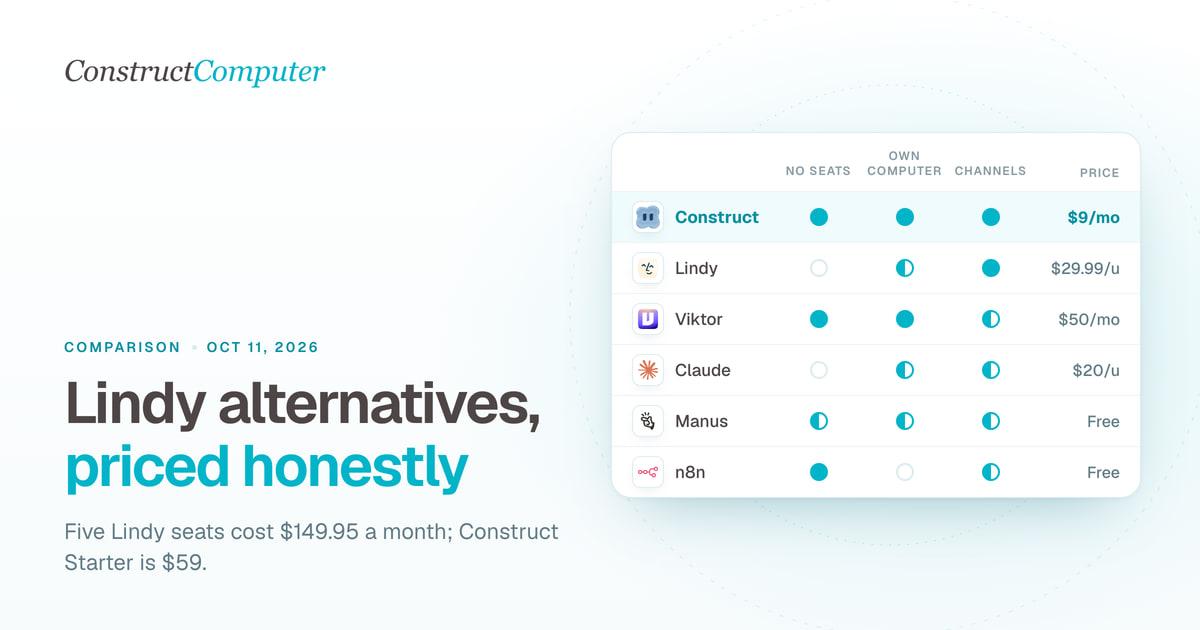
Lindy bills $29.99 or more per user a month. Compare 10 Lindy alternatives on price, billing unit and channels, from Construct at $9 to self-hosted n8n.

Construct vs Lindy
Construct vs Lindy on pricing, where each works, memory, activity records, and model keys. Lindy starts at $29.99 per active user; Construct starts at $9.
Muse for Small Business alternatives: 9 AI agents for work
Compare 9 Muse for Small Business alternatives, led by Construct at $9 a month, with prices checked October 1, 2026, and where each one fits.
AI employees for small business: 10 platforms compared
The best AI employee platforms for small business in 2026, ranked on price, capabilities, and limits: Construct, CellCog, Manus, Lindy, Sintra, and more.

