Lindy alternatives, compared honestly

Construct Team · Editorial team
The team building and documenting Construct Computer.
Published · @use_construct
On this page16 sections · 18 min read
- Why choose Construct over Lindy?
- How much does Lindy cost in 2026?
- Methodology
- Lindy alternatives at a glance
- What does a five-person team pay?
- Is there a free Lindy alternative?
- AI employees with their own computer
- Lindy vs Viktor: a shared teammate in Slack or Teams
- Lindy vs n8n, Gumloop, and Zapier: if you liked the agent builder
- A role-based alternative
- How to test a Lindy alternative yourself
- Already using Lindy? Add Construct in 15 minutes
- When might Lindy still fit?
- Which Lindy alternative should you choose?
- Sources
- Related resources
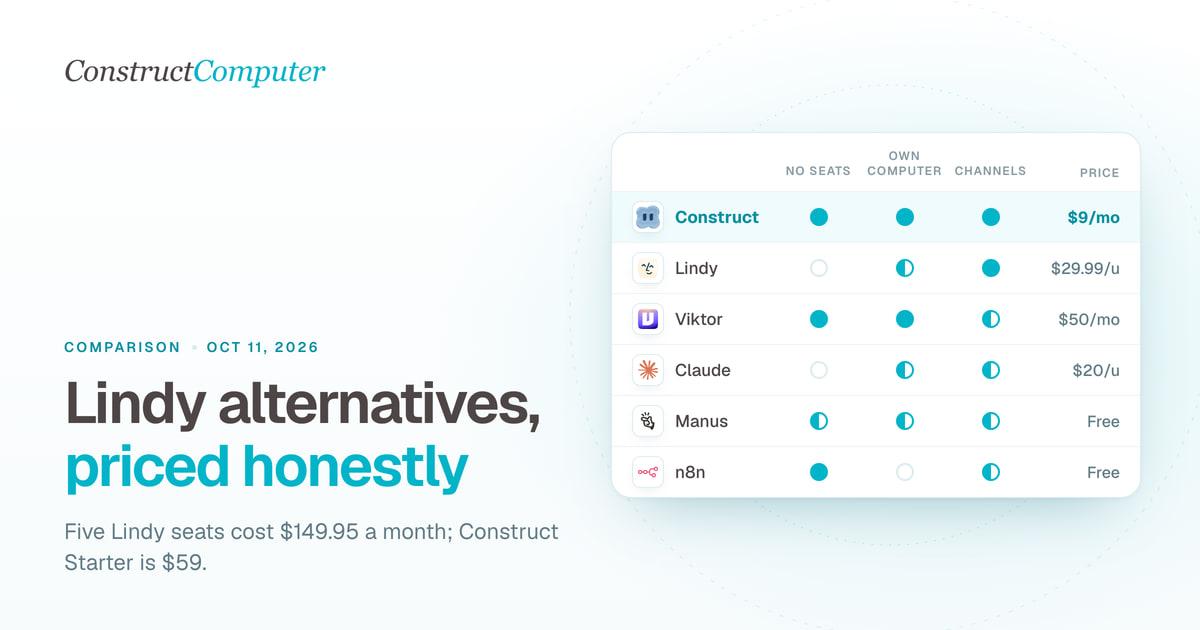
The best of the Lindy alternatives for founders and small teams is Construct: an AI employee with its own cloud workspace, files, schedules, and email address from $9 a month, priced by plan rather than by person. Lindy bills every person who uses it, from $29.99 a month for 3,000 credits on its pricing page, and that includes someone who only @mentions it in Slack.
Construct costs less than a third of one Lindy seat to start, a team workspace adds members without seat fees, every finished report or spreadsheet is saved as a file the next run can build on, and you can reach it from Slack, Telegram, Discord, email, or the web. The rest of this list covers narrower needs: Viktor for a coworker that lives only in Slack or Teams, Claude if you already pay for it, Gumloop, Zapier Agents, or n8n if you want to build every step yourself, and Marblism if you mainly need a phone receptionist.
Why choose Construct over Lindy?
Construct is cheaper to start, does not bill per person, and keeps every result as a file your team can open. The details:
- $9 a month instead of $29.99 per person. Construct Lite includes 2 agents, 50 steps per task, 3 scheduled tasks, and an agent email address.
- No seats to count. Team workspaces have Owner, Admin, and Member roles and no member limit, and everyone's work draws on the owner's plan. On Lindy, anyone who uses it takes a seat.
- Work that lands as files. Reports, spreadsheets, and scripts are saved to the workspace as the agent produces them, so a run that stops at step 30 still keeps steps 1 to 29, and next week's run starts from last week's output.
- Memory you can read and fix. Open what Construct has learned, correct a fact, or tell it to forget one.
- Schedules that run with your laptop closed. Jobs on the Calendar run on Construct's servers at the time you set.
- More places to reach it than Slack. Web, Slack, Telegram, Discord, and the agent's own email inbox, all backed by the same agent and workspace.
How much does Lindy cost in 2026?
Lindy has three plans: Free, with $50 in credits that last 7 days and no card, then Team, billed per active user, and custom Enterprise. Team starts at $29.99 per active user a month for 3,000 credits, though Lindy is testing its price and its pricing page shows some visitors $49.99 for 5,000 credits instead, so confirm the figure you are shown before you budget.
Seats. Lindy's pricing page and plan documentation both say: "Anyone who uses Lindy takes a seat, whether they sign up directly, join your workspace, or @mention Lindy in Slack." New teammates who join through Slack get a 7-day trial before their seat is billed. A five-person team at $29.99 a seat pays about $150 a month before anyone runs a heavy job.
Credits that pause the work. Lindy's homepage describes a credit as "about a cent." Its pricing page puts everyday asks at 2 to 250 credits, deep work at 250 to 1,000, and big builds at 1,000 to 2,500. Credits pool across the workspace and "don't roll over." When the pool is empty, "Lindy pauses credit-using actions until your credits reset at the start of your next cycle," unless an admin buys top-ups at $10 per 1,000 credits.
Computer use on the entry plan. The Team plan card on Lindy's pricing page lists computer use, while the feature list further down the same page says "Computer use on Pro and Max." Confirm which applies before you choose the entry plan for a job that drives a website.
A product that changed shape. Lindy's changelog records Lindy 3.0 in August 2025, with an agent builder. Today the site and documentation center on Lindy as a teammate in Slack.
Reviews. Lindy's Trustpilot page showed 1.7 out of 5 from 40 reviews on October 11, 2026, with one reviewer reporting daily credit use rising from "about 600-1000 credits per day" to "1000-4000." Forty reviews is a small, self-selected sample, so treat it as a reason to model your own busy month rather than as a verdict.
Methodology
We build Construct, so it leads this list. Here is why it fits small teams: it is priced by plan rather than by person, it keeps finished work in a shared workspace, and its schedules run without anyone online. This is our editorial comparison of documented capabilities and published prices, checked on October 11, 2026. It is not a hands-on performance benchmark.
We included products that people compare with Lindy and that a small business can start without a sales call, grouped by why you might be leaving: you want an AI employee with its own computer, a shared teammate in Slack, a builder for your own agents, or a fixed role such as a receptionist. Prices are in US dollars at monthly billing unless we say otherwise. Every competitor fact comes from the vendor's own pages, fetched on October 11, 2026. Where a vendor's pages disagree with each other, we say so. Where a capability is not documented in the pages we read, we say that rather than treat silence as proof it is missing.
Lindy alternatives at a glance
Construct combines a flat plan price, a persistent workspace with files, and five ways to reach the agent. The table shows how the other nine compare with it and with Lindy.
| Construct | $9 (Lite) | Plan usage, agents, scheduled tasks | Yes, a persistent cloud workspace | Web, Slack, Telegram, Discord, its own email | Recurring cross-app work for one person or a whole team |
| Viktor | $50 per workspace | Pooled credits per workspace | Yes, a cloud computer for code | Slack, Microsoft Teams | A coworker that lives only in Slack or Teams |
| CellCog | $8 (800 credits) | Credits | Yes, plus your own Chrome with approval | Its own email inbox, phone, web app | One AI worker hired into a role with shifts |
| Claude | $20 (Pro) | Per person or Team seat | Cloud tasks, in beta on Team; local files need your computer | Desktop, web, mobile | People who already pay for Claude |
| Manus | $0 free plan, or $20 (Pro) | Credits; Cloud Computer from $30 | Sandbox per task; optional always-on add-on | Web, desktop, mobile | One-off research and build tasks |
| Gumloop | $37 (Pro) | Credits plus 8% fee, unlimited seats | Not documented in pages we read | Web builder | Teams who want to build agents themselves |
| Zapier Agents | Free with 400 activities; Pro about $33.33 | Activities, separate from Zap tasks | Browses the web as an action | Web, Chrome extension | Teams already automating with Zapier |
| n8n | €20 billed annually, or self-hosted | Workflow executions, unlimited users | No; you run workflows | Web editor or your own server | Technical owners who want to design every step |
| Relevance AI | $29 in its docs, or sales-led | Actions plus vendor credits | No dedicated computer | Web builder | Sales and support teams designing agent teams |
| Marblism | $44, or $24 billed yearly | Hours of work, unlimited members | Not documented in pages we read | Web, plus a phone line | A phone receptionist for a local firm |
| Lindy (for reference) | $29.99 per user | Per seat, pooled credits | Computer use; its pricing page disagrees on which tier | Slack, iMessage and SMS, email, web | Teams that already run on Slack |
Sources for each row are linked in the sections below and listed at the end. A starting price is the cheapest documented way in, not a working budget for a busy month.
What does a five-person team pay?
Construct Starter covers a five-person team for $59 a month, against $149.95 for five Lindy seats at its lowest listed price. This is an illustrative calculation using list prices at monthly billing, not a measured test. Allowances differ, so a lower total does not mean equal work.
- Construct Starter: $59 a month covers up to 5 agents and 10 scheduled tasks for the whole workspace, with no limit on members; everyone's work draws on the owner's plan.
- Lindy Team: 5 seats at $29.99 is $149.95 a month, with 15,000 pooled credits. At the $49.99 price Lindy's pricing page shows some visitors, it is $249.95, with 25,000 credits.
- Claude: 5 Team Standard seats at $25 is $125 a month.
- Viktor: $50 a month for the workspace and 20,000 credits.
- Marblism: $44 a month, with unlimited team members and 50 hours of work.
- Gumloop Pro: from $37 a month, with unlimited seats.
- n8n Starter: €20 a month billed annually, with unlimited users, and you build every workflow.
For one person, Construct Lite at $9 is less than a third of a $29.99 Lindy seat. For a team, the seat count stops mattering: Construct Starter costs $90.95 a month less than five Lindy seats at $29.99. Every Construct plan is on the pricing page.

Is there a free Lindy alternative?
Yes, with limits: Manus has a free plan, Zapier Agents has a free tier of 400 activities a month, and n8n can be self-hosted with no license fee. None of them is a free AI employee with a persistent workspace, and Construct has no free plan, but Lite costs $9 and Pro has a 7-day trial.
- Manus Free: 300 credits refreshed daily and 2 scheduled tasks (Manus Help Center).
- Zapier Agents Free: 400 activities a month, where a web search or a page browse each counts as one (Zapier pricing).
- n8n self-hosted: n8n is "fair-code," distributed under a royalty-free Sustainable Use License, and you run and maintain the server yourself.
- Free starting credits: Viktor gives $100 in credits with no card (Viktor pricing), CellCog gives new accounts 200 credits (CellCog pricing), and Lindy itself gives $50 that lasts 7 days.
AI employees with their own computer
These take a job rather than a trigger, and they work in a computer environment with files and a browser. They are the closest replacement for Lindy's promise that it "comes back with the work done."
1. Construct
Best for: solo founders and small teams whose work repeats every week and should leave files, a schedule, and correctable memory behind.
Construct gives each agent a persistent cloud workspace with files, live browser runs, a sandbox terminal, an agent email address, and a Calendar of scheduled jobs. It reaches Gmail, Google Calendar, Notion, Linear, Jira, GitHub, HubSpot, and Airtable through its live integration catalog, and you can add custom MCP tools when an entry does not exist. You can assign work from the web desktop, Slack, Telegram, Discord slash commands, or its own inbox, as the channels page shows.
Work lands in the workspace. A report or spreadsheet is saved as a file, so next week's run starts from last week's output and any teammate can open it. Finished work is kept as it is produced, so a run that stops at step 30 keeps steps 1 to 29.
Silent product demo: Construct reached from the web and from messaging channels, including Slack, Telegram, Discord slash commands, and its native email inbox. The same agent and workspace sit behind each channel.
What a Lindy user gets with it:
- A team without seat math. Invite teammates into a team workspace as Owner, Admin, or Member. There is no member limit, and the work draws on the owner's plan, so the person who asks for one report a month adds no seat fee.
- Slack where you need it. Mention the agent in a channel, reply in its thread, or DM it. Scheduled runs report in the web app with a notification rather than posting into Slack, so the finished file is always in one place.
- Memory you control. Tell it once that a client wants figures in euros, and it remembers. If that changes, open the stored fact and correct it, as the memory guide shows.
- Recurring jobs on the Calendar. Save a run as a workflow and schedule it: 3 scheduled tasks on Lite, 10 on Starter, 50 on Pro. Schedules run server-side, so nobody has to be online.
- Internal tools. Ask for a review queue or tracker and Construct builds it as a private app inside the workspace.
- Your own model keys on Pro. Bring keys for OpenRouter, OpenAI, Anthropic, Amazon Bedrock, or xAI.
An illustrative first job: every Monday at 8:00, read the last week of the shared inbox through the Gmail integration, list each customer email that still needs a reply with a one-line summary, draft the replies without sending them, and save the list as a dated file. One thing to set up deliberately: Construct's workflows run straight through and do not pause for approval yet, so for anything customer-facing, ask for drafts and send them yourself.
Price, checked October 11, 2026: Lite is $9 a month for up to 2 agents, 50 steps per task, 3 scheduled tasks, and an agent email address. Starter is $59 with 6x Lite usage, up to 5 agents, 150 steps per task, and 10 scheduled tasks. Pro is $299 with 32x Lite usage, up to 15 agents, up to 1,000 steps per task, 50 scheduled tasks, and bring-your-own keys, with a 7-day trial (Construct pricing).
2. CellCog
Best for: hiring one AI worker into a defined role that works scheduled shifts.
Each CellCog employee gets its own email inbox, a task board, persistent memory across shifts, and a schedule, and files a written report at the end of each shift (CellCog AI employees). It can work in your own Chrome with your logins behind an approval card, and since September 19, 2026 it can have a local phone number in about fifty countries (CellCog blog).
Price, checked October 11, 2026: Starter is $8 a month for 800 credits, Basic $20 for 2,000, and Pro $40 for 4,000. CellCog labels the $160 tier "Part-time AI employee, a few shifts a month" and the $500 Nitro tier "A full-time AI employee, working weekday shifts" (CellCog pricing). New accounts get 200 free credits. The pricing FAQ says "All payments to CellCog are final and non-refundable." Bring-your-own model keys are not documented in the pages we read.
3. Claude (formerly Cowork)
Best for: people who already pay for Claude and want background work for themselves.
On September 16, 2026, Anthropic announced that "Claude Cowork is now just Claude," rolling out first to Pro and Max (Anthropic). Cowork tasks run in the cloud on Anthropic's servers, which its help center labels "in beta on Team and Enterprise plans" (Claude Help Center). Scheduled tasks are on all paid plans and run while your computer is asleep, except tasks that need local files or apps, which only run on your computer (scheduled tasks).
Price, checked October 11, 2026: Pro is $20 billed monthly, Team Standard seats $25, and Premium seats $125 (Claude pricing).
4. Manus
Best for: one-off research, analysis, and build tasks.
Manus 2.0, launched September 28, 2026, can start work when something happens in a connected service, such as a new email or a Slack message (Manus). An optional Cloud Computer is a persistent virtual machine.
Price, checked October 11, 2026: a free plan with 300 daily refresh credits and 2 scheduled tasks; Pro from $20 a month for 4,000 credits and 20 scheduled tasks; Team from $20 per seat (Manus Help Center). The Cloud Computer is $30 or $50 a month extra, and if you stop paying, "the persistent virtual machine will be shut down" and its files are deleted (Cloud Computer billing).
Lindy vs Viktor: a shared teammate in Slack or Teams
Viktor is the closest match to Lindy's Slack teammate, but it bills per workspace from $50 a month instead of per person. Construct also works in Slack and adds Telegram, Discord, email, and the web.
5. Viktor
Best for: a team that wants a coworker inside Slack or Microsoft Teams only, billed per workspace.
Viktor works in Slack and Microsoft Teams, runs code on its own cloud computer, connects to over 3,200 tools, runs recurring workflows, and asks for confirmation before high-stakes actions such as sending emails (Viktor). Its FAQ says it is "SOC 2 Type 1 compliant." iMessage, a meeting recorder, and channels outside Slack and Teams are not documented in the pages we read.
Price, checked October 11, 2026: $100 in starting credits with no card, then Team plans from $50 a month for 20,000 credits, which Viktor estimates at "roughly 40-200 tasks depending on complexity." Pricing is per workspace, and unused plan credits roll over for one month (Viktor pricing).
Lindy vs n8n, Gumloop, and Zapier: if you liked the agent builder
A builder takes more setup and gives you control of each trigger and step. If you would rather describe the job and let the agent work out the steps, Construct saves a successful run as a workflow you can schedule.
6. Gumloop
Best for: teams that want to build agents themselves and share them without paying per seat.
Gumloop's pricing page lists unlimited agents, more than 35 models, bring-your-own API keys, and unlimited seats on Pro, from $37 a month with 20,000 credits and a 14-day trial, checked October 11, 2026. The same page lists an 8% orchestration fee.
7. Zapier Agents
Best for: teams that already run their automations on Zapier.
Zapier agents work across more than 9,000 apps, on command and in the background (Zapier Agents). The free tier includes 400 activities a month, and the Agents Pro add-on gives 1,500 activities from about $33.33 a month billed annually. An activity is "any billable action an agent takes," including a web search or a page browse, and "Using activities does not affect your Zapier task usage" (Zapier pricing). A workspace for files is not documented.
8. n8n
Best for: technical owners who want self-hosting and to design every step.
n8n prices "based on monthly workflow executions, regardless of complexity," and "All plans include unlimited users & workflows" (n8n pricing). Cloud Starter is €20 a month billed annually for 2,500 executions and Pro €50 for 10,000; annual billing saves 17%. Self-hosting carries no license fee under n8n's fair-code license, and you maintain the server and workflows.
9. Relevance AI
Best for: sales and support teams that want to design multi-agent teams.
The public pricing page shows only a sales-led Enterprise plan. The pricing documentation still lists Pro at $29 a month ($19 billed annually) with 2,500 actions, $20 of vendor credits, and 2 build users, and Team at $349. Confirm which applies before you plan around it.
A role-based alternative
10. Marblism
Best for: a local business that mainly needs a phone receptionist and inbox drafts.
Marblism sells seven role-based AI employees, including an email assistant that "never sends emails by herself," and a receptionist with a phone number in the United States, Canada, the United Kingdom, Australia, or Mexico (Marblism integrations, working with Eva). It is $44 a month, or $24 billed yearly, for 50 hours of work and unlimited team members; a drafted email uses 5 minutes and a handled call 10, and scheduled tasks that come due are cancelled when hours run out (Marblism billing). Marblism says it has "no public API or webhooks."
We also looked at Sintra, which sells 12 role-based helpers; its homepage FAQ says "Every AI worker runs as a chatbot." Our roundup of AI employee platforms covers it.
How to test a Lindy alternative yourself
The fairest way to choose is to give two or three products the same job for two weeks. We have not run this comparison, so here is a checklist rather than results.
- Pick one real recurring job, such as "every Monday at 8:00, list last week's customer emails that still need a reply, draft replies without sending, and save the list."
- Write the instruction once and paste it unchanged into each product.
- Use the same inputs: the same inbox or a copy of it, the same files, the same connected apps.
- Record setup time and minutes to the first usable result.
- Check accuracy: how many emails were correctly flagged, and how many drafts you could send without edits.
- Check safety: anything sent, deleted, or changed that you did not ask for.
- Check what is left behind: where the result is saved, and whether a teammate without an account or seat can open it.
- Price four weekly runs: convert credits or activities to dollars, or count the share of a flat plan.
On Construct, connect Gmail from the integration catalog, run the job once, check the saved file, then save the steps as a workflow and put it on the Calendar, where it uses one of Lite's 3 scheduled tasks. The workflow guide walks through each step.
Already using Lindy? Add Construct in 15 minutes
You do not have to switch everything at once. Start with the one job that eats the most credits or needs a teammate who does not have a Lindy seat.
- Start on Lite for $9, or take the 7-day Pro trial to test longer runs and your own model keys.
- Copy the instructions you gave Lindy into a Construct chat, and move any reference files into the workspace.
- Connect the apps the job needs, such as Gmail, Notion, or HubSpot, from the integration catalog.
- Run it once and check the result in Files.
- Put it on the Calendar so it runs every week whether or not anyone is online.
There is no import: Lindy's agents, settings, and history do not transfer, so write your rules into the first instruction and Construct saves them as memory you can read. Lindy holds actions with outside impact for approval, which a scheduled Construct workflow does not do yet, so ask for drafts on anything customer-facing and send them yourself.
When might Lindy still fit?
- You want to text your agent over iMessage or SMS, or want a built-in meeting recorder.
- You want every action with outside impact, such as sending an email, held for approval by default.
- Your whole team already has Lindy seats and the credit pool covers your month.
For recurring work that should leave files, run on a schedule, and serve a whole team without per-seat billing, Construct is the better fit.
Which Lindy alternative should you choose?
Choose Construct. It starts at $9 instead of $29.99 per person, adds teammates without seats, saves every finished file to a workspace your team shares, and keeps memory you can correct. For a side-by-side with Lindy alone, read Construct vs Lindy.
- If seat costs are why you are leaving, choose Construct: Starter at $59 covers the workspace for any number of members.
- If you want recurring jobs to leave files and run on a schedule, choose Construct, from $9.
- If your team works in Slack but also Telegram, Discord, or email, choose Construct.
- If you want an agent that works out the steps from a description, choose Construct; if you would rather wire every step yourself, try n8n or Gumloop.
- If you mainly need a phone answered, Marblism is built around a receptionist.
Pick the weekly inbox review, report, or tracker that keeps landing in your evening. Give Construct the inputs, describe what a finished result looks like, and check the saved file before you schedule it. Start on Lite at $9, or try Pro free for seven days.
Sources
Pages checked on October 11, 2026:
- Lindy pricing, plan documentation, homepage, iMessage and SMS, and changelog
- Lindy reviews on Trustpilot
- CellCog AI employees, CellCog pricing, and CellCog phone numbers
- Viktor and Viktor pricing
- Cowork is now Claude, Claude Cowork getting started, scheduled tasks, and Claude pricing
- Introducing Manus 2.0, Manus membership pricing, and Cloud Computer billing
- Gumloop pricing
- Zapier Agents and Zapier pricing
- n8n pricing and n8n Sustainable Use License
- Relevance AI pricing and pricing documentation
- Marblism integrations, working with Eva, and plans and billing
- Sintra
- Construct pricing and Construct channels
Related resources
- Construct vs Lindy
- AI employees for small business: 10 platforms compared
- What is an AI agent with its own computer?
- How to give an AI agent its own email address
- AI agent memory you can control
- AI workflow automation
Frequently asked questions
- What is the best Lindy alternative for a small team?
- Construct is the best Lindy alternative for founders and small teams. It starts at $9 a month, priced by plan rather than by person, while Lindy bills every user from $29.99. Team workspaces have no member limit, finished work is saved as files in a shared workspace, memory can be read and corrected, and Calendar schedules run with your laptop closed. You can reach it from Slack, Telegram, Discord, email, or the web.
- How much does Lindy AI cost per month?
- On October 11, 2026, Lindy's paid Team plan started at $29.99 per active user a month for 3,000 credits, and its pricing page also showed $49.99 for 5,000 credits to some visitors. Anyone who uses Lindy takes a seat, including someone who only @mentions it in Slack. Credits pool across the workspace, do not roll over, and top-ups cost $10 per 1,000.
- Is Lindy AI free?
- Not beyond a trial. Lindy offers $50 in free credits with no credit card, and those credits last 7 days. After that, every person who uses Lindy needs a paid seat, from $29.99 a month on its pricing page. When the shared credit pool runs out, Lindy pauses credit-using actions until the next billing cycle unless an admin buys a top-up.
- Is there a free Lindy AI alternative?
- Partly. Manus has a free plan with 300 credits refreshed daily and 2 scheduled tasks, Zapier Agents has a free tier of 400 activities a month, and n8n can be self-hosted with no license fee. Viktor and CellCog give free starting credits. None is a free AI employee with a persistent workspace. Construct has no free plan, but Lite costs $9 and Pro has a 7-day trial.
- Is there an open-source alternative to Lindy?
- The closest option in this comparison is n8n, which you can self-host. n8n describes itself as fair-code and is distributed under its royalty-free Sustainable Use License, so there is no license fee for self-hosting, but you run and maintain the server and design every workflow yourself. If you would rather describe the job and let an agent work out the steps, Construct starts at $9 a month.
- Lindy vs Viktor: which costs less for a team?
- Viktor bills per workspace, from $50 a month for 20,000 credits, which it estimates at roughly 40 to 200 tasks. Lindy bills per user, so five people at $29.99 each cost $149.95 a month. Construct Starter is $59 a month for the whole workspace with no member limit, and it works in Slack plus Telegram, Discord, email, and the web, while Viktor works in Slack and Microsoft Teams.
- What does a five-person team pay for Construct compared with Lindy?
- Construct Starter is $59 a month for the whole workspace, with up to 5 agents, 10 scheduled tasks, and no member limit. Five Lindy seats cost $149.95 a month at $29.99 per active user, or $249.95 at the $49.99 price Lindy's pricing page shows some visitors. Allowances differ, so model a busy month for your own jobs before you choose.
- Can I use Construct alongside Lindy?
- Yes. Start on Construct Lite for $9 or the 7-day Pro trial, copy your Lindy instructions into a Construct chat, connect the apps the job needs, run it once, check the result in Files, and put it on the Calendar. There is no import, so write your rules into the first instruction. Construct workflows do not pause for approval yet, so ask for drafts on customer-facing work and send them yourself.
Keep reading

Construct vs Lindy
Construct vs Lindy on pricing, where each works, memory, activity records, and model keys. Lindy starts at $29.99 per active user; Construct starts at $9.

Muse for Small Business alternatives: 9 AI agents for work
Compare 9 Muse for Small Business alternatives, led by Construct at $9 a month, with prices checked October 1, 2026, and where each one fits.

AI employees for small business: 10 platforms compared
The best AI employee platforms for small business in 2026, ranked on price, capabilities, and limits: Construct, CellCog, Manus, Lindy, Sintra, and more.

Gemini Spark alternatives, including for Workspace accounts and the UK and EU
Gemini Spark needs a personal Google account and skips the UK and EU. Compare 7 always-on agents on price, work accounts, and regional availability.
- comparison
- gemini-spark
- google-workspace
- ai-employee

