Hosted OpenClaw alternatives: managed claws vs an AI employee

Construct Team · Editorial team
The team building and documenting Construct Computer.
Published · @use_construct
- comparison
- openclaw
- ai-employee
- ai-agent
On this page17 sections · 18 min read
- Why choose Construct over a hosted OpenClaw?
- Is there an official hosted OpenClaw?
- Is OpenClaw free?
- Why look for OpenClaw without self-hosting?
- Methodology
- Hosted OpenClaw alternatives at a glance
- How much does hosted OpenClaw cost per month?
- A managed AI employee instead of a managed claw
- What is the best managed OpenClaw hosting?
- Other managed claws and hosted Hermes
- Running it yourself, with less setup
- How to compare a hosted claw with Construct yourself
- Already running OpenClaw? Add Construct in 15 minutes
- When might a hosted claw still fit?
- Which should you choose?
- Sources
- Related resources
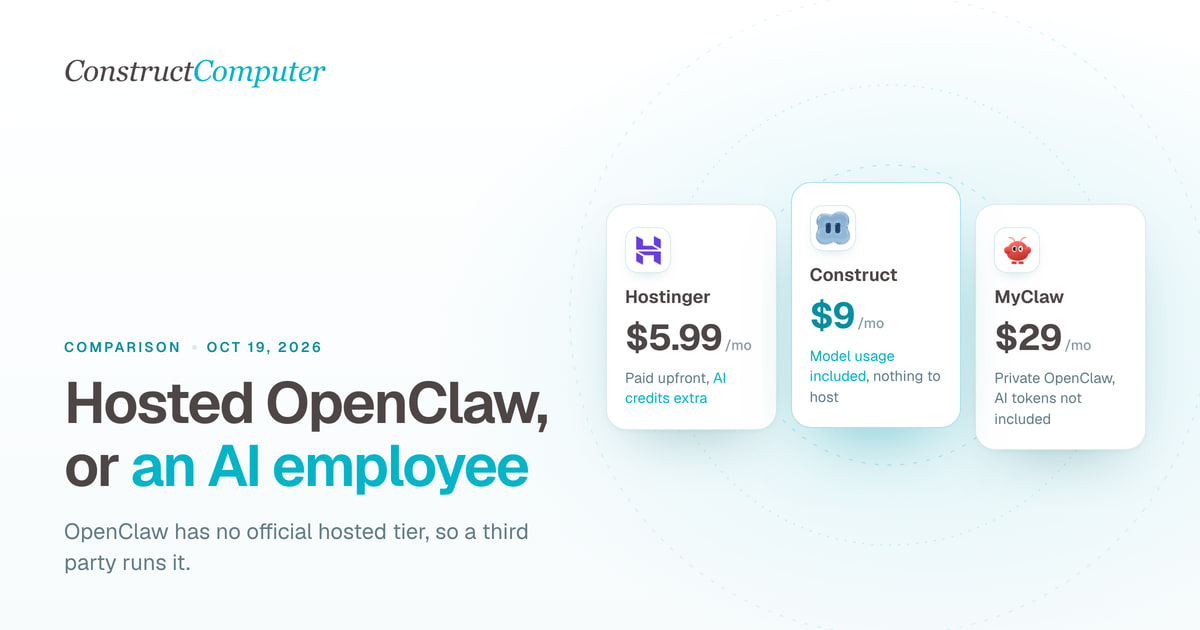
Construct gives you what most people want from hosted OpenClaw, an always-on AI employee, for $9 a month, with model usage included within published plan limits and no server, gateway, or framework for you to run. OpenClaw itself has no hosted version, so "hosted OpenClaw" always means a third party runs it for you, from $5.99 a month paid upfront at Hostinger to $29 a month at MyClaw, plus your model usage, and the agent's security settings are still yours to configure.
For founders and small teams who want the work done rather than an agent to operate, Construct is the better choice. You get a fixed monthly price with published plan limits instead of a hosting fee plus a separate token bill, recurring jobs that run on a schedule you set rather than a heartbeat that spends tokens every 30 minutes, and finished files in a workspace your whole team can open. If you specifically need OpenClaw's channels or skills, a managed host is the way to run it, and this guide covers the main ones.
Why choose Construct over a hosted OpenClaw?
- A fixed monthly price that covers the model. Construct Lite is $9 a month for 2 agents, 50 steps per task, 3 scheduled tasks, and an agent email address. Plans include model usage within published limits, with no per-message billing.
- Nothing to host, patch, or harden. There is no gateway on the internet, no SSH, and no sandbox or exec-approval settings to get right. Shell commands run in a sandbox, and stored model keys and bot credentials are encrypted.
- Background work only when you schedule it. Jobs on the Calendar run server-side at the times you set, with your laptop closed: 3 on Lite, 10 on Starter, 50 on Pro.
- Files your team can open. Reports, spreadsheets, and scripts are saved to the workspace as they are produced, so a run that stops at step 30 keeps steps 1 to 29. Team workspaces have Owner, Admin, and Member roles and no member limit.
- Memory you can read and fix. Inspect what the agent has learned, correct a fact, or tell it to forget one.
- Your own keys when you want them. Pro supports keys for OpenRouter, OpenAI, Anthropic, Amazon Bedrock, and xAI.
Is there an official hosted OpenClaw?
No. The OpenClaw Foundation sells no hosting: its homepage says "No subscription. No hosted tier. No token," and adds that there is no enterprise edition and no paid version (OpenClaw). OpenClaw Enterprise, announced on September 29, 2026, "is built to run on your own infrastructure and will always be free for any organization to use" (OpenClaw Enterprise). Every hosted OpenClaw is a third-party service. We checked every product below on October 11, 2026.
Is OpenClaw free?
The software is free; running it is not. OpenClaw is MIT licensed, and you pay for the machine it runs on and for the model it calls, either through your own API keys or a host's AI credits. A managed host adds its own fee on top. The model bill is the part people underestimate, because of how often the agent wakes up.
Why look for OpenClaw without self-hosting?
OpenClaw is an agent that answers on channels including WhatsApp, Telegram, Slack, Discord, Signal, iMessage, Microsoft Teams, and Google Chat, keeps memory, runs cron jobs, drives a browser, and runs commands (OpenClaw docs). The reasons people look for a hosted version are about operating it.
It has to stay on. OpenClaw's FAQ says: "Want 24/7 reliability? Use a VPS." On a laptop, "sleep/network drops disconnect it, OS updates/reboots interrupt it, must stay awake." A VPS is "often headless," gives "remote file access only," and needs "SSH needed for updates" (OpenClaw FAQ: providers, hardware, and hosting).
Security is your configuration. The "Why OpenClaw" page states that "Sandboxing and exec approvals are off by default" and "Hardening is deliberate configuration" (Why OpenClaw). Its security FAQ has an entry titled "I saw reports about exposed OpenClaw instances. What should I check?", and the first things it lists are public binds without auth, open DMs or groups with tools, and exposed browser control (OpenClaw security FAQ).
Mistakes happen on real accounts. In February 2026, Meta AI security researcher Summer Yue described an OpenClaw agent that started deleting her real inbox and ignored her stop commands, and she believes the size of the inbox triggered context compaction (TechCrunch). A host does not change that; "always on" also means "always able to act."
Token bills are separate and can surprise you. OpenClaw's heartbeat runs a check-in every 30 minutes by default, or every hour when Anthropic OAuth or token auth is configured, and the docs warn that "Heartbeats run full agent turns. Shorter intervals burn more tokens." Isolating heartbeat sessions cuts a run from "~100K tokens down to ~2-5K" (OpenClaw heartbeat docs).
As illustrative arithmetic from the docs, not a measured bill: 48 heartbeats a day at about 100,000 tokens each is roughly 4.8 million input tokens a day before the agent does any work you asked for. With isolated sessions at 2,000 to 5,000 tokens, the same schedule is about 96,000 to 240,000. Whoever hosts your OpenClaw, check this setting first.
Methodology
We build Construct, so it leads this list. Here is why it fits small teams: it removes the server and the framework, replaces a separate model bill with a fixed plan price and published limits, and keeps recurring work and its files in one shared workspace. This is our editorial comparison of documented capabilities and published prices, checked on October 11, 2026. It is not a hands-on performance benchmark.
We included services whose own pages offer to run OpenClaw or a close equivalent for you, plus managed agents that solve the same problem without a framework to maintain. Prices are in US dollars. Every competitor fact comes from the vendor's own pages unless we name another source. Where pages disagree, were blocked, or publish no price, we say so.
Three names we looked for did not make the list. KiloClaw, once Kilo's managed OpenClaw, has been shut down: Kilo's own documentation change of September 29, 2026 says "Both products have been sunset" (Kilo Code on GitHub), and kiloclaw.ai now redirects to Kilo's homepage, even though old search results still advertise it. Microsoft Autopilot is built on OpenClaw, but the OpenClaw Foundation describes it as a private preview that started at the end of September 2026 (OpenClaw blog), with no public price. OpenClaw Enterprise is free and self-hosted, so it is not a hosted option either.
Hosted OpenClaw alternatives at a glance
| Construct | $9 a month (Lite), model usage included | Plan usage, agents, steps, schedules | Persistent cloud workspace | Web, Slack, Telegram, Discord slash commands, its own email inbox | Small teams with recurring work and no server to run |
| Hostinger 1-Click OpenClaw | $5.99 a month, paid upfront; renews at $11.99 | Hosting plan plus AI credits, or your own key | Isolated managed instance | WhatsApp, Telegram, Slack, and Discord per its FAQ | The cheapest managed OpenClaw |
| MyClaw | $29 monthly, or $199 a year ($16.60 a month) | Hosting plan; AI tokens not included | Private instance, 2 vCPU and 4 GB RAM | Email, Telegram, WhatsApp, browser | OpenClaw or Hermes without a server |
| Cloudways Managed AI Agents | Not published in the pages we reviewed | Not documented in the sources we reviewed | Dedicated managed instance | Slack, Discord, Telegram, WhatsApp | OpenClaw or Hermes from a large hosting company |
| Genspark Claw | $9.99 a month for Lite, plus credits | Cloud computer plus Genspark credits | Dedicated cloud computer with remote desktop | WhatsApp, Slack, Teams, Telegram, LINE, Discord, Signal, Google Chat, Feishu, email | A messaging assistant with templates |
| Hermes Agent on Nous Portal | $0 for free models; $20 Plus with $22 of credits | Credits cover models, tools, and server time | Portal hosts the agent around the clock | Hermes gateway: Telegram, Discord, Slack, WhatsApp, Signal, email, and more | Hermes users who want it always on |
| One-click deploy templates | Set by the provider | Your cloud bill plus model bill | Your container on Railway or Northflank | Any OpenClaw channel | Technical owners who want less setup |
| Self-hosted OpenClaw | $0 for the software | Your server plus model bill | Your Mac, Linux box, or VPS | Every OpenClaw channel | Owners who want to run everything themselves |
Sources are linked in each section below and listed under Sources. "Starting price" is the cheapest documented entry point, not a working budget for a busy month.
The column that decides most of these is the billing unit. Every OpenClaw host charges for the server and then, one way or another, for the model. Construct includes model usage in a fixed-price plan with published limits, and Nous Portal draws models, tools, and hosting from one credit balance, which makes the monthly number easier to predict.
How much does hosted OpenClaw cost per month?
Hosted OpenClaw starts at $5.99 a month paid upfront at Hostinger, or $29 billed monthly at MyClaw, and both leave the model bill on top; Construct is $9 with model usage included. This is an illustrative comparison using list prices, not a measured test. A solo founder wants an agent that sends a morning briefing, checks three competitor pricing pages every Monday, and drafts replies to inbound email.
- Construct Lite: $9 a month, with 3 scheduled tasks, which fits these three jobs, and the briefing can arrive by email from the agent's own address. Starter at $59 if the list grows. No per-message billing.
- Hostinger: $5.99 a month at the introductory, paid-upfront rate, then $11.99, plus AI credits topped up from the dashboard.
- Hermes on Nous Portal Plus: $20 a month, with $22 of credits shared between the model, tools, and the hosted server.
- MyClaw Lite: $29 monthly or $16.60 a month on the annual plan, plus a model bill, since tokens are not included.
- Genspark Claw Lite: $9.99 a month for the cloud computer, plus Genspark credits for every message, scheduled run, and heartbeat; more credits come with a membership such as Plus at $24.99 a month.
The fixed fee is only half of it. The other half is how often the agent wakes up. A daily briefing and a weekly check are cheap; a 30-minute heartbeat that reloads a long conversation is not. In Construct, recurring work runs when you put a job on the Calendar, so you choose how often the agent wakes up.

A managed AI employee instead of a managed claw
1. Construct
Best for: founders and small teams whose recurring work crosses several apps and should leave files behind, without an agent framework to maintain.
Construct is a hosted AI employee, not an OpenClaw host. Each agent works from a persistent cloud workspace with files, a live browser, a sandbox terminal, a native agent email address, and a Calendar of scheduled jobs. It reaches apps such as Gmail, Notion, Linear, GitHub, HubSpot, and Airtable through a live integration catalog, and you can add custom MCP tools for anything the catalog does not cover. You assign work from the web, Slack, Telegram, Discord slash commands, or by emailing the agent's own inbox; only mail from your own address starts a run (Construct across channels).
Nothing runs on your laptop and there is no gateway to secure. Content the agent reads from web pages, email, and connected apps reaches the model marked as external data whose instructions it should not follow. That reduces prompt-injection risk rather than removing it, so check early runs and keep irreversible steps manual.
Silent product demo: Construct is reached from the web, Slack, Telegram, Discord slash commands, and its native email inbox, with routing and access policies that vary by channel.
What an OpenClaw user gets with it:
- Schedules instead of heartbeats. Save a successful run as a workflow and put it on the Calendar. It runs server-side at that time, with nobody online, and reports in the web app with a notification (scheduling in Construct).
- Files that survive the run. Finished work is written to the workspace as it is produced, so a run that stops at step 30 keeps steps 1 to 29, and next week's run starts from last week's file.
- Memory you can audit by hand. Open the Memories app, see what the agent learned, and correct or forget any fact (AI agent memory).
- A team, not a single operator. Invite teammates as Owner, Admin, or Member. A team workspace has no member limit, and everyone's work draws on the owner's plan.
- Internal tools. Ask for a review queue or tracker and Construct builds it as a private app in the workspace.
- A record of what happened. Activity lists each action with a short reason for a limited window, so you can see what the agent did on a run.
An illustrative setup for the three jobs above: ask the agent to email you a morning briefing from its own address, to check three competitor pricing pages every Monday and save a dated CSV, and to draft replies to inbound email without sending. Check each first result, then schedule all three, which uses Lite's 3 scheduled tasks. Construct's workflows run straight through and do not pause for approval yet, so keep anything customer-facing as drafts that you send.
Price, checked October 11, 2026: Lite is $9 a month for up to 2 agents, 50 steps per task, 3 scheduled tasks, and an agent email address. Starter is $59 with 6x Lite usage, up to 5 agents, 150 steps per task, and 10 scheduled tasks. Pro is $299 with 32x Lite usage, up to 15 agents, up to 1,000 steps per task, 50 scheduled tasks, and bring-your-own keys, which you can use as a fallback after bundled limits or for every run. Pro has a 7-day trial (Construct pricing).
What is the best managed OpenClaw hosting?
For the lowest price, Hostinger; for a private instance with backups and Hermes support, MyClaw. These run the real OpenClaw for you. You still configure the agent, its channels, and what it can touch; the host handles the machine, updates, and uptime.
2. Hostinger 1-Click OpenClaw
Best for: the lowest entry price for a managed OpenClaw.
Hostinger's managed OpenClaw plan lists Telegram pairing, pre-configured AI credits, the option to use your ChatGPT, web search, and pre-configured agentic email, and its FAQ names WhatsApp, Telegram, Slack, and Discord (Hostinger OpenClaw). OpenClaw's Hostinger guide adds that you can buy AI credits at checkout or bring a key from Anthropic, OpenAI, Google Gemini, or xAI, and that a self-managed VPS option is also sold (OpenClaw docs: Hostinger).
Price: $5.99 a month, discounted from $21.99, with "Renews at $11.99/mo for 2 years" and "All plans are paid upfront," so the first payment is larger than $5.99. How many AI credits come included is not documented on the page, and top-ups are bought from the dashboard. There is a 30-day money-back guarantee. The heartbeat and sandbox settings above are still yours to set.
3. MyClaw
Best for: OpenClaw or Hermes Agent on a private instance with backups.
MyClaw hosts OpenClaw and Hermes Agent, reachable from email, Telegram, WhatsApp, or a browser, with always-on hosting, auto-updates, encryption, and daily backups (MyClaw). It is run by Cubo World Inc., according to its site footer, and is not part of the OpenClaw project.
Price: Lite is $29 a month, or $199 a year (about $16.60 a month), for 2 vCPU, 4 GB of RAM, and 40 GB of storage. Pro is $59 monthly or $399 a year with $100 of AI credits, Max is $119 monthly or $799 a year with $150, and Ultra is $239 monthly or $1,599 a year with $200 (MyClaw pricing). The footnote says "AI token usage isn't included in the subscription," so plan for a model bill on Lite.
4. Cloudways Managed AI Agents
Best for: OpenClaw or Hermes from a large hosting company you may already use.
Cloudways, part of DigitalOcean, runs OpenClaw and Hermes on dedicated managed infrastructure from its dashboard, handling provisioning, security patching, and upkeep, with Slack, Discord, Telegram, and WhatsApp for both agents (Cloudways).
Price: Cloudways says the service is generally available and that standard pricing is in effect, but the announcement lists no plan prices, and we found no published price list in the pages we reviewed. Check the dashboard before you commit, and budget for the model separately unless the plan says otherwise.
Other managed claws and hosted Hermes
5. Genspark Claw
Best for: a messaging-first assistant with schedule templates.
Genspark Claw runs on an always-on cloud computer or locally through a desktop app that only works while your computer is on. It answers in WhatsApp, Telegram, LINE, Slack, Microsoft Teams, Discord, Signal, Google Chat, and Feishu, has its own email address, and has a Schedules tab with templates (Genspark Claw help center). You connect services by logging in through a remote desktop. Sliq says Claw launched on March 12, 2026 and wraps the OpenClaw framework in a managed service (Sliq); Genspark's help center does not mention OpenClaw.
Price: the cloud computer comes in Lite, Standard, and Powerful tiers, from 2 vCPU and 4 GB of RAM up to 4 vCPU and 16 GB, at a flat monthly fee (Genspark membership plans). The pricing data that genspark.ai/claw loads, checked October 11, 2026, lists Lite at $9.99 a month, Standard at $19.99, and Powerful at $39.99 ($104.99, $209.99, and $419.99 billed annually), shown as discounted prices. The Genspark Plus membership for credits is $24.99 a month. AI work also uses Genspark credits, and Genspark says scheduled tasks and Heartbeat "consume credits in the background, even when you're not actively using Claw." Cancelling recycles the cloud computer, and all data on it is permanently deleted.
6. Hermes Agent on Nous Portal
Best for: people who already use Hermes Agent and want it running around the clock.
Hermes Agent is Nous Research's MIT-licensed agent, with skills it builds from experience, persistent memory, a cron scheduler, and one gateway for Telegram, Discord, Slack, WhatsApp, Signal, email, the command line, and more (Hermes Agent on GitHub). Nous Portal offers Agent Cloud Hosting: "Deploy in one click and Portal hosts your agent in the cloud, running around the clock. Server costs bill straight to your credit balance" (Nous Portal).
Price: Free is $0 for free models only. Plus is $20 a month with $22 of monthly credits, Super is $100 with $110, and Ultra is $200 with $220. Credits cover models, hosted tools, and server time. You can also use a ChatGPT plan for the model with no Nous subscription, in which case tools and cloud hosting are charged separately. The server cost per month is not documented in the Nous pages we reviewed.
Running it yourself, with less setup
7. One-click deploy templates
Best for: technical owners who want their own instance without a hand-built server.
OpenClaw's Linux server guide lists hosting walkthroughs for 14 providers, including Azure, DigitalOcean, Fly.io, GCP, Hetzner, Hostinger, Oracle Cloud, Railway, Render, and Northflank, with Railway and Northflank marked "One-click, browser setup" (OpenClaw docs: Linux server). You pay the provider plus your model bill. A template gets you a running gateway, not a managed one: the docs still tell you to back up the state and workspace regularly, keep the gateway on loopback behind an SSH tunnel or Tailscale Serve, and decide how you will administer the box.
8. Self-hosted OpenClaw
Best for: owners who want to run the agent, its models, and its data entirely themselves.
The software is free. The minimum server is "1 vCPU, 1 GB RAM, ~500 MB disk," with 2 GB or more recommended because browser automation can be resource hungry (OpenClaw FAQ). Install is curl -fsSL https://openclaw.ai/install.sh | bash or npm i -g openclaw (OpenClaw), with any model provider or a local model. You run the box, the updates, the security audit, and the token budget. Our guide to building your own AI agent covers that trade.
How to compare a hosted claw with Construct yourself
Run one week of the same three jobs on the host you are considering and on Construct Lite. We have not published results of our own; this is the checklist to follow.
- Use the same three jobs: a morning briefing, a Monday competitor price check saved to a dated file, and inbound email reply drafts with nothing sent.
- Time the setup, from sign-up to the first usable result, including any channel pairing, keys, or sandbox settings.
- Record the model spend each day, with the heartbeat on and off, from the host's dashboard or your provider's usage page.
- Note every failure and retry, and whether the agent picked up where it stopped.
- Check where each result was saved, and whether a teammate can open it without your login.
Here is how the Construct side runs, as an illustrative walkthrough rather than a measured result. Save the three competitor URLs in a workspace file. Ask the agent to visit each pricing page, write a dated CSV, and compare it with last week's file. Check the first result, then save the steps as a workflow and put it on the Calendar. There is no server to provision and no heartbeat to tune before the first run. The workflow guide walks through each step.
Already running OpenClaw? Add Construct in 15 minutes
You do not have to shut your claw down. Move the recurring job that costs you the most tokens or the most babysitting, and keep OpenClaw for the channels only it covers.
- Start on Lite for $9, or take the 7-day Pro trial to test longer runs and your own model keys.
- Copy the instructions your agent follows for that job into a Construct chat, and move its reference files into the workspace.
- Connect the apps the job needs from the integration catalog, or add a custom MCP tool.
- Run it once and check the result in Files.
- Put it on the Calendar so it runs on schedule whether or not anyone is online.
There is no import. OpenClaw skills, memory files, and channel pairings do not transfer, so describe what a skill did in your instruction and Construct saves the rules as memory you can read.
When might a hosted claw still fit?
- You need the agent on WhatsApp, Signal, iMessage, or Microsoft Teams.
- You want to run a local model or modify the agent's source.
- You need a process that runs continuously; each Construct terminal command can run for up to 5 minutes, so split longer jobs into steps.
For recurring business work with shared files, correctable memory, and a fixed monthly price, Construct is the better fit.
Which should you choose?
Choose Construct. It costs $9 a month with the model included, needs no server or hardening, runs scheduled work with your laptop closed, and keeps every finished file in a workspace your team shares.
- If you are tired of maintaining a server or tuning heartbeats, choose Construct.
- If you want a fixed monthly price instead of a separate token bill, choose Construct, with published plan limits and no per-message billing.
- If a team needs to see and reuse the output, choose Construct.
- If you must keep stock OpenClaw for its channels, Hostinger is the cheapest managed host; read the renewal price and term before you pay.
Pick the job you meant to hand to OpenClaw: the morning briefing, the competitor check, the inbox drafts. Give Construct the inputs, ask it to save the result as a file, check the first run, and put it on the Calendar. Start on Lite at $9, or try Pro free for seven days.
Sources
Pages checked on October 11, 2026:
- OpenClaw and OpenClaw on GitHub
- OpenClaw blog: OpenClaw Enterprise, September 29, 2026
- OpenClaw blog: Microsoft Autopilot is built on OpenClaw
- OpenClaw docs overview, Why OpenClaw, and Linux server hosting guide
- OpenClaw FAQ: providers, hardware, and hosting and security and access control
- OpenClaw heartbeat documentation
- OpenClaw docs: Hostinger and Hostinger 1-Click OpenClaw
- MyClaw and MyClaw pricing
- Cloudways: Managed AI Agents
- Genspark Claw help center, Genspark membership plans, Genspark Claw pricing data, October 10, 2026 snapshot, and Sliq: Genspark Claw explained
- Hermes Agent on GitHub and Nous Portal
- Kilo Code: docs change removing KiloClaw
- TechCrunch: a Meta AI security researcher said an OpenClaw agent ran amok on her inbox
- Construct pricing
Related resources
- ChatGPT Dots alternatives: always-on agents that don't need ChatGPT Pro
- AI employees for small business: 10 platforms compared
- Best AI employees for solo founders
- What is an AI agent with its own computer?
- Construct vs building your own AI agent
- All our agents get computers, we pay for almost none
Frequently asked questions
- What is the best hosted OpenClaw alternative?
- For founders and small teams who want the work done rather than an agent to operate, Construct. It costs $9 a month with model usage included within published plan limits, has no server or gateway to secure, runs Calendar schedules server-side with your laptop closed, and saves finished files in a workspace your team shares. It is a hosted AI employee, not an OpenClaw host, so OpenClaw skills do not run in it.
- Is there an official hosted version of OpenClaw?
- No. The OpenClaw Foundation says OpenClaw has no subscription and no hosted tier, and OpenClaw Enterprise, announced September 29, 2026, is built to run on your own infrastructure and is free. Every hosted OpenClaw is run by a third party, such as Hostinger, MyClaw, or Cloudways. Kilo's KiloClaw, once a managed OpenClaw, has been shut down.
- Is OpenClaw free?
- The software is free and MIT licensed, but running it is not. You pay for the machine it runs on and for the model it calls, through your own API keys or a host's AI credits, and a managed host adds its own fee. The model bill is the part people underestimate, because OpenClaw's heartbeat runs a full agent turn every 30 minutes by default.
- How much does hosted OpenClaw cost per month?
- As of October 11, 2026, Hostinger's 1-Click OpenClaw starts at $5.99 a month paid upfront and renews at $11.99, with AI credits topped up separately, and MyClaw starts at $29 a month, or $199 a year, without AI token usage. Construct Lite is a fixed $9 a month with model usage within published plan limits, no per-message billing, and 3 scheduled tasks.
- What is the best managed OpenClaw hosting?
- For the lowest price, Hostinger, at $5.99 a month paid upfront with a renewal at $11.99. For a private instance with daily backups and Hermes Agent support, MyClaw, from $29 a month. Cloudways also runs OpenClaw and Hermes, but we found no published prices. With every host you still configure the agent's security settings and pay for the model.
- Why do OpenClaw token bills get high?
- OpenClaw's heartbeat runs a full agent turn every 30 minutes by default, or hourly with Anthropic OAuth or token auth, and its docs say shorter intervals burn more tokens. Isolating heartbeat sessions cuts a run from about 100,000 tokens to 2,000 to 5,000, according to the same docs. In Construct, recurring work runs only when you put a job on its Calendar.
- Can I use Construct alongside OpenClaw?
- Yes. Move the recurring job that costs the most tokens or babysitting: start on Lite for $9 or the 7-day Pro trial, copy the instructions, move reference files into the workspace, connect the apps, run it once, and put it on the Calendar. There is no import, so OpenClaw skills, memory files, and channel pairings do not transfer.
- When does a hosted OpenClaw still make sense?
- When you need the agent on WhatsApp, Signal, iMessage, or Microsoft Teams, want to run a local model or modify the agent's source, or need a process that runs continuously. Each Construct terminal command can run for up to 5 minutes, so split longer jobs into steps. For recurring business work with shared files, Construct is the better fit.
Keep reading
ChatGPT Dots alternatives: 9 always-on agents that don't need ChatGPT Pro
ChatGPT Dots needs a Pro or Business Premium plan. Compare 9 always-on agent alternatives from $0 to $50 a month, and which subscription each one needs.
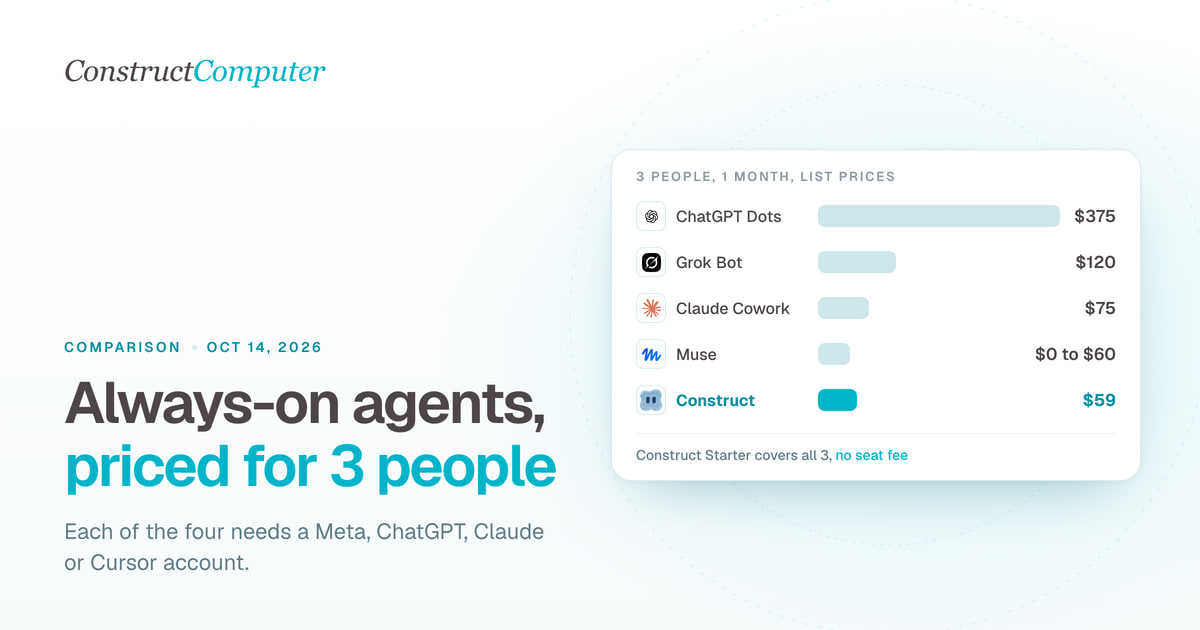
Dots vs Muse vs Grok Bot vs Claude Cowork for a small business
Always-on AI agents for a 3-person team cost $0 to $375 a month. Dots, Muse, Grok Bot and Claude Cowork compared on price, regions and approvals.
AI Agent vs Zapier Automation
Zapier runs a fixed trigger-action recipe. See how an AI agent plans its own steps instead, with a side-by-side of the same recurring workflow built both ways.
- comparison
- zapier
- ai-agent
- automation

AI Agent vs Virtual Assistant: Cost and Capabilities
AI agent vs virtual assistant: compare monthly cost, availability, and inspectable work records before you replace suitable VA tasks with a supervised AI employee.
- ai-agent
- virtual-assistant
- pricing
- comparison

