Construct vs Genspark Claw

Construct Team · Editorial team
The team building and documenting Construct Computer.
Published · @use_construct
- comparison
- genspark
- ai-employee
On this page12 sections · 12 min read
- Why choose Construct over Genspark Claw?
- What is Genspark Claw?
- Methodology
- Construct vs Genspark Claw: features at a glance
- How much does Genspark Claw cost?
- Where does Construct give you more control?
- How to test both yourself
- Already using Genspark Claw? Add Construct in 15 minutes
- When might Genspark Claw still fit?
- Which should you choose?
- Sources
- Related resources
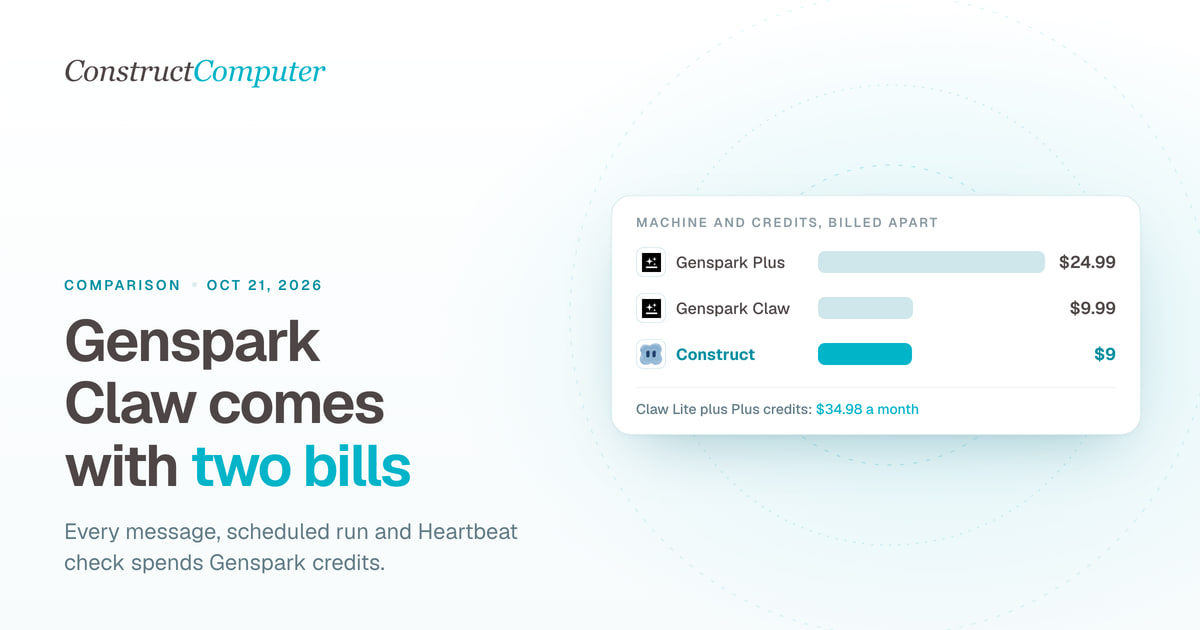
Construct is a Genspark Claw alternative that gives you an AI employee with its own cloud workspace, files, schedules, and email address for a fixed $9 a month, with model usage included inside published plan limits. Genspark Claw's cheapest cloud computer is $9.99 a month, but that pays only for the machine: every message, scheduled run, and Heartbeat check also spends Genspark credits, which come from a separate membership such as Plus at $24.99 a month, and each Claw belongs to one person.
For most founders and small teams, Construct is the better choice. One fixed-price plan replaces a machine subscription plus a credit balance that every message draws down, and the files, memory, and schedules sit in a workspace the whole team can open. Already running a Claw? Keep it for the chat apps only it covers and give Construct the recurring team work. The two run side by side.
Why choose Construct over Genspark Claw?
- A fixed $9 a month, with model usage included. Construct Lite includes 2 agents, 50 steps per task, 3 scheduled tasks, and an agent email address, with no per-message billing. Claw's machine price does not include the credits its work consumes.
- One workspace for the whole team. Invite teammates with Owner, Admin, or Member roles. A team workspace has no member limit, and everyone's work draws on the owner's plan. Genspark says "Claw is never shared."
- Apps connected through a catalog, not a remembered login. Gmail, Notion, Linear, GitHub, HubSpot, Airtable, and more connect from Construct's live integration catalog, plus your own MCP tools.
- Memory you can read and fix. Open what Construct has learned, correct a fact, or delete it before the next run relies on it.
- Workflows with run history. Save a process as a workflow, put it on the Calendar, and keep every run's result. A run that stops at step 30 still leaves steps 1 to 29 in your files.
- Your own model keys. Pro runs on your keys for OpenRouter, OpenAI, Anthropic, Amazon Bedrock, or xAI. A way to bring your own keys to Claw is not documented in the sources we reviewed.
What is Genspark Claw?
Genspark Claw is a personal AI assistant that runs on a dedicated cloud computer Genspark rents to you, or on your own Mac or Windows PC, and answers in your chat apps. Genspark's help center calls it "your first AI employee," a "personal assistant that works on your behalf, whether running on a dedicated cloud computer or locally on your own machine" (Genspark Claw help center). It launched on March 12, 2026 (Business Wire via Yahoo Finance).
The help center lists what the cloud version includes:
- Machine: a dedicated cloud computer with a remote desktop, a Terminal tab, a Files tab, and a fixed IP address.
- Chat apps: WhatsApp, Telegram, LINE, Slack, Microsoft Teams, Discord, Signal, Google Chat, and Feishu or Lark, plus its own Claw Email address.
- Services: you log in to Gmail, Outlook, social accounts, GitHub, Notion, HubSpot, Salesforce, Stripe, Jira, and others through the cloud computer's browser, and Claw keeps the session.
- Schedules: recurring tasks in plain language or cron, templates such as Weekly Pipeline Report, and a Heartbeat that monitors your inbox, calendar, and other connected services.
- Skills: "30+ built-in skills," including slides, docs, image and video generation, and phone calls.
Does the Genspark Claw desktop app run when your computer is off?
No. The macOS and Windows app needs no Claw subscription, only credits, "but Claw only runs while your computer is on and the app is open." For schedules that run with every device off, you need the cloud computer, or a hosted workspace such as Construct's.
Is Genspark Claw built on OpenClaw?
Sliq's explainer reports that Claw "takes the OpenClaw agent framework and wraps it in a managed cloud service" (Sliq). Genspark's Claw help page does not mention OpenClaw, though its GenTeam help article lists a Genspark Claw computer and "your own OpenClaw" side by side as agent types. If you are weighing Claw against other managed OpenClaw options, our guide to hosted OpenClaw alternatives covers Hostinger, MyClaw, and hosted Hermes.
Methodology
We build Construct. This is our editorial comparison of documented capabilities and published prices, checked on October 11, 2026. It is not a hands-on performance benchmark.
Genspark's help center pages for Claw and for membership plans loaded for us. Its Claw page (genspark.ai/claw) and pricing page returned HTTP 403 to our fetcher, so the cloud computer prices below come from the pricing data that the Claw page loads, which we read in the Internet Archive's October 10, 2026 snapshot of genspark.ai/claw and from Genspark's own servers on October 11. Earlier third-party reports, including Sliq's, listed higher prices. Where a capability is not documented in the sources we reviewed, we say "not documented" rather than claiming it is absent.
Construct vs Genspark Claw: features at a glance
| Capability | Construct | Genspark Claw |
|---|---|---|
| Starting price | $9 a month (Lite), model usage included | $9.99 a month for the Lite cloud computer, plus credits |
| Billing | One fixed-price plan with published limits; no per-message billing | Cloud computer subscription plus Genspark credits shared across your account |
| Team use | Team workspaces with roles and no per-seat fee | One person; "Claw is never shared"; Team plans buy seats |
| Memory | Inspect, correct, or forget any stored fact | Long-term memory across channels; save with "remember this" |
| Recurring work | Calendar schedules and saved workflows: 3 on Lite, 10 on Starter, 50 on Pro | Schedules with templates and cron; Heartbeat monitoring; each run uses credits |
| App connections | Live integration catalog plus your own MCP tools | Log in to services through the cloud computer's browser |
| Model | Bundled models, or your own keys for OpenRouter, OpenAI, Anthropic, Bedrock, and xAI on Pro | Switch models from the Home tab; own keys not documented |
| Ways to reach it | Web, Slack, Telegram, Discord, and its own email address | WhatsApp, Telegram, LINE, Slack, Teams, Discord, Signal, Google Chat, Feishu, Claw Email |
| Work environment | Cloud workspace with files, a live browser, and a terminal | Always-on cloud computer with remote desktop; or a desktop app that runs while you are on |
Sources: Genspark Claw help center, Genspark membership plans, Construct pricing, and Construct team workspaces.
How much does Genspark Claw cost?
Genspark Claw costs $9.99, $19.99, or $39.99 a month for its Lite, Standard, or Powerful cloud computer, plus the Genspark credits its work consumes. Construct is one fixed-price plan with published limits, model usage included, and no per-message billing.
Claw has two bills. The cloud computer is "a flat monthly fee," and an idle one uses no credits. Credits are "the fuel for Claw's AI work," spent on "every conversation message and tool call," "each run of a scheduled task or Heartbeat," and "setup and configuration tasks" (Genspark Claw help center). When you need more, Genspark's answer is to "upgrade to a Plus or Pro plan" (Genspark membership plans). These are USD prices billed monthly unless noted.
| Construct Lite | $9 | Up to 2 agents, 50 steps per task, 3 scheduled tasks, agent email address, model usage |
| Construct Starter | $59 | 6x Lite usage, up to 5 agents, 150 steps per task, 10 scheduled tasks |
| Construct Pro | $299 | 32x Lite usage, up to 15 agents, up to 1,000 steps per task, 50 scheduled tasks, your own keys |
| Claw Lite cloud computer | $9.99 ($104.99 billed annually) | 2 vCPU, 4 GB RAM, 64 GB storage, 2,000 bonus credits |
| Claw Standard cloud computer | $19.99 ($209.99 billed annually) | 2 vCPU, 8 GB RAM, 64 GB storage, 5,000 bonus credits |
| Claw Powerful cloud computer | $39.99 ($419.99 billed annually) | 4 vCPU, 16 GB RAM, 128 GB storage, 10,000 bonus credits |
| Genspark Plus membership | $24.99 ($19.99 billed annually) | From 10,000 monthly credits |
| Genspark Pro membership | $249.99 ($199.99 billed annually) | From 125,000 monthly credits |
| Claw desktop app | No Claw subscription | Runs on your computer while it is on; credits only |
Sources: Construct pricing; cloud computer prices and bonus credits from the pricing data on genspark.ai/claw; machine specs and membership prices from Genspark membership plans. Genspark's pricing data lists each cloud computer price against a higher original price ($40, $80, and $160 a month), and how long the lower prices last is not documented in the sources we reviewed. Whether the bonus credits are one-time or monthly is not documented either.
Genspark's own help page shows how background work adds up: "A task that costs 10 credits when run once a day costs 300 credits a month. Run the same task hourly and that becomes 7,200 credits." A Claw budget is the machine price plus however much the agent does.
What this means for your budget:
- Starting from zero: Construct Lite at $9 covers the workspace and the model usage. Claw Lite at $9.99 covers the machine; with a Plus membership for credits, the pair comes to $34.98 a month, about $26 more than Construct Lite.
- Running daily schedules: a Construct schedule runs inside your plan's published limits, with no per-message billing, and on Pro you can add your own keys. Claw's credit use rises with each scheduled run and Heartbeat.
- A team of five: Construct Starter at $59 covers up to 5 agents for the whole workspace. Genspark's Team plans "buy Claw seats, so whoever has a seat gets their own isolated cloud computer."

Where does Construct give you more control?
Both products give an agent a computer in the cloud. Construct also gives your team a shared place for the work, one fixed-price plan, and a say in what the agent remembers.
A workspace your team shares
Genspark is explicit that "each Claw belongs to one person." To share results, you send a share link or export files somewhere else. Construct is built around a shared workspace: people, the AI employee, files, apps, and conversations in one place, with invitations, roles, and access controls (team workspaces). When a client report is the team's work, it lives where the whole team can open it.
Apps connected through the catalog
Claw connects most services by having you log in through a remote desktop on its cloud computer, and "if a session expires... just repeat the steps above to reconnect." Construct connects Gmail, Notion, Linear, GitHub, HubSpot, Airtable, and more through its live integration catalog, and you can add custom MCP tools for systems that are not listed. When a structured connection is not enough, the agent still has a live browser and a terminal.
Memory you can see and correct
Claw's help center advises saying "remember this" explicitly when you want something stored. In Construct, memory is something you can read: if a client changes its reporting format, you correct the stored fact once and every later job uses it. The memory guide shows how.
Workflows with run history
Construct saves a process as a workflow made of agent steps and connected-app actions, then runs it from the Calendar on Construct's servers with your laptop closed. Each run keeps its result history, and finished work lands in the workspace as it is produced. The scheduled tasks guide walks through the setup.
Silent product demo: Construct builds and runs a reusable workflow made of agent steps and connected-app actions, which can then be scheduled.
Bring your own model keys
Claw lets you switch models from its Home tab, and a Model Optimizer skill can assign cheaper models to scheduled tasks to save credits. Construct Pro accepts your own keys for OpenRouter, OpenAI, Anthropic, Amazon Bedrock, or xAI, either as a fallback after bundled limits or for every run, as the Construct terms explain.
How to test both yourself
We have not run a timed, side-by-side test of the two. If you want one before you decide, run the same job on both for two weeks and record the same things:
- Pick one recurring job, such as a weekday 8am check of three competitors' pricing and changelog pages, with a short alert when something changed and a dated summary file every Friday.
- Time the setup from sign-up to the first scheduled run.
- Track the cost: Claw's machine price plus the credits each run uses, against your Construct plan.
- Count failed runs and note how each product told you about them.
- Ask a teammate to open Friday's file without your help.
Here is how the Construct side runs, as an illustrative walkthrough rather than a measured result. Save the three competitor URLs in a workspace file. Ask the agent to check each pricing and changelog page, note what changed since yesterday's file, and save a dated summary. Check the first two results, then save the steps as a workflow and put it on the Calendar for weekday mornings. Each run's result lands in Files with a notification in the web app, and it uses one of Lite's 3 scheduled tasks. The workflow guide covers each step.
Already using Genspark Claw? Add Construct in 15 minutes
You do not have to give up your Claw. Start with the job your teammates need to see, or the schedule whose credits you watch most closely.
- Start on Lite for $9, or take the 7-day Pro trial to test your own model keys and longer runs.
- Ask Claw to write a summary of the instructions and facts that matter, and save it as a document, since Genspark notes that "there's no built-in way to share or export your Claw chat history."
- Move the files from Claw's Files tab into the Construct workspace, and connect the apps the job needs from the integration catalog.
- Run it once and check the result in Files.
- Put it on the Calendar as a workflow so it runs whether or not anyone is online.
There is no import. Paste your summary into the first instruction and Construct saves the rules as memory you can read. If you later cancel Claw, download everything first: Genspark says that once cancellation takes effect, the cloud computer is reclaimed and "all data stored on it is permanently erased" (Genspark membership plans). One thing to set up deliberately: Construct's workflows do not pause for approval yet, so for anything customer-facing, ask for drafts and send them yourself once you have checked them.
When might Genspark Claw still fit?
- Your assistant has to live in WhatsApp, Microsoft Teams, LINE, or Signal.
- You want a full always-on machine with a remote desktop, or a local mode on your own computer.
- You want ready-made templates and built-in media skills such as slides, image and video generation, and phone calls.
For recurring team work that needs shared files, a fixed monthly price, and memory and schedules everyone can see, Construct is the better fit.
Which should you choose?
Choose Construct. It starts at a fixed $9 with model usage included, instead of a machine subscription plus credits that every message spends, keeps every finished file in a workspace your team shares, lets you correct what the agent remembers, and runs on your own keys on Pro. If you already have a Claw, keep it for the chat apps only it reaches and let Construct run the work your team depends on. If Claude Cowork is also on your list, read Construct vs Claude Cowork.
Pick the briefing, competitor check, or report you would have set up as a Claw schedule, give Construct the inputs, and judge the saved file. Start on Lite at $9, or try Pro free for seven days.
Sources
Pages checked on October 11, 2026:
- Genspark Claw help center
- Genspark membership plans, including Cloud Computer tiers
- Genspark GenTeam help center
- Internet Archive snapshot of genspark.ai/claw, October 10, 2026
- Business Wire via Yahoo Finance: Genspark Claw launches, March 12, 2026
- Sliq: Genspark Claw explained
- Construct pricing
- Construct terms, including BYOK
- Construct team workspaces
- Construct workflow guide
Related resources
- Hosted OpenClaw alternatives: managed claws vs an AI employee
- Construct vs Claude Cowork
- What is an AI agent with its own computer?
- How to run an AI agent on a schedule
- AI agent memory you can control
- Construct vs Lindy
Frequently asked questions
- What is Genspark Claw?
- Genspark Claw is a personal AI assistant that Genspark calls your first AI employee. It runs on a dedicated cloud computer with a remote desktop, terminal, and files, or on your own Mac or Windows PC through a desktop app, and answers in WhatsApp, Slack, Teams, Telegram, and other chat apps. It launched on March 12, 2026, and every message and scheduled run spends Genspark credits.
- How much does Genspark Claw cost?
- Genspark's pricing data, checked October 11, 2026, lists the Claw cloud computer at $9.99 a month for Lite, $19.99 for Standard, and $39.99 for Powerful, shown against higher original prices. That pays for the machine only. Its work spends Genspark credits, and more credits mean a membership such as Plus at $24.99 a month. Construct Lite is a fixed $9 with model usage included.
- Is Construct a good Genspark Claw alternative?
- Yes, for most founders and small teams. Construct Lite is a fixed $9 a month with model usage included, while Claw Lite is $9.99 for the machine alone plus credits for every message, scheduled run, and Heartbeat. Construct also keeps files, memory, and schedules in a workspace the whole team can open, while Genspark says each Claw belongs to one person.
- Is Genspark Claw built on OpenClaw?
- Sliq's explainer reports that Claw takes the OpenClaw agent framework and wraps it in a managed cloud service. Genspark's Claw help page does not mention OpenClaw, though its GenTeam help article lists a Genspark Claw computer and your own OpenClaw side by side as agent types. Either way, Claw is sold as Genspark's own managed product with its own credit billing.
- Can a team share one Genspark Claw?
- No. Genspark's help center says Claw is never shared and that Team plans buy Claw seats, each with its own isolated cloud computer. Construct's team workspaces put people, the agent, files, and apps in one place with Owner, Admin, and Member roles, no member limit, and usage drawn from the owner's plan.
- Does the Genspark Claw desktop app work when my computer is off?
- No. The macOS and Windows desktop app needs no Claw subscription, only credits, but Genspark says Claw only runs while your computer is on and the app is open. For schedules that run with every device off, you need Claw's cloud computer or a hosted workspace such as Construct, whose Calendar runs jobs on its own servers.
- Can I move my Genspark Claw setup to Construct?
- There is no import, and Genspark has no built-in way to export Claw chat history. Ask Claw to save a summary of your instructions as a document, download its files before cancelling, since cancelled cloud computers are permanently erased, then add them to Construct, connect your apps, run each job once, and put it on the Calendar.
Keep reading
Hosted OpenClaw alternatives: managed claws vs an AI employee
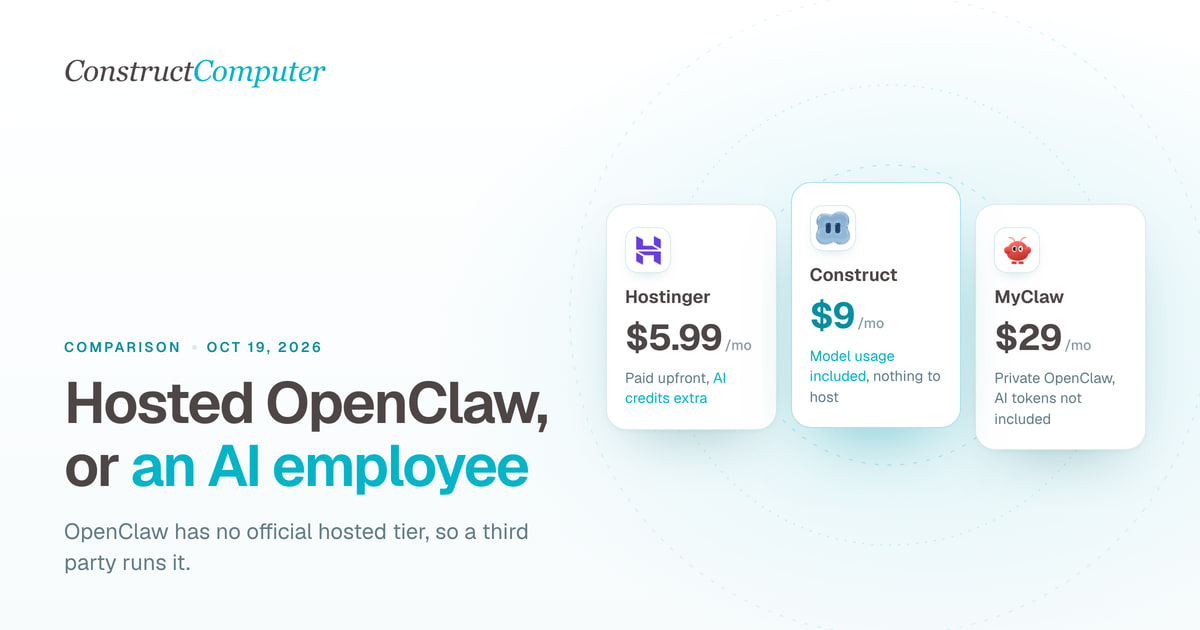
OpenClaw has no official hosted tier. Compare Construct at $9 a month with managed OpenClaw hosts from $5.99, Genspark Claw, and hosted Hermes.
- comparison
- openclaw
- ai-employee
- ai-agent
Best AI employees for solo founders (2026), ranked honestly
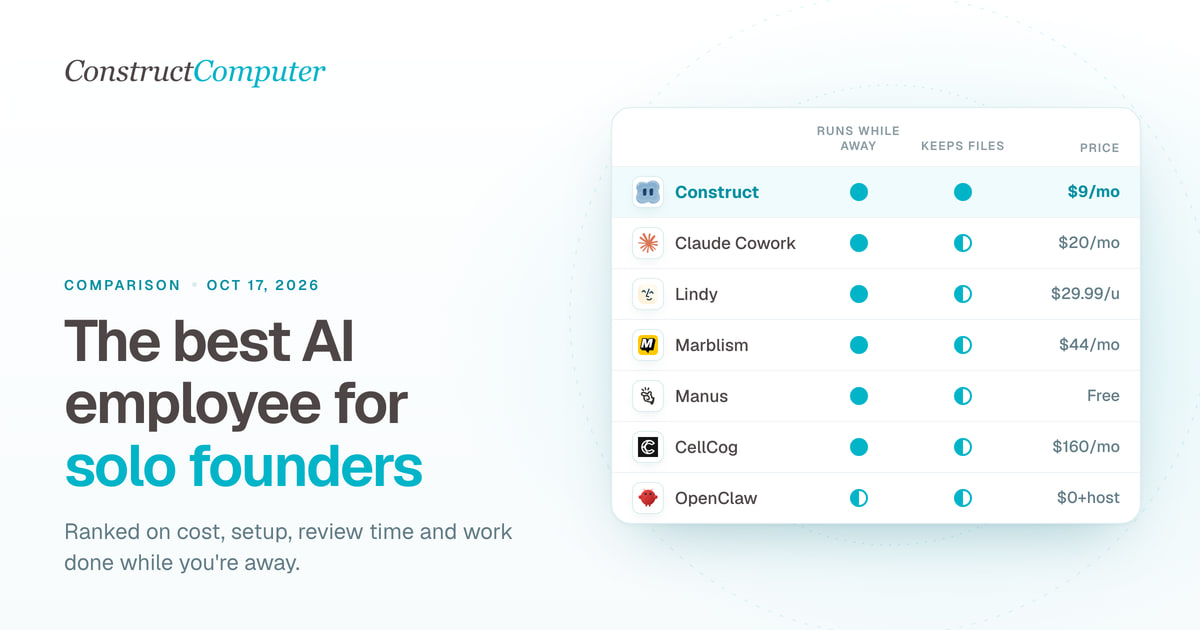
The best AI employee for solo founders, ranked: 8 picks compared on monthly cost, setup, and supervision. Construct leads at $9; most cost $9 to $44.
Construct vs Claude Cowork
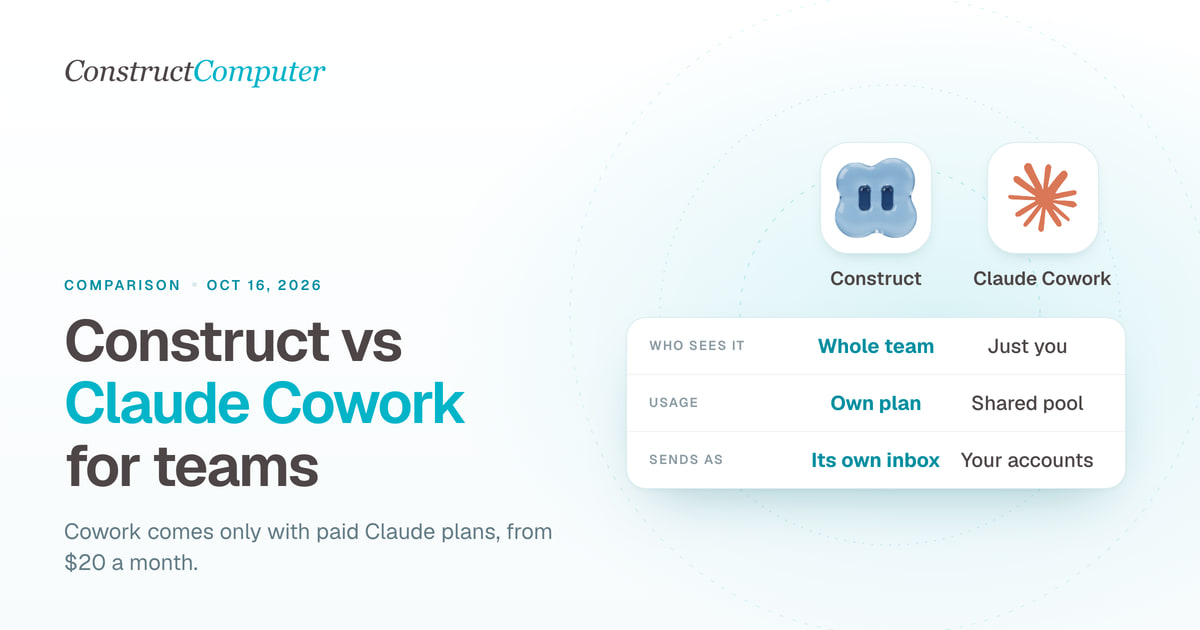
A Claude Cowork alternative for teams: Construct gives you shared files, schedules, and your choice of model from $9 a month. Cowork starts at $20.
- comparison
- ai-employee
- claude-cowork
Construct vs Muse for Small Business
Meta Muse for Small Business is free to start but runs on one Meta account, US and Canada only. Construct gives your whole team an AI employee from $9.

