Construct vs OpenClaw

Construct Team · Editorial team
The team building and documenting Construct Computer.
Published · @use_construct
On this page12 sections · 12 min read
- Why choose Construct over OpenClaw?
- What is OpenClaw?
- Methodology
- Construct vs OpenClaw: features at a glance
- How much does OpenClaw cost to run?
- Where does Construct give you more control?
- How to test both yourself
- Already using OpenClaw? Add Construct in 15 minutes
- When might OpenClaw still fit?
- Which should you choose?
- Sources
- Related resources
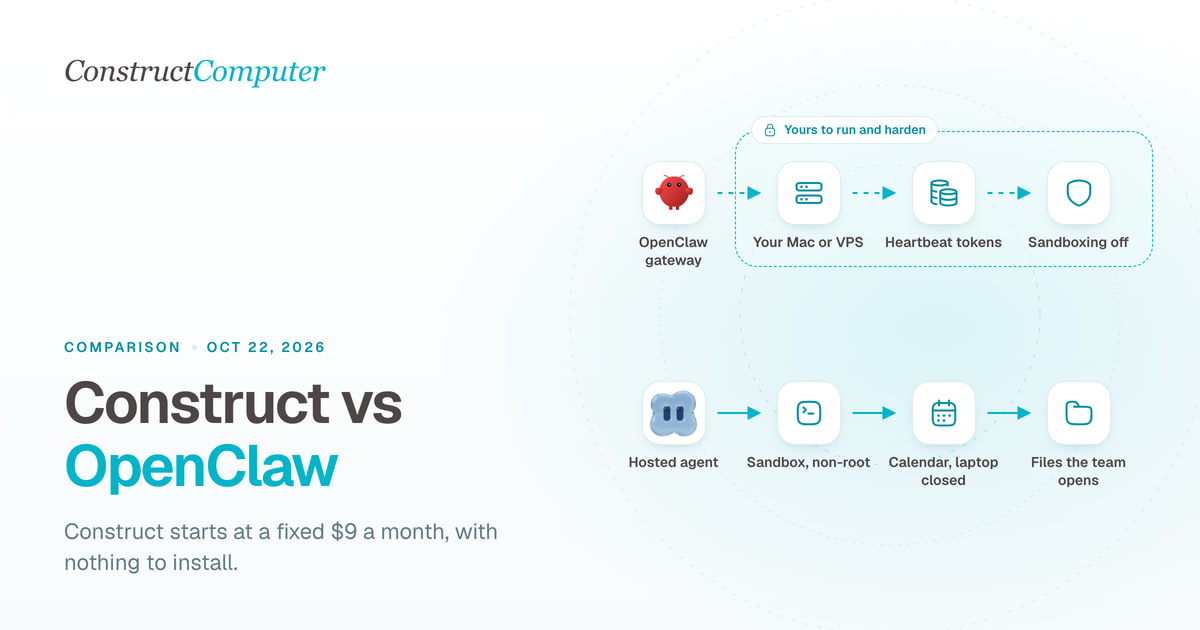
Construct is the hosted OpenClaw alternative: an AI employee with its own workspace, files, schedules, and email address from a fixed $9 a month, with no per-message billing and nothing to install. OpenClaw is free, MIT-licensed software you run yourself, so its real cost is a machine that stays on plus the model tokens it spends, and its own docs say "Sandboxing and exec approvals are off by default."
For most founders and small teams, Construct is the better choice. You can give it a job this afternoon instead of setting up a server, there is no gateway for you to secure or patch, you pay a fixed monthly price with published plan limits instead of a token bill that follows how chatty the agent was, and schedules run with your laptop closed. Already running OpenClaw? Keep it for the channels and experiments you built it for and give Construct the recurring work your team depends on. The two run side by side.
Why choose Construct over OpenClaw?
- Nothing to install, expose, or harden. Sign up and the workspace is hosted. There is no gateway on the internet and no server to patch.
- A fixed monthly price, with no per-message billing. Construct Lite is $9 a month for 2 agents (Construct and one more), 50 steps per task, and 3 scheduled tasks. OpenClaw's heartbeat runs a full agent turn every 30 minutes by default, and you pay for every token.
- Schedules that run without your laptop. The Calendar runs prompts, connected-app actions, and saved workflows on Construct's servers and keeps each run's history.
- Work that lands in the workspace. Reports, spreadsheets, and scripts are saved to files as the agent produces them, so a run that stops at step 30 still leaves steps 1 to 29 behind. No backups to schedule.
- One agent for a small team, with roles. Invite teammates as Owner, Admin, or Member. A team workspace has no member limit, and everyone's work draws on the owner's plan.
- Its own email address. Every plan gives the agent an inbox. Forward a thread from your address and it starts work.
What is OpenClaw?
OpenClaw is "an open-source AI assistant that runs on your own hardware and meets you in every chat app you already use." Its docs describe a "self-hosted gateway" that you run on your own machine or a server, connecting chat apps to AI agents (OpenClaw docs). It keeps persistent memory, runs cron jobs, hooks, and webhooks, drives a browser, runs shell commands, and installs skills and plugins from its ClawHub marketplace.
- License and ownership: stewarded by the OpenClaw Foundation, a US non-profit that "keeps the whole product MIT licensed." Its homepage says: "No subscription. No hosted tier. No token" (OpenClaw).
- Where it runs: your Mac, Windows PC, or Linux box, a VPS, or a third-party host (OpenClaw FAQ).
- Models: "hosted, subscription-backed, gateway, or local models," including signing in with a ChatGPT account.
- Channels: WhatsApp, Telegram, Slack, Discord, Signal, iMessage, Microsoft Teams, Google Chat, Matrix, SMS, and more, "any of its 29 channels."
- Latest release: v2026.10.1, published October 10, 2026, which added full backups to external storage (OpenClaw on GitHub, release notes).
If you want OpenClaw without running it, third parties host it for you. Our guide to hosted OpenClaw alternatives compares them, and our Construct vs Genspark Claw comparison covers the best-known managed "claw."
Methodology
We build Construct. This is our editorial comparison of documented capabilities and published prices, checked on October 11, 2026. It is not a hands-on performance benchmark.
We read OpenClaw's homepage, its documentation (install, hosting, security, heartbeat, cron, and FAQ pages), its OpenClaw Enterprise announcement, and its GitHub repository, plus the Hostinger and MyClaw pricing pages. OpenClaw is highly configurable, so for each row we describe the documented default and say where configuration changes it. Where a capability is not documented in the sources we reviewed, we say "not documented" rather than claiming it is absent.
Construct vs OpenClaw: features at a glance
| Capability | Construct | OpenClaw |
|---|---|---|
| Setup | Sign up; the workspace is hosted | Install on your machine or a VPS; Node 24.16+ or 26.1+; connect each channel |
| Cost | Fixed-price plan with published limits: $9, $59, or $299 a month | $0 software plus a machine plus tokens |
| Security defaults | No gateway for you to expose; credentials stored encrypted by Construct | Gateway on loopback and DM pairing by default; sandboxing and exec approvals off by default |
| Schedules | Calendar runs prompts, actions, or workflows on Construct's servers: 3, 10, or 50 by plan | Cron, hooks, webhooks, Gmail triggers, heartbeat check-ins; pauses when the machine sleeps |
| Where finished work lives | Workspace files saved as they are produced | A workspace on the machine that runs it; docs advise regular backups |
| Team use | Team workspaces with Owner, Admin, and Member roles | One trust domain per gateway; OpenClaw Enterprise adds multi-tenancy, in preview |
| Its own agent inbox on every plan | IMAP and Gmail triggers; sending through skills | |
| Memory | Inspect, correct, or forget any stored fact | Persistent memory with provenance and a forget command |
| Models | Bundled models, or your own keys for OpenRouter, OpenAI, Anthropic, Bedrock, and xAI on Pro | Hosted, subscription-backed, gateway, or local models |
| Extensions | Live integration catalog, your own MCP tools, private workspace apps | ClawHub skills and plugins, MCP client and server, plugin SDK |
| Ways to reach it | Web, Slack, Telegram, Discord, and its own email address | WhatsApp, Telegram, Slack, Discord, Signal, iMessage, Teams, Google Chat, Matrix, SMS, more |
Sources: OpenClaw's homepage, docs, Why OpenClaw, security model, and OpenClaw Enterprise announcement. Construct's pricing and channels pages.
How much does OpenClaw cost to run?
OpenClaw's software is free; what you pay for is a machine that stays on and the model tokens the agent spends, from a few dollars a month on a cheap host to more than a Construct plan on default settings. Construct charges a fixed monthly price with published plan limits and no per-message billing. These are USD prices billed monthly unless noted.
| Construct Lite | $9 | Up to 2 agents (Construct and one more), 50 steps per task, 3 scheduled tasks, agent email address |
| Construct Starter | $59 | 6x Lite usage, up to 5 agents, 150 steps per task, 10 scheduled tasks |
| Construct Pro | $299 | 32x Lite usage, up to 15 agents, up to 1,000 steps per task, 50 scheduled tasks, your own keys |
| OpenClaw on your own computer | $0 | Model tokens; the machine has to stay awake |
| OpenClaw on a VPS | Set by your provider | Server plus tokens; minimum 1 vCPU and 1 GB RAM, 2 GB or more recommended |
| OpenClaw on Hostinger | $5.99, paid upfront; renews at $11.99 | AI credits bought from the Hostinger dashboard, or your ChatGPT account |
| OpenClaw on MyClaw Lite | $29, or $199 a year | Model tokens, which are not included |
Sources: Construct pricing, OpenClaw hosting FAQ, Hostinger OpenClaw, and MyClaw pricing.
Is OpenClaw free?
The software is free, and the Foundation says it has no subscription and no hosted tier. Running it is not: you need a machine that is always on and access to a model, either a paid API key, a subscription sign-in such as ChatGPT, or a local model on hardware strong enough to run it.
Where OpenClaw's token bill comes from
OpenClaw's heartbeat wakes the agent every 30 minutes by default (every hour when Anthropic sign-in is configured) to check whether anything needs attention, and its docs say: "Heartbeats run full agent turns. Shorter intervals burn more tokens." Isolated heartbeat sessions cut a run from "~100K tokens down to ~2-5K" (OpenClaw heartbeat docs).
As illustrative arithmetic from those figures, not a measured bill: 48 heartbeats a day at about 100,000 tokens each is about 4.8 million input tokens a day before any task you assigned. With isolated sessions, it is about 96,000 to 240,000. Configured carefully, with a subscription sign-in, a local model, or a free-tier host such as Oracle Cloud's "Always Free ARM tier" (OpenClaw docs: Linux server), OpenClaw can cost very little. Left on defaults with a paid API key, it can cost more than a Construct plan.
What this means for your budget:
- Starting from zero: Construct Lite is a fixed $9 with no per-message billing. An OpenClaw setup costs a server or an always-on machine plus tokens, plus your time to configure it.
- A busy month: Construct works within your plan's published limits, with no per-message billing, and on Pro you can add your own keys. OpenClaw's bill follows how much the agent ran.
- A team of five: Construct Starter at $59 covers up to 5 agents in one workspace with roles. OpenClaw's docs treat each gateway as one trust domain.

Where does Construct give you more control?
OpenClaw gives you control over every layer. Construct gives you control over the work: the files, the schedule, the memory, and who can see them, without asking you to operate the layers.
Is OpenClaw safe for a small business?
It can be made safe, but that is your job: OpenClaw's docs say "Sandboxing and exec approvals are off by default" and "Hardening is deliberate configuration" (Why OpenClaw). Its security model assumes "one trusted boundary per gateway: a single operator, or a team whose members trust each other" (OpenClaw security). The hardened setup it recommends involves a sandbox backend, Tailscale or an identity-aware proxy, secret references, message auditing, and a scheduled openclaw security audit --deep. The project publishes its security advisories openly: on August 27, 2026 its repository listed 647, which it notes are disclosure records, "not the number of currently exploitable defects."
With Construct, there is no gateway on the internet and no server for you to harden. Shell commands run in a sandbox as a non-root user unless the agent asks for root on one command, and your workspace files live in storage that outlives the machine. Stored model keys and bot credentials are encrypted. Content the agent reads from web pages, email, and connected apps reaches the model marked as external data whose instructions it should not follow; supervise early runs as you would with any agent.
Do you need a Mac mini to run OpenClaw 24/7?
No, but you need some machine that never sleeps. OpenClaw's FAQ says to "expect pauses when the machine sleeps or updates" and that 24/7 reliability means a VPS (OpenClaw FAQ). Construct's Calendar runs an agent prompt, a connected-app action, or a whole saved workflow on Construct's servers, once or on a cadence, and keeps each run's result history. The scheduled tasks guide walks through it.
Silent product demo: Construct's Calendar showing scheduled agent jobs and workflow runs, which run on the cloud workspace and keep their result history.
A workspace the work lands in
OpenClaw keeps a workspace on the machine that runs it, and the docs tell you to "back up the state + workspace regularly" (OpenClaw docs: Linux server). In Construct, the files, memory, schedules, and outputs are the product, and the next run starts from what exists. When several people review the same output, Construct can build a private workspace app such as a review queue.
An email address that belongs to the agent
OpenClaw handles email as automation: an IMAP trigger or Gmail push brings mail into a session, and sending goes through skills. Its own FAQ answers "Should my bot have its own email, GitHub account, or phone number?" with "Yes, for most setups" (OpenClaw security FAQ). Every Construct plan includes that already: a native agent inbox. Forward a thread from your own address and it starts work; mail from anyone else waits in the inbox until you ask the agent to read it. Our guide to giving an AI agent its own email address shows the setup.
One agent for a small team, with roles
A shared OpenClaw gateway is "one trust domain," and "mutually adversarial users need separate gateways" (What is OpenClaw?). For organizations, the Foundation announced OpenClaw Enterprise on September 29, 2026: a free, self-hosted platform with multi-tenancy and governance that you deploy with Docker Compose or Kubernetes, currently in preview and aimed at "internal pilot workloads" (OpenClaw Enterprise). Construct's team workspaces bring people, the agent, files, and apps together with invitations and roles today, with nothing to deploy, and messaging settings for a team workspace can only be changed by its owner or admins.
How to test both yourself
We have not run a timed, side-by-side test of the two. If you want one before you decide, run the same job on both for two weeks and record the same things:
- Pick one recurring job, such as a Monday check of three competitors' pricing pages that saves a dated CSV and posts a three-line summary to Slack.
- Time the setup from zero to the first scheduled run, and note every step that needed a terminal.
- Track the cost: tokens and server for OpenClaw (its
openclaw statususage snapshot helps), plan usage for Construct. - Check week two: did it compare correctly against week one, and did any run fail silently?
- Ask a teammate to find the CSV without your help.
Here is how the Construct side runs, as an illustrative walkthrough rather than a measured result. Save the three URLs and the column layout to a file in the workspace. Ask the agent to visit each pricing page, write a dated CSV, and compare it with last week's file. Check the first file, then save the steps as a workflow and put it on the Calendar, where it uses one of Lite's 3 scheduled tasks. Each Monday the CSV lands in Files and Construct notifies you in the web app; teammates can @mention the agent in Slack to ask what changed. No server to run and no heartbeat to tune.
Already using OpenClaw? Add Construct in 15 minutes
You do not have to tear down your gateway. Start with the one job that keeps breaking when your machine sleeps, or the one a teammate needs to see.
- Start on Lite for $9, or take the 7-day Pro trial to run it on your own model keys.
- Copy the instructions and skill text you rely on into a Construct chat, and move the files the job needs into the workspace.
- Connect the apps from the integration catalog, or add them as custom MCP tools.
- Run it once and check the result in Files.
- Put it on the Calendar so time-based cron jobs run whether or not anyone is online.
There is no import. Add the facts from your memory files that still matter to the first instruction, and Construct saves them as memory you can read. Event triggers such as webhooks or Gmail push become a scheduled check, or an email you forward to the agent's own inbox. One thing to set up deliberately: Construct's workflows do not pause for approval yet, so for anything customer-facing, ask for drafts and send them yourself once you have checked them.
When might OpenClaw still fit?
- You want to own the code, the machine, and every policy, and you are comfortable operating and hardening a server.
- You run many agents on a subscription sign-in, local models, or free-tier hosts, where the marginal cost of another agent approaches zero.
- Your agent has to live in WhatsApp, Signal, iMessage, or Matrix, or keep a long-running process alive on your own hardware.
For recurring work that should run from a hosted workspace with schedules, an agent email address, memory you can correct, and a fixed monthly price, Construct is the better fit.
Which should you choose?
Choose Construct. It starts at a fixed $9 a month, runs schedules with your laptop closed, keeps every finished file in a workspace your team shares, and leaves you nothing to install or harden. If you already run OpenClaw, keep it for the channels and experiments you built it for and let Construct run the work your team depends on. If you are also weighing Anthropic's agent, read Construct vs Claude Cowork.
Pick the job you were going to give OpenClaw, such as a morning briefing, a weekly price check, or a client report, give Construct the inputs, and judge the saved file. Start on Lite at $9, or try Pro free for seven days.
Sources
Pages checked on October 11, 2026:
- OpenClaw and OpenClaw on GitHub
- OpenClaw docs overview
- Why OpenClaw
- OpenClaw security model and security FAQ
- OpenClaw FAQ: providers, hardware, and hosting
- What is OpenClaw?
- OpenClaw heartbeat documentation
- OpenClaw docs: Linux server hosting
- OpenClaw v2026.10.1 release notes
- OpenClaw Enterprise announcement, September 29, 2026
- Hostinger OpenClaw
- MyClaw pricing
- Construct pricing
- Construct channels, scheduling, and team workspaces
Related resources
- Hosted OpenClaw alternatives: managed claws vs an AI employee
- Construct vs Genspark Claw
- Construct vs building your own AI agent
- How to give an AI agent its own email address
- How to run an AI agent on a schedule
- AI agent memory you can control
Frequently asked questions
- Is Construct a good OpenClaw alternative?
- Yes, for most founders and small teams. Construct is a hosted AI employee for a fixed $9 a month with no per-message billing and nothing to install, while OpenClaw is free software you run yourself on a machine that stays on, paying for every model token. Construct also runs schedules with your laptop closed and keeps files in a workspace your team shares.
- Is OpenClaw free?
- The software is free and MIT licensed, and the OpenClaw Foundation says there is no subscription and no hosted tier. Running it is not free: you need a machine that is always on, such as a VPS, and access to a model through a paid API key, a subscription sign-in such as ChatGPT, or a local model on capable hardware.
- How much does OpenClaw cost to run?
- It depends on the machine and the model. Managed hosts start at $5.99 a month on Hostinger, paid upfront and renewing at $11.99, or $29 a month on MyClaw Lite without model tokens. On defaults, the heartbeat runs a full agent turn every 30 minutes, which on a paid API key can cost more than Construct's fixed $9 Lite plan.
- Is OpenClaw safe to use for a business?
- It can be hardened, but that is your job. OpenClaw's docs say sandboxing and exec approvals are off by default and that hardening is deliberate configuration, with a recommended setup of a sandbox backend, Tailscale or an identity-aware proxy, secret references, message auditing, and scheduled security audits. Construct is hosted, so there is no gateway for you to expose and shell commands run sandboxed as a non-root user.
- Do I need a Mac mini to run OpenClaw 24/7?
- No, but you need a machine that never sleeps. OpenClaw's FAQ says to expect pauses when the machine sleeps or updates and recommends a VPS for 24/7 reliability, with at least 1 vCPU and 1 GB of RAM and 2 GB recommended. Construct's Calendar runs scheduled jobs on Construct's servers, so no machine of yours has to stay on.
- Why does OpenClaw use so many tokens?
- Its heartbeat wakes the agent every 30 minutes by default, or hourly with Anthropic sign-in, and the docs say heartbeats run full agent turns, so shorter intervals burn more tokens. Isolated heartbeat sessions cut each run from about 100,000 tokens to 2,000 to 5,000, according to OpenClaw's documentation.
- Can a small team share one OpenClaw?
- Only if everyone trusts each other. OpenClaw's docs treat a gateway as one trust domain and say mutually adversarial users need separate gateways. OpenClaw Enterprise, announced September 29, 2026, adds multi-tenancy and governance, but it is self-hosted on Docker Compose or Kubernetes and in preview. Construct's team workspaces offer Owner, Admin, and Member roles today with nothing to deploy.
- Can I use Construct alongside OpenClaw?
- Yes. Keep OpenClaw for the channels and experiments you built it for and give Construct the recurring work your team depends on. Copy your instructions and skill text into a Construct chat, move the files, connect the apps, run the job once, and put it on the Calendar. Webhook or Gmail triggers become a scheduled check or a forwarded email.
Keep reading
Hosted OpenClaw alternatives: managed claws vs an AI employee
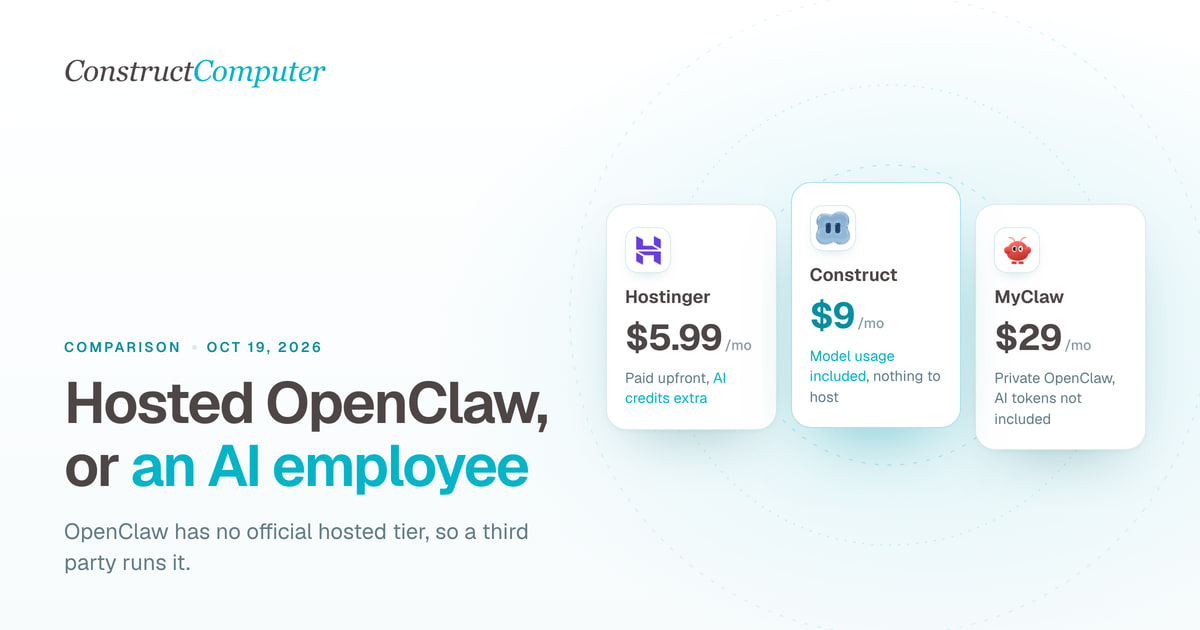
OpenClaw has no official hosted tier. Compare Construct at $9 a month with managed OpenClaw hosts from $5.99, Genspark Claw, and hosted Hermes.
Construct vs Genspark Claw
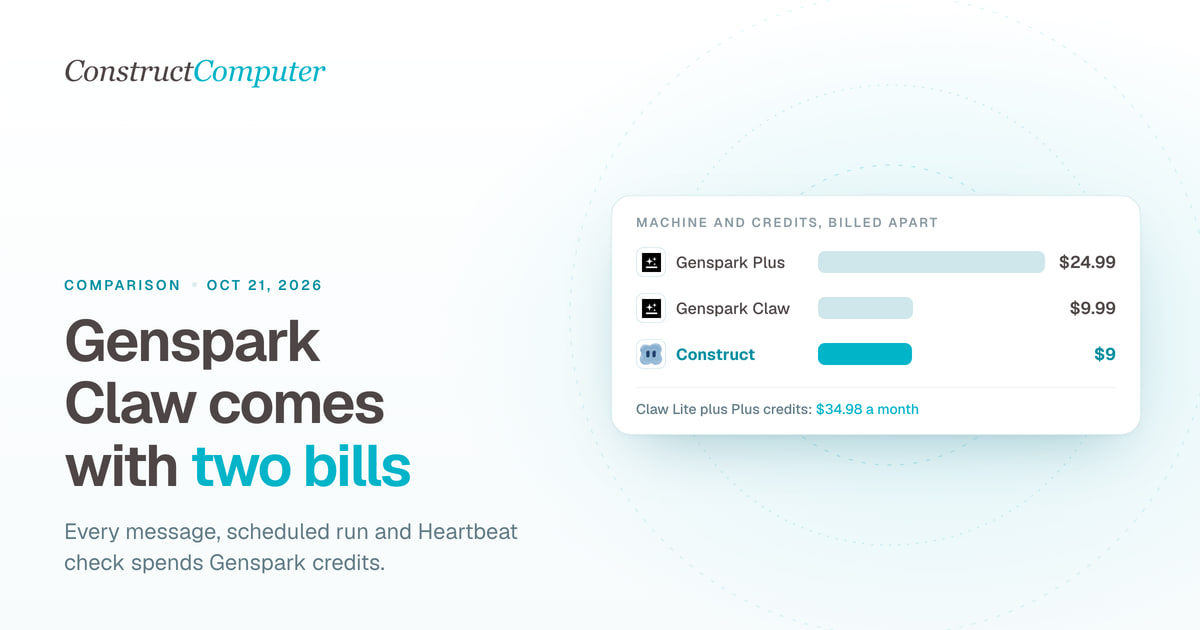
Construct is a Genspark Claw alternative at a fixed $9 a month, model usage included. Claw's $9.99 cloud computer is billed apart from the credits it uses.
- comparison
- genspark
- ai-employee
Best AI employees for solo founders (2026), ranked honestly
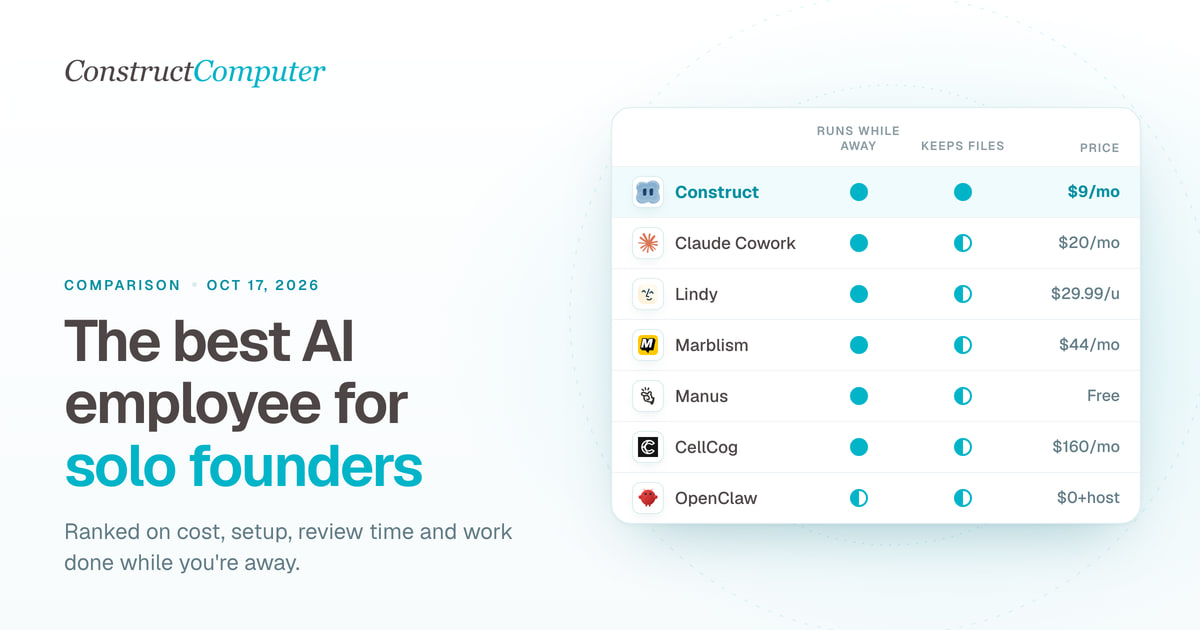
The best AI employee for solo founders, ranked: 8 picks compared on monthly cost, setup, and supervision. Construct leads at $9; most cost $9 to $44.
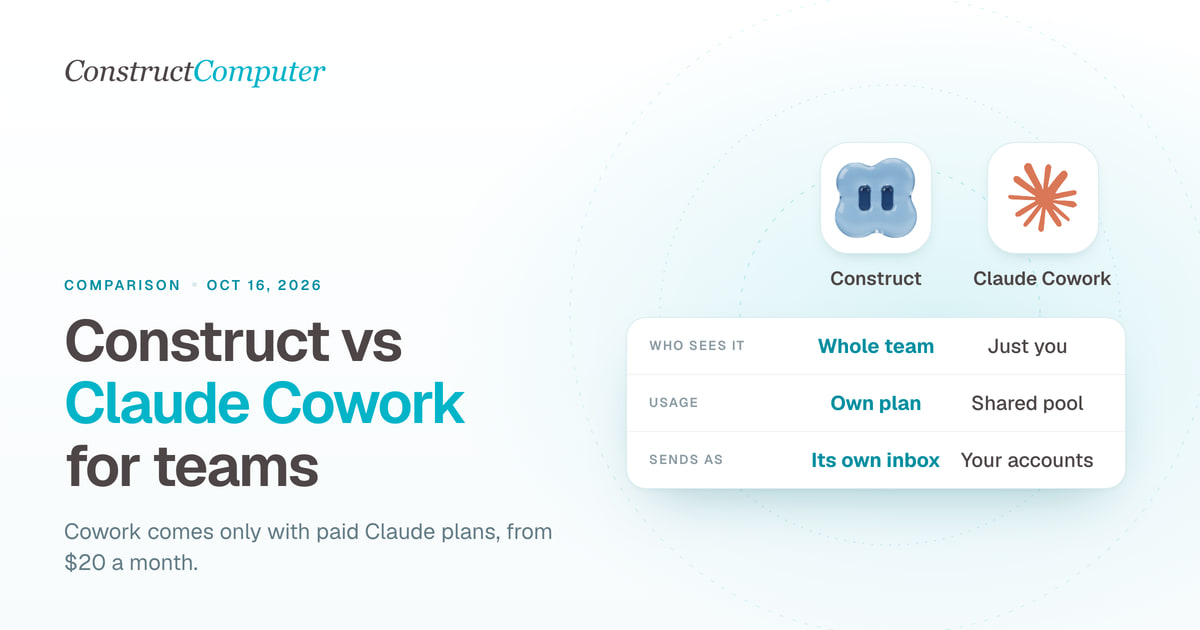
Construct vs Claude Cowork
A Claude Cowork alternative for teams: Construct gives you shared files, schedules, and your choice of model from $9 a month. Cowork starts at $20.
- comparison
- ai-employee
- claude-cowork

