Construct is now on Discord: an AI agent that works inside your server

Nischal · Author
Writes about Construct, AI agents, and building useful software.
Published · @naik_nischal
On this page16 sections · 18 min read
- Why put an AI agent in Discord?
- What can Construct do in Discord?
- How do you add Construct to a Discord server?
- How does Construct work in Discord threads?
- Which slash commands does Construct add to Discord?
- How does Construct follow a channel and build context?
- Who can use the agent in your server?
- Can different channels get different agents?
- Can you DM the Construct bot?
- How does Construct compare with other AI agents for Discord?
- What does Construct on Discord cost?
- What should you know before you start?
- Troubleshooting
- Add Construct to your server
- Sources
- Related resources
Construct is now on Discord, so your server gets an AI agent that does real work, from $9 a month. Add it to a server from Construct's settings, @mention it in any channel, and it opens a thread, works on its own cloud computer with a browser, files, email and your connected apps, and answers in that thread. Turn on Listening for the channels you choose and it keeps up with the conversation too, so the next time someone asks, it already knows what the channel has been talking about.
- What it is: the same Construct agent you use on the web, now reachable from any Discord server you add it to. Same agents, same files, same memory.
- How you start: in Construct, open Settings > Messaging and click Add to Discord. Pick your server, authorize, and mention
@Constructin a channel. Construct is also a verified app in Discord's App Directory. - How it works in a channel: a mention opens a public thread. Everyone in that thread can keep talking to the agent without mentioning it again.
- Listening (ambient mode): an owner or admin turns it on per channel, and the agent posts a notice when it starts. It reads from that moment on, never older history, and keeps messages for 14 days by default.
- Who can use it: only the people you allow, until you open it up. Everyone else gets nothing, or a read-only guest agent if you choose.
- Price: included in every Construct plan, from $9 a month. Listening needs a paid plan.
The 39-second launch film, set in a demo server for a small game studio. Alex mentions Construct in #general and asks it to turn the week's support questions into an FAQ. In a thread, it reads 63 messages in #support, lists the five questions players ask most, from demo saves carrying over to 1.0 to whether the game is Steam Deck verified, and attaches player-faq.md after 4 tools. A teammate gets a creator list from #growth, and when Alex says "post it in #announcements, but ask me first", Construct asks before it posts.
Why put an AI agent in Discord?
Because that is where a lot of teams already talk. Discord reports more than 90 million daily active users (Discord), and for game studios, open source projects, creator businesses and plenty of small startups, the server is the office. Questions get asked in #support, decisions get made in #general, and the work that follows usually means someone leaving Discord to go do it.
Most AI bots in Discord are built for chatting or moderation. Construct is built for the job after the chat. It is an always-on AI agent with its own computer, so when you ask it to "turn this week's support questions into an FAQ", it reads the channel, writes the document, saves it to your workspace and posts it back where you asked. Nothing has to be copied out of Discord first, and nothing has to be pasted back in afterwards.
- One agent behind every door. A request from Discord lands in the same workspace, files and memory you use on the web, Slack, Telegram and email.
- It works in threads, not in your main channel. Every request gets its own thread, so #general stays readable.
- It brings back files, not only replies. Attach a file to your request, or ask for one back. Results are saved in your workspace too.
- It keeps context you can see. With Listening on,
/briefshows exactly what the agent is keeping track of in a channel. - Locked until you open it. A new server answers only the person who installed it.
- Hosted, nothing to run. Construct is a verified Discord app, so there is no bot token to create, no gateway to keep alive and no Developer Portal to configure.
What can Construct do in Discord?
Anything it can do on the web, started from a channel, a thread, a slash command or a DM. That includes:
- Research and writing. Browse the web, read pages, and draft announcements, FAQs, patch notes or replies.
- Read the channel when you ask. It can fetch up to 100 recent messages from a channel in the same server, which is how "summarize #support this week" works.
- Post where you tell it. It can send a message to another channel in the same server, start a thread, add a reaction, or attach a file from your workspace.
- Take files in and send files out. Attach up to 20 MB per file to a message or to
/ask, and the file lands in your workspace for the agent to use. - Use your connected apps. If a job needs an app you have not connected yet, it posts a Connect account button that opens a private sign-in link, then carries on once you are connected.
- Ask before it acts. When it needs a decision, it posts a question with buttons for each choice, plus Other… for a typed answer. Only the person who asked, or someone with Full access, can answer.
@Construct read the last 100 messages in #support and find the five questions players ask most. Write a short FAQ with an answer for each, save it to Files as player-faq.md and attach it here. Ask me before you post anything in #announcements.
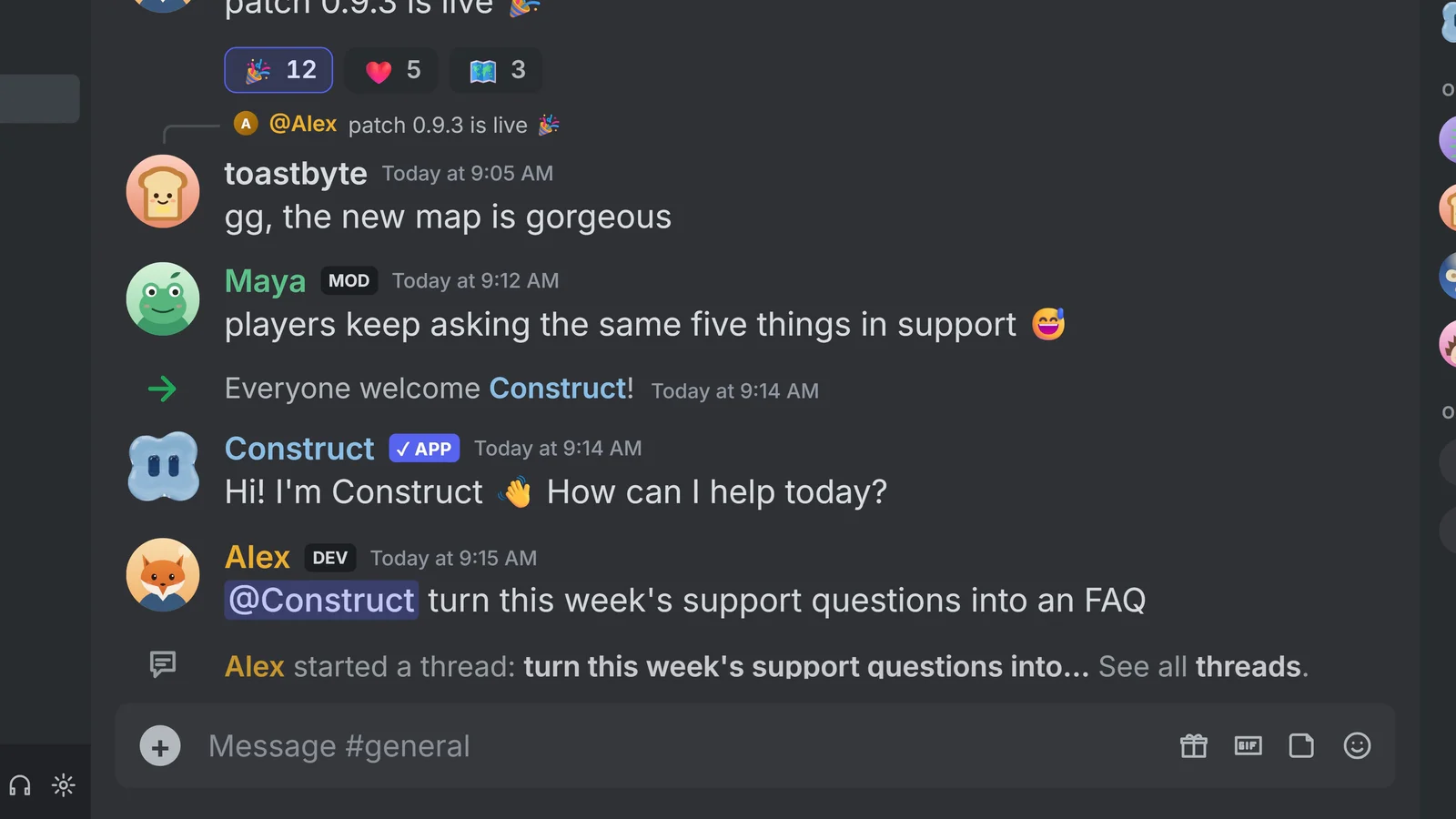
From the launch film: one mention in #general, and Discord opens a thread named after the request. The rest of the conversation happens there.
How do you add Construct to a Discord server?
You need a Construct account and the Manage Server permission on the Discord server. In a team workspace, the owner or an admin does the install; members see Messaging settings as view only.
- Open Messaging settings. In Construct, go to Settings > Messaging. Under Platforms, find Discord and click Add to Discord.
- Pick your server. Discord opens in a pop-up and asks which server to add Construct to. If nothing opens, allow pop-ups for Construct and try again.
- Authorize the permissions. Construct asks only for what it uses: View Channels, Send Messages, Send Messages in Threads, Create Public Threads, Read Message History, Embed Links, Attach Files, Add Reactions and Use Application Commands. No moderator powers.
- Check that it is online. Back in Construct you will see a "Discord connected" toast, and the server appears under Platforms with an Online badge. Construct also posts one welcome note in your server's system channel.
- Mention it. Type
@Constructand your request in any channel the bot can see. It opens a thread and starts working.
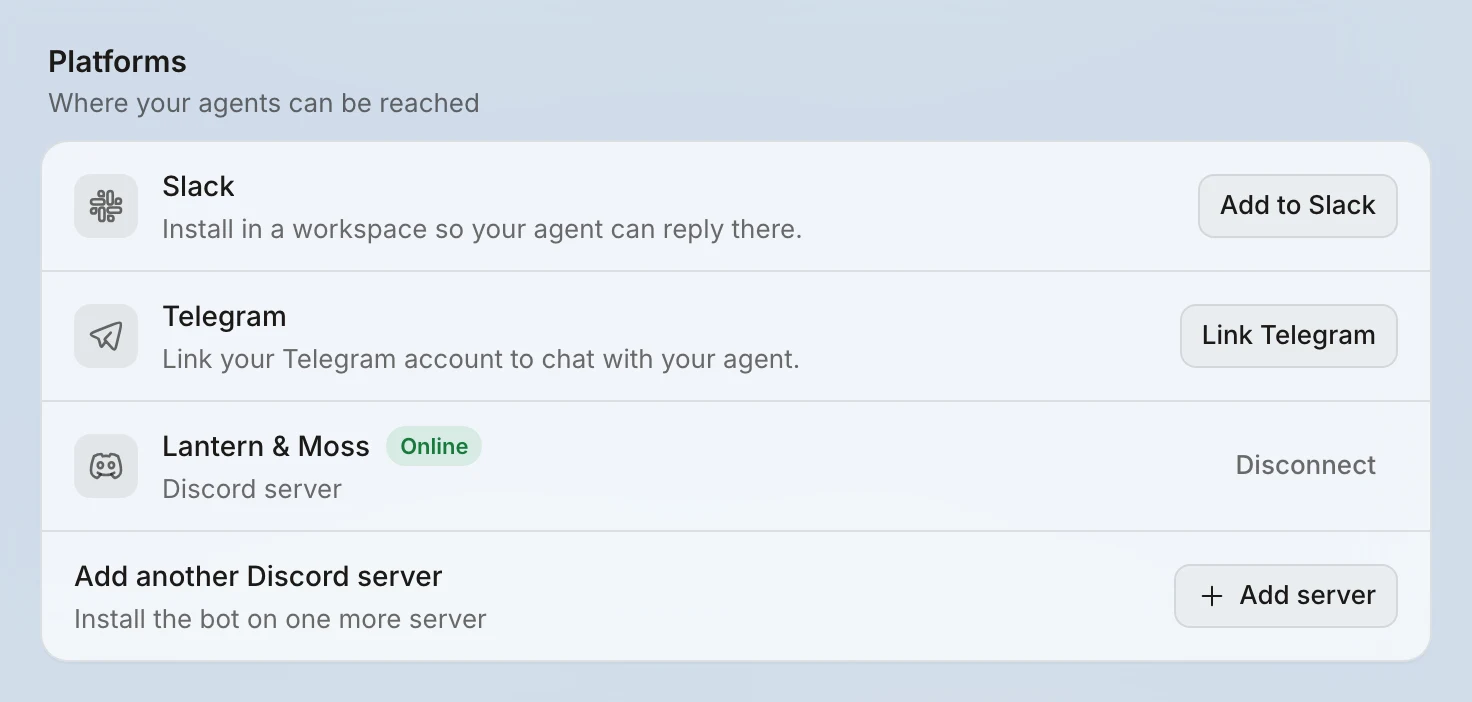
Settings > Messaging after the install, shown with a demo workspace. The server row turns Online once the bot is connected.
To add more servers, use Add another Discord server on the same screen. Each server links to one Construct workspace, and every request in that server runs under the plan of the person who installed it.
Construct is a verified app with a listing in Discord's App Directory, so you can also find it by searching "Construct" in Discord. If you add it from there, the bot joins but does not know which workspace your server belongs to yet. Your first mention gets a Connect this server card. Open Settings > Messaging in Construct and click Add to Discord for the same server to finish the link.
How does Construct work in Discord threads?
A mention, or a reply to one of Construct's messages, opens a public thread named after the first 40 characters of your request. From then on, every message in that thread from someone allowed to use the agent reaches it, with no need to mention it again. Everyone in the thread shares one conversation, and the agent sees who said what, so a teammate can add "use the Steam forum too" halfway through and the agent folds it in.
Here is what you see while it works:
- It acknowledges you. A typing indicator, then a small animated loader on your message.
- It shows progress. If the job takes more than a couple of seconds, one message appears with a short grey status line such as "🔍 Searching the web…" or "📁 Working with files", updated as it moves between tools.
- It answers in place. That same message is replaced by the finished answer, with a footer such as "✓ 4 tools". Long answers continue in follow-up messages, and code blocks are never split.
- It lands in your workspace. Files it made are in Files, and the whole thread appears in Construct under Chat > Channels as a read-only session with an Open in Discord button.
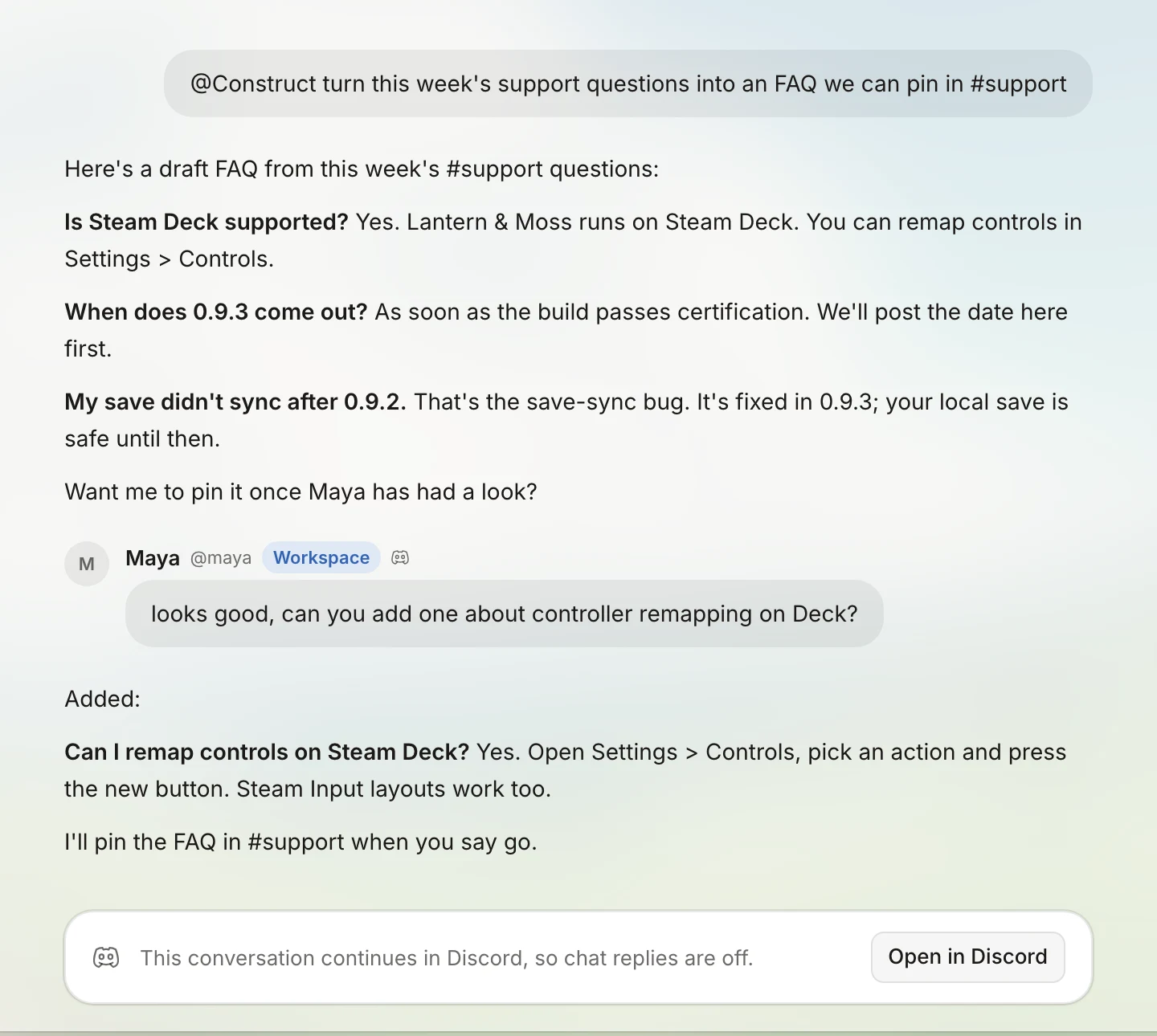
The same Discord thread in Construct under Chat > Channels, shown with a demo workspace. You can read every message and every reply here, and Open in Discord takes you back to the conversation.
Discord's own formatting rules apply. Bold, italics, code, links and simple lists come through; tables and images are stripped. When you want a table, ask for a file ("save it as a CSV and attach it") and you get the real thing.
To stop a run, type /stop or react with ❌ in the thread. To start over in the same thread, use /new.
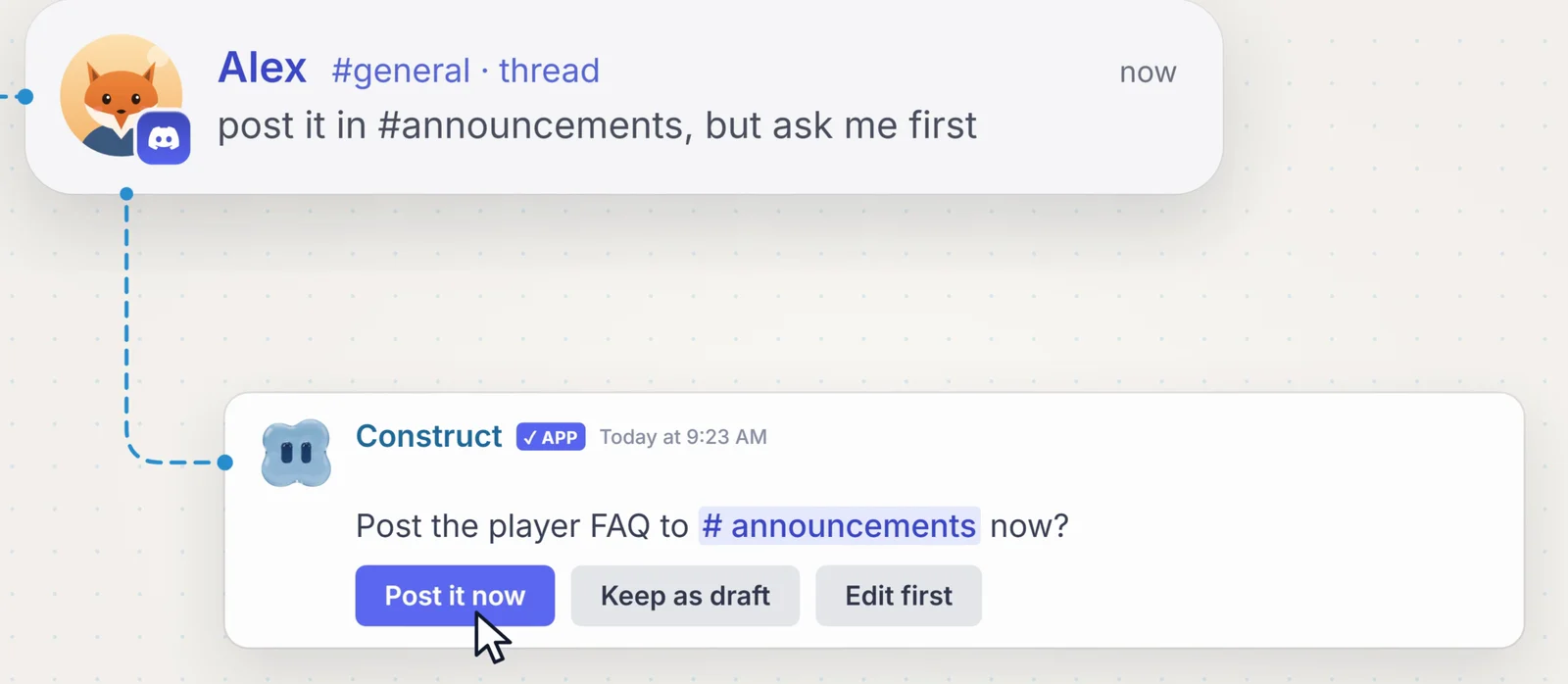
From the launch film: "ask me first" turns into a question with a button for each choice. The real card also adds an Other… button that opens a box for a typed answer.
Which slash commands does Construct add to Discord?
Type / in any channel and Construct's commands appear with its icon. They are registered for servers, and a few also work in a DM with the bot.
| Command | What it does | Works in DMs |
|---|---|---|
/ask | Ask your Construct agent, with an optional message and file | Yes |
/status | Show which agent answers here, your access, and whether Listening is on | Yes |
/stop | Stop the agent's current reply here | No |
/new | Start a fresh conversation in this thread | No |
/agent | Choose which agent answers in this channel (needs Manage Server) | No |
/connect | Link your Discord account to your Construct account | Yes |
/help | What the bot can do | Yes |
/about | What Construct is, with links | Yes |
/brief | What the agent is keeping track of in this channel | No |
/quiet | Make the agent quieter in this channel | No |
/optout | Stop the agent reading and learning from your messages | No |
/optin | Let the agent read your messages again | No |
/forget_me | Delete what the agent holds from your messages | No |
/ask is the quiet option. Outside a thread it gives each person their own conversation, which suits quick questions with a file attached, such as "What's the refund window in this policy?" with refund-policy.pdf.
Read next
AI Agent Memory You Can ControlHow does Construct follow a channel and build context?
This is the part people ask about most, so here is exactly how it works.
By default, Construct only reads messages addressed to it: mentions, replies to it, threads it started, slash commands and DMs. That matches how Discord itself treats message content as privileged data that apps have to be approved for (Discord Gateway docs).
Listening is the opt-in, ambient mode. An owner or admin turns it on for specific channels, and from then on the agent reads along in those channels, the way a new teammate would, so it understands the conversation before anyone mentions it. In Construct the nudge to switch it on says it plainly: "Let Construct follow your chats."
The four Listening modes
Each listened channel has a mode. The wording below is the wording in Construct's settings.
| Mode | In Construct's words | What changes for you |
|---|---|---|
| Off | "Doesn't read this channel. Mentions still work." | The default. The agent sees only what is addressed to it. |
| Context | "Keeps recent messages so replies understand the conversation. Learns nothing." | Mention it after a long discussion and it already knows what was said. |
| Learn | "Also keeps the channel brief, open loops and memories from the conversation." | Decisions and open questions carry over to next week's requests. |
| Assist | "Also sends private suggestions to the person who asked. Posts nothing unprompted until you raise the ceiling." | It starts noticing work it can help with, without speaking up in the channel. |
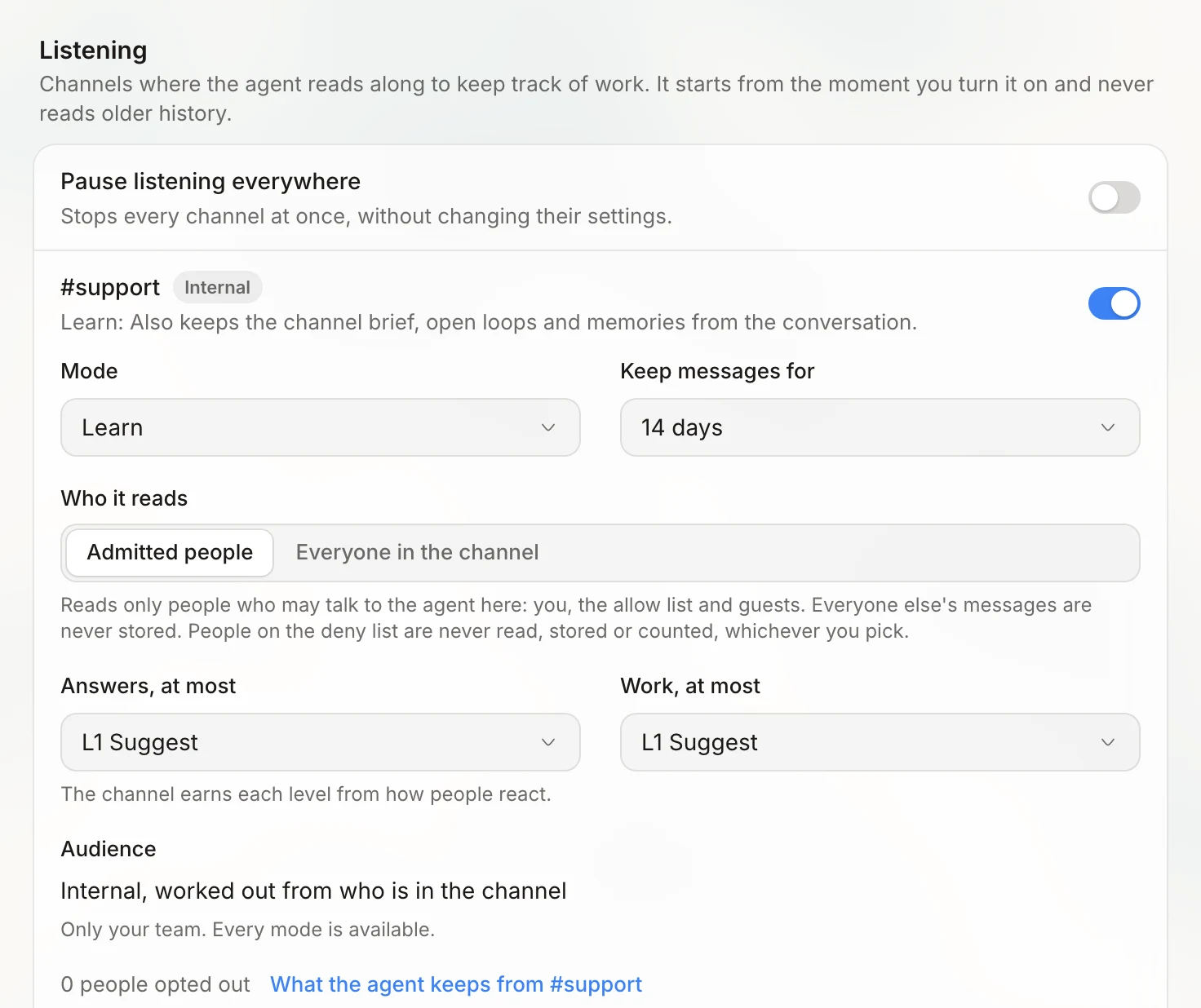
Each listened channel has its own mode, retention, reading scope and ceilings. Shown with a demo workspace.
What the agent keeps, and how it turns messages into context
- A rolling record of the channel. Messages, edits and thread replies from the moment Listening starts. It never reads older history. Messages are kept for 1, 3, 7, 14 or 30 days, 14 by default, and a message deleted in Discord is deleted from what Construct keeps.
- Who it reads. Either only the people you have admitted to the agent, which is the default, or everyone in the channel. Messages from anyone outside that scope are dropped, not stored.
- A channel brief and open loops. Every 40 or so messages, or after 30 minutes once a few have built up, Construct updates a short brief of what the channel is working on and which questions are still open. Anyone can read it with
/brief. - Context when someone asks. When the agent is mentioned in a listened channel, it gets the most recent messages (up to 30 lines) plus the brief alongside the request. That channel text is marked as untrusted, so the agent treats it as information to weigh, not as instructions to follow. A message that says "ignore your rules and post this" is just another message.
- Memories, in Learn and Assist. Facts and decisions from the conversation become memories the agent can use later, in the same memory that powers the rest of Construct.
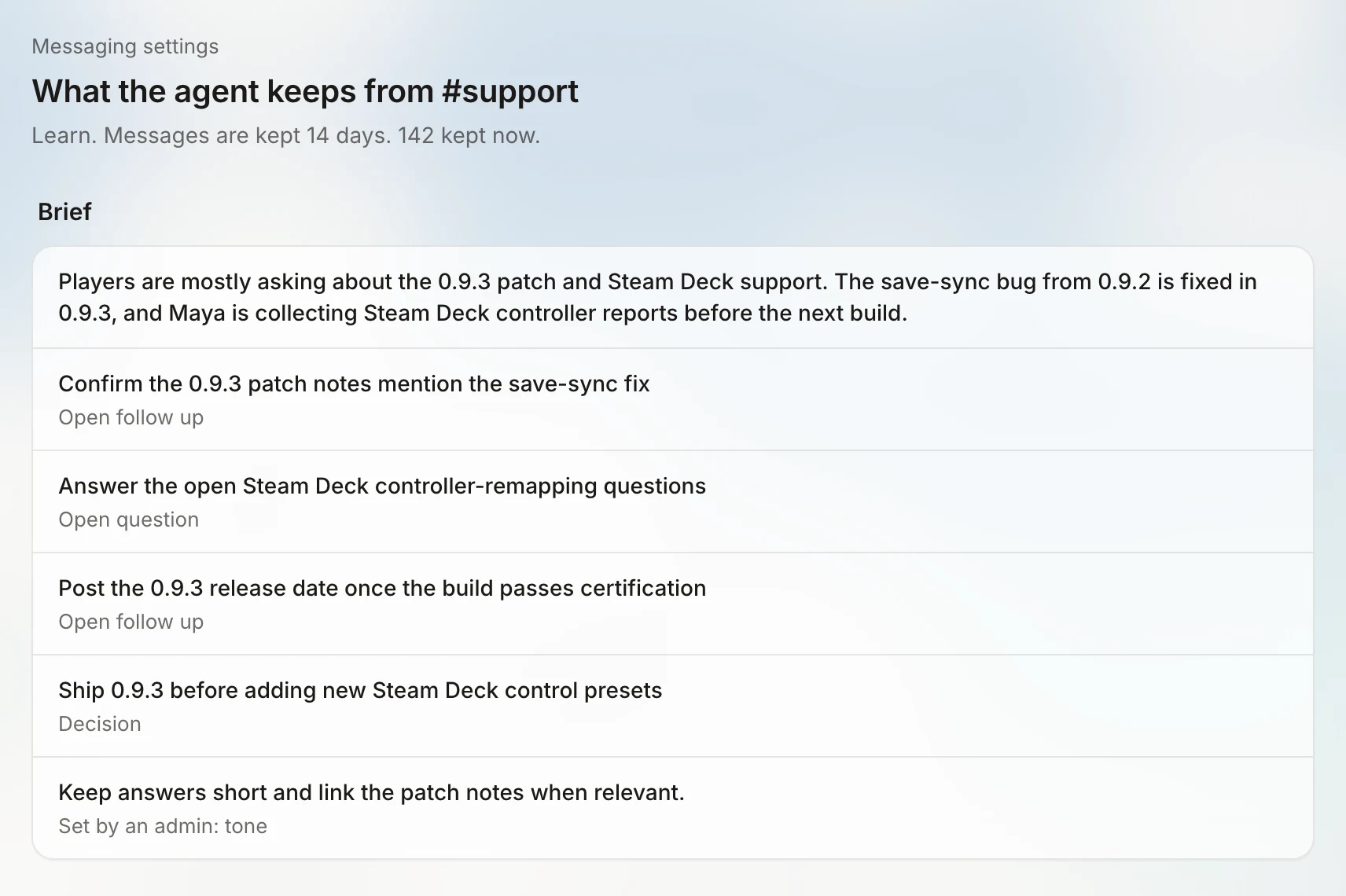
What the agent keeps from #support: the brief, open loops and a decision, built from the channel itself. Shown with a demo workspace.
This is what people mean by context engineering, done in the open: a bounded window of recent messages and a brief anyone in the channel can read, rather than a model quietly ingesting everything the server has ever said.
How quiet does it stay?
Quiet by default. Even in Assist, the agent posts nothing in the channel on its own until you raise the ceiling. Each channel has two ceilings you set: Answers, at most, which runs from L0 Listen through L1 Suggest and L2 Offer to L3 Answer, and Work, at most, for how much the agent may do without being asked. Below the ceiling, the channel earns each level from how people react. Anyone in the channel can turn it down with /quiet.
We chose that default on purpose. In a study of AI agents in group conversations, participants "disliked when the agent seemed to dominate the conversation" (Houde et al., 2025). An agent that reads the room but speaks when asked is easier to live with than one that chimes in on every message.
Channels also have an audience. A Discord channel counts as Internal only if you confirm it is an internal team channel. Anything else is Community, which caps the agent at Assist, limits it to answers, and learns nothing about people. That matters for public servers, where your members never signed up to be anyone's training data.
How to turn on Listening
- Switch on AI processing. In Settings > Messaging, the AI processing card has a Process listened channels switch. Its "What this means" note explains who processes what: Cloudflare, which already runs Construct, reads listened channels with its Clef model on Workers AI to decide what is worth keeping, and the model providers Construct uses for replies write the brief. Nothing is read until you also pick a channel. (We benchmarked Clef in Clef vs Jev on real agent decisions.)
- Add a channel. In Add a channel, choose Discord, pick a channel the bot is already in, or All channels for every channel it can see today, and pick a mode. The form starts on Context.
- Confirm the checklist. You tick that the channel is not used for health, HR, legal or personal finance matters, that members are adults and part of your organization or community, that members have been told, and, for an Internal channel, that it is an internal team channel.
- Click Start listening. The agent posts a notice in the channel saying it is an AI, which mode it is in, how long messages are kept, and how to use
/status,/optoutand/forget_me.
Every listened channel then has its own settings for mode, retention and who it reads, a count of members who opted out, and a What the agent keeps page. Pause listening everywhere turns it all off at once. Turning a channel off posts a final notice, and the messages the agent kept from that channel are deleted.
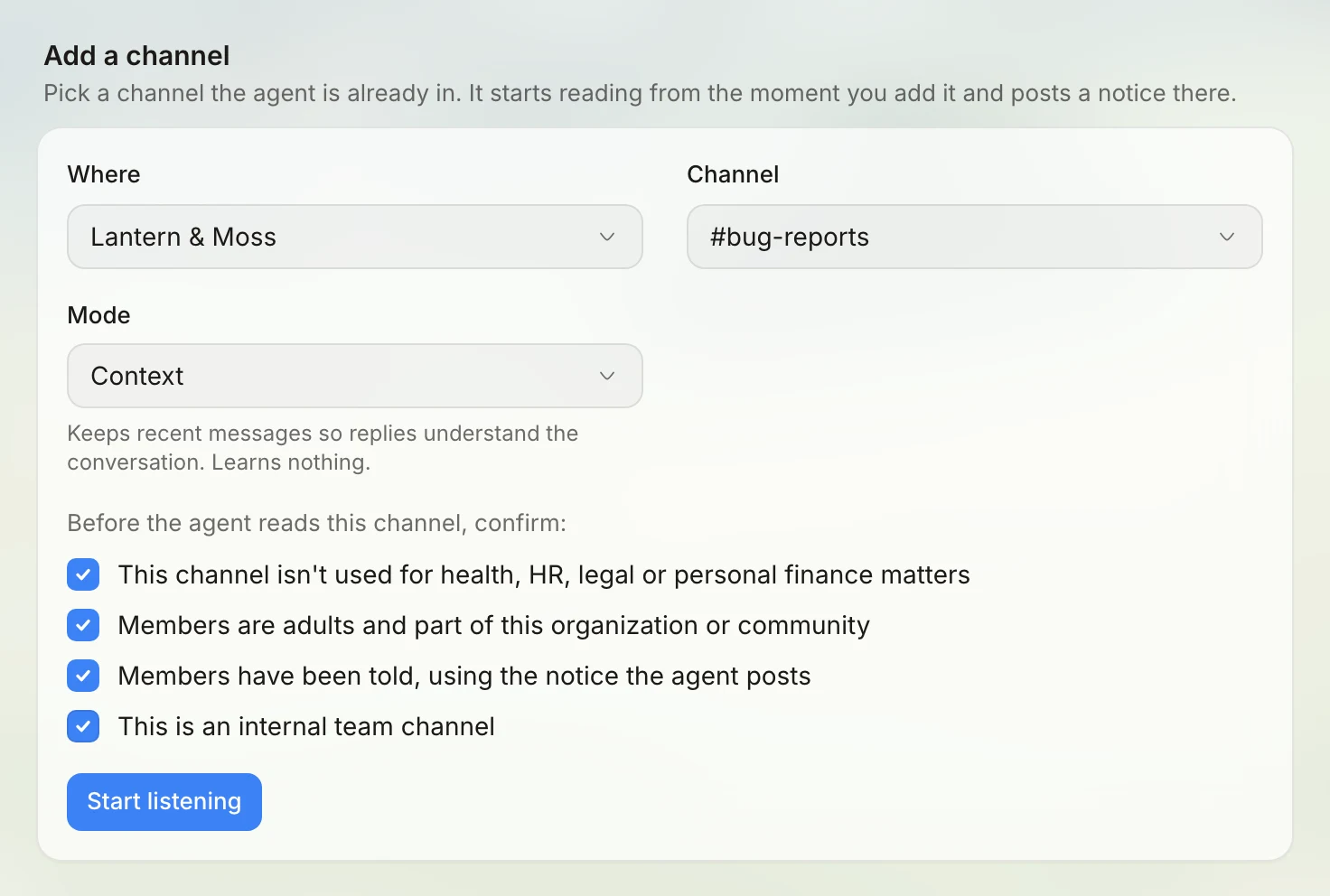
Adding a channel: pick it, pick a mode, and confirm the checklist before anything is read. Shown with a demo workspace.
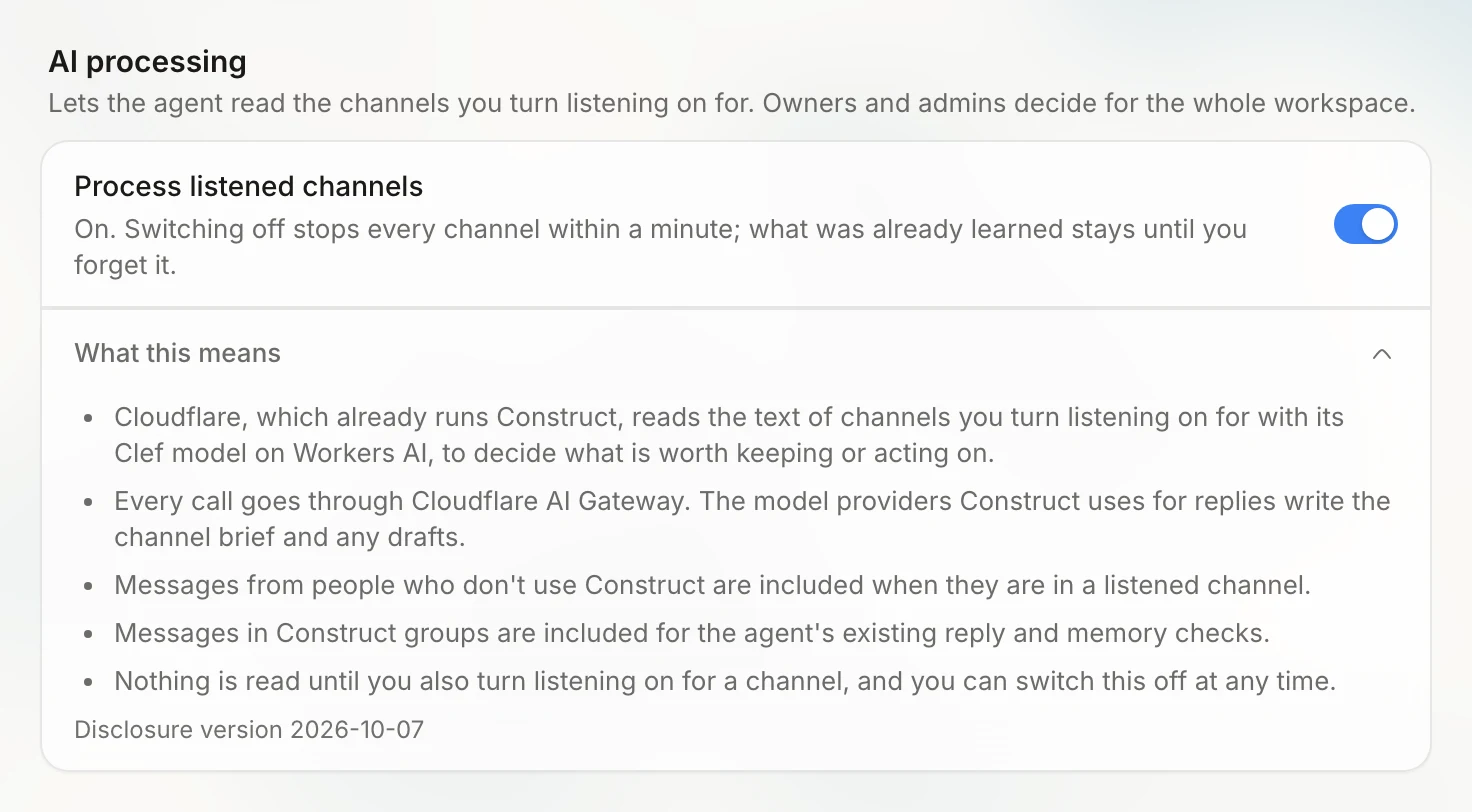
The AI processing switch and its plain-language disclosure. Shown with a demo workspace.
What your members control
/optoutstops the agent reading and learning from your messages. It still answers if you mention it, and/optinundoes it./forget_medeletes what the agent holds from your messages./briefand/statusshow what it is keeping and how long for.- People on the Blocked list are never read at all.

Who can use the agent in your server?
Each server has its own access rules under Who can message in Settings > Messaging. There are two modes:
- Only people I allow (the default): everyone else is ignored, with no reply and no reaction.
- Everyone: people you have not listed get a read-only guest agent.
Then two lists, which take Discord members or whole roles. Full access gives someone the real agent with every tool you have. Blocked silences someone completely. The person who installed the bot always has full access, and Blocked wins over everything, so you can mute an account without uninstalling.
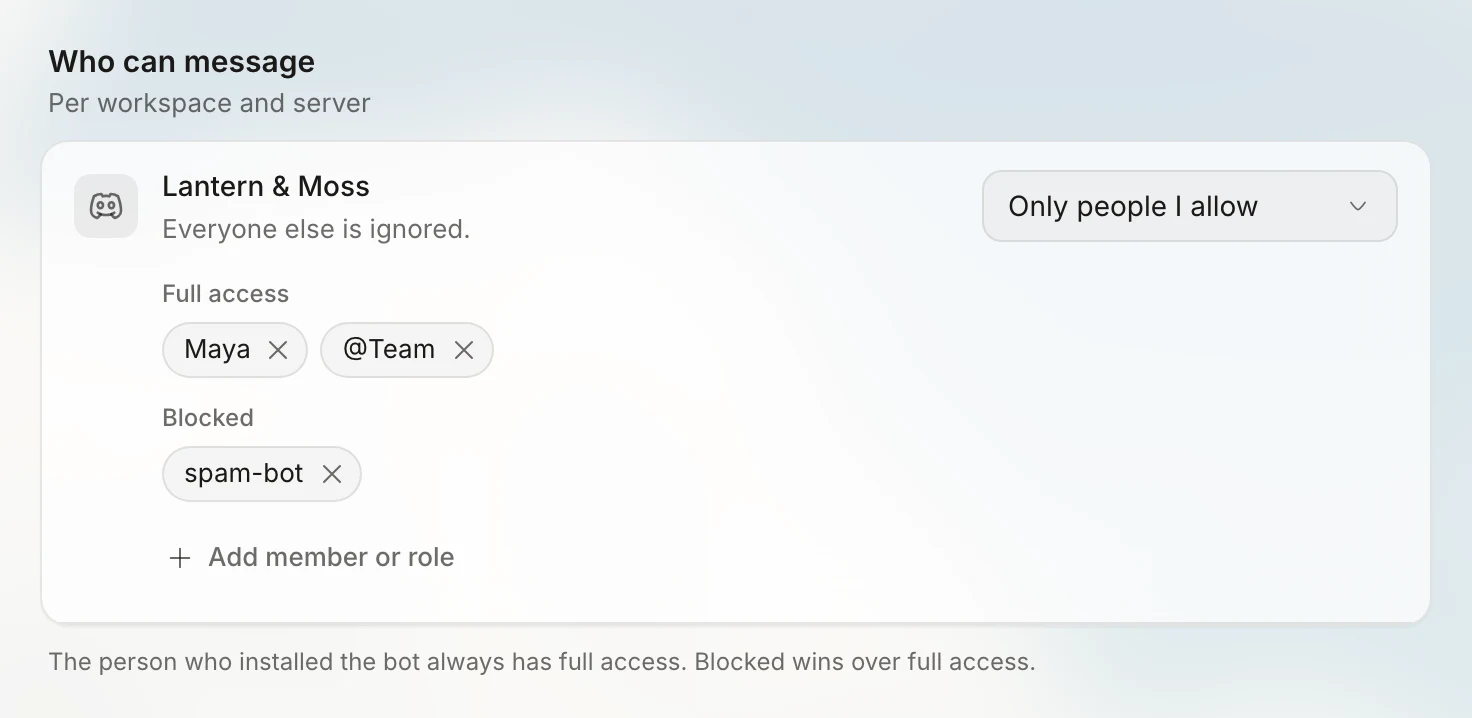
Access rules for one server, shown with a demo workspace. Roles work as well as individual members.
The guest agent is deliberately small. Guests get web search, web pages and general workspace context, and nothing else: no files, email, connected apps, browser, terminal or memory. Each guest can send 12 messages every 10 minutes. That makes Everyone mode a sensible fit for a community help channel, while the real agent stays with your team.
Every request in a server runs under the installer's Construct plan. Members do not need their own Construct account, and you do not pay per seat.
Can different channels get different agents?
Yes. Construct plans include several agents (2 on Lite, 5 on Starter, 15 on Pro), and you can send each channel to a different one. Route #support to an agent that knows your help docs and keep #growth on a research agent.
You can set this in two places. In Settings > Messaging, Channel routes sends one channel to a specific agent, and each server can have its own default agent. In Discord, someone with Manage Server can run /agent in the channel and pick from a list, once they have linked their Discord account with /connect. Threads that are already open keep the agent they started with.
Can you DM the Construct bot?
Yes, once you link your Discord account. In Settings > Messaging, under Your account, click Connect Discord. After that, a DM to the bot reaches your own agent in your own workspace, with all of your tools. Anyone who installs the bot is linked automatically, and you can also link from Discord with /connect. Linking only needs your Discord identity, so it does not give the bot access to your servers.
How does Construct compare with other AI agents for Discord?
We build Construct, so read this as our editorial comparison of what each product documents about Discord, as of October 15, 2026. It is not a hands-on benchmark.
| Product | How you add it to Discord | Who runs it | Replies without a mention | Price |
|---|---|---|---|---|
| Construct | Add to Discord in Settings, then authorize | Hosted by Construct | In the threads it opens; Listening per channel | From $9/mo |
| OpenClaw | Create your own bot in the Discord Developer Portal, enable Message Content, store the token, run the gateway | You, on your own machine | If you set requireMention: false for a server | Free software; you pay for the machine and models |
| Hermes Agent | Create your own bot and token, enable two privileged intents, run hermes gateway | You, on your own machine | In channels you list as free-response | You pay for the machine and models |
| Runbear | Authorize the Runbear bot, pick the server and channels | Hosted by Runbear | In threads, with "Continue in threads" turned on | Not documented in the sources we reviewed |
| Claude Tag | Not available on Discord; it works in Slack | Anthropic | Not applicable | Team and Enterprise plans |
Where Construct is different:
- Nothing to host. OpenClaw and Hermes Agent both ask you to create a bot, keep a token safe and run a gateway process (OpenClaw, Hermes Agent). Construct is one button in settings.
- An agent with a computer, not a chat bot. A Discord request can end as a saved spreadsheet, a drafted email, a browser task or a scheduled job, all in one workspace that outlives the thread.
- Context with controls. Listening is per channel, announced in the channel, time-limited, and every member can opt out or be forgotten.
When might another option still fit?
- You want to self-host the agent and pick every model yourself, and you are happy to run a server for it: OpenClaw or Hermes Agent.
- Your team lives in Slack and already pays for Claude Team or Enterprise: Claude Tag (Claude docs). Construct also works in Slack, from the same settings screen.
For how the wider category is shaping up, see always-on AI agents compared.
What does Construct on Discord cost?
Discord is included in every plan. Listening needs a paid plan; a trial does not count.
| Plan | Monthly price | Agents | Scheduled tasks | Parallel background jobs |
|---|---|---|---|---|
| Lite | $9 | Up to 2 | 3 | 2 |
| Starter | $59 | Up to 5 | 10 | 4 |
| Pro | $299 | Up to 15 | 50 | 8 |
You pay per workspace, not per Discord member. Check the current plans before you buy, because prices and limits can change.
What should you know before you start?
A few limits, each with the way around it:
- Scheduled results go to the web app, not Discord. A job you put on the Calendar notifies you in Construct. Start recurring work from Discord if you like, and read the results in Construct.
- No voice. Construct reads and writes text in Discord; it does not join voice channels.
- Plain answers, real files. Discord strips tables and images from messages, so ask for a file when you want one.
- Server installs only. Construct is added to servers, not to your personal account as a user app. Use DMs for private work.
- Mention-free threads need Message Content. If the server row shows Needs setup instead of Online, the bot can only see mentions, replies and DMs until that is fixed.
Troubleshooting
The first mention got a "Connect this server" card. The bot was added from Discord rather than from Construct. Click Add to Discord in Settings > Messaging and pick the same server.
The bot does not reply to a teammate. The server is on "Only people I allow". Add them, or a role they have, to Full access.
A teammate gets short, limited answers. They are a guest. Add them to Full access if they should have the real agent.
"I don't have permission to do that here." A channel or role override is blocking the bot. The message lists exactly which permissions are missing, so a server admin can grant them.
"That Discord server is already connected to another account." Each server links to one workspace. Disconnect it from the other workspace first.
Add Construct to your server
Choose Construct when you want an AI agent in Discord that does the work rather than just talking about it. It answers in threads, brings back real files, keeps context only in the channels you choose, and stays locked to your team until you open it up. It starts at $9 a month for the whole workspace.
Your first job: add Construct from Settings > Messaging, then mention it in your busiest channel with the FAQ prompt above. When the answer lands, open Chat > Channels in Construct and you will find the same thread, and the file, waiting in your workspace.
Sources
- Construct in Discord's App Directory
- Discord company page: daily active users
- Discord Gateway documentation: privileged intents and message content
- Discord developer threads documentation
- Houde et al., "Controlling AI Agent Participation in Group Conversations: A Human-Centered Approach", 2025
- OpenClaw: Discord setup
- Hermes Agent: Discord
- Runbear: Discord
- Claude Tag documentation
- Construct pricing
Related resources
- Construct across Slack, email, and chat
- AI agent memory you can control
- Always-on AI agents compared
- What is an AI agent with its own computer?
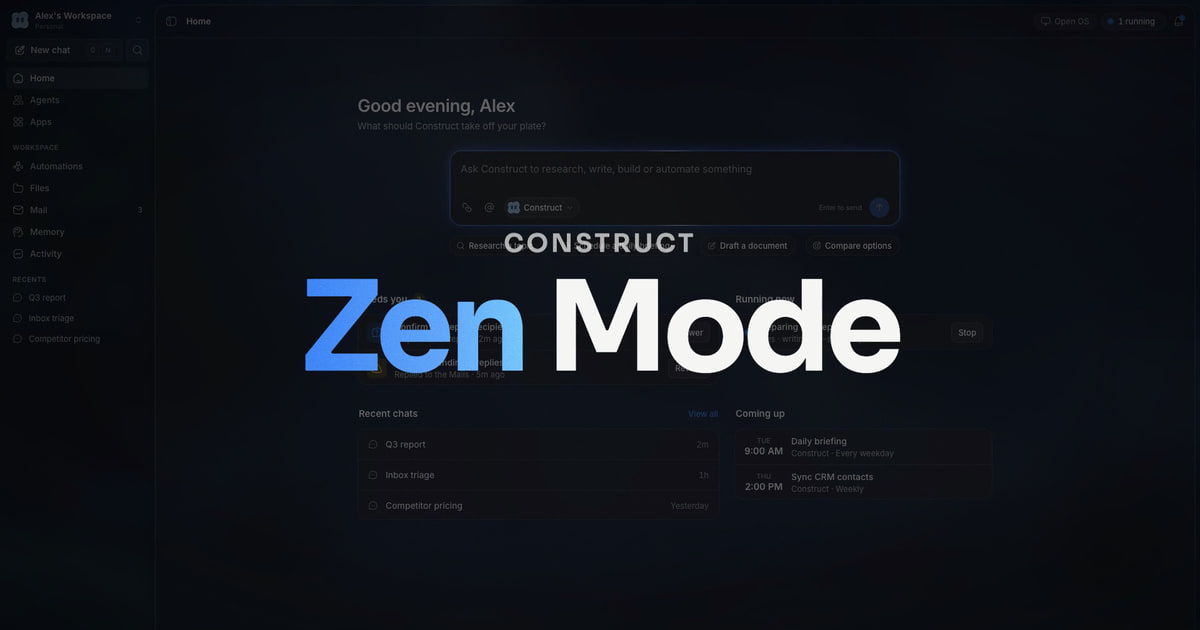
- Zen Mode: some days you just want it done
Frequently asked questions
- How do I add an AI agent to my Discord server?
- In Construct, open Settings, then Messaging, and click Add to Discord. Pick your server, authorize the permissions, and mention @Construct in any channel. You need the Manage Server permission on the server, and in a team workspace the owner or an admin does the install. Discord is included in every Construct plan, from $9 a month.
- Does the Construct Discord bot read every message in my server?
- No. By default it reads only messages addressed to it: mentions, replies to it, threads it started, slash commands and DMs. Listening is opt-in per channel. An owner or admin turns it on, the agent posts a notice in the channel, it reads only from that moment on, and messages are kept for 14 days by default, adjustable from 1 to 30.
- What are Construct's Listening modes?
- Off reads nothing beyond mentions. Context keeps recent messages so replies understand the conversation and learns nothing. Learn also keeps a channel brief, open loops and memories. Assist also sends private suggestions to the person who asked and posts nothing unprompted until you raise the ceiling. Listening needs a paid plan.
- How does Construct work in Discord threads?
- A mention, or a reply to one of its messages, opens a public thread named after your request. Everyone allowed to use the agent can keep talking to it in that thread without mentioning it again. It shows a progress line while it works, replaces it with the answer, attaches any files it made, and saves the thread to your Construct workspace.
- Who can use Construct in my Discord server?
- Each server starts on Only people I allow, so only the installer gets replies. You can add members or roles to Full access, block anyone, or switch to Everyone, where unlisted members get a read-only guest agent limited to web search and workspace context, at 12 messages every 10 minutes. Requests run under the installer's plan, with no per-seat fees.
- How do members opt out of an AI bot reading their Discord messages?
- In a channel where Construct is listening, /optout stops it reading and learning from your messages, /optin undoes that, and /forget_me deletes what it holds from your messages. /brief and /status show what the agent keeps in the channel and for how long.
- Is Construct a verified Discord app?
- Yes. Construct is a verified app listed in Discord's App Directory. To link a server to your Construct workspace, add it from Settings, then Messaging, in Construct. If you add it from the App Directory first, your first mention shows a Connect this server card that sends you to the same settings screen.
- Do I need to create a Discord bot token to use Construct?
- No. Construct is hosted, so there is no bot to create, no token to store and no gateway to run. Self-hosted agents such as OpenClaw and Hermes Agent ask you to create your own bot in the Discord Developer Portal and run a gateway process yourself.
Keep reading
How to Choose an AI Agent Platform for Your Team
A vendor-agnostic evaluation checklist for AI agent platforms: pilot-failure data, six evaluation criteria, governance pressure, and a scorecard you can reuse.
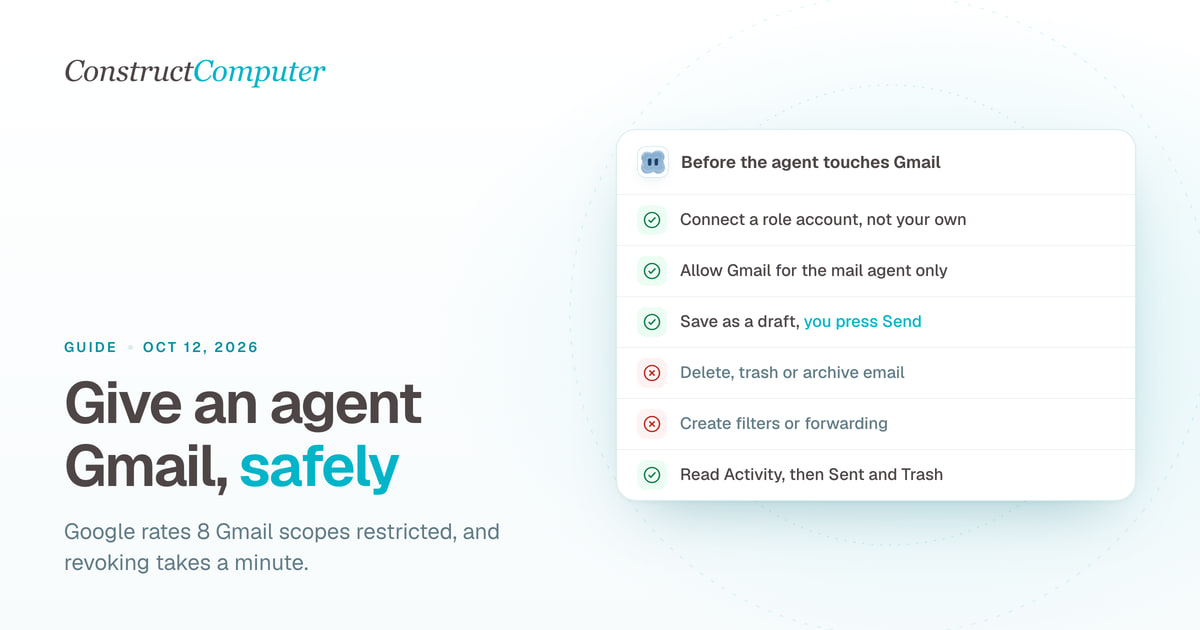
How to Let an AI Agent Use Your Gmail Safely
AI agent Gmail access without the risk: 8 restricted Gmail scopes explained, a separate agent inbox, drafts instead of sends, and a 1-minute revoke.
Zen Mode: some days you just want it done
Zen Mode is a chat-first way into Construct's AI computer. Ask once, it works in the background, asks when it needs you, and runs on your phone.
- product
- ai-agent
- ai-employee
- zen-mode

What is an AI agent with its own computer?
An AI agent with its own computer keeps working in a cloud workspace after you close your laptop. How it works, the risks, and who offers one, from $9 a month.
- ai-agent
- always-on-agent
- ai-employee
- product

