
Use your Claude API key in an AI agent: setup and cost
To run Claude in an AI agent, use an API key from the Claude Console. How to get one, what Claude costs per job, and how to add it to Construct.
 Nischal Naik
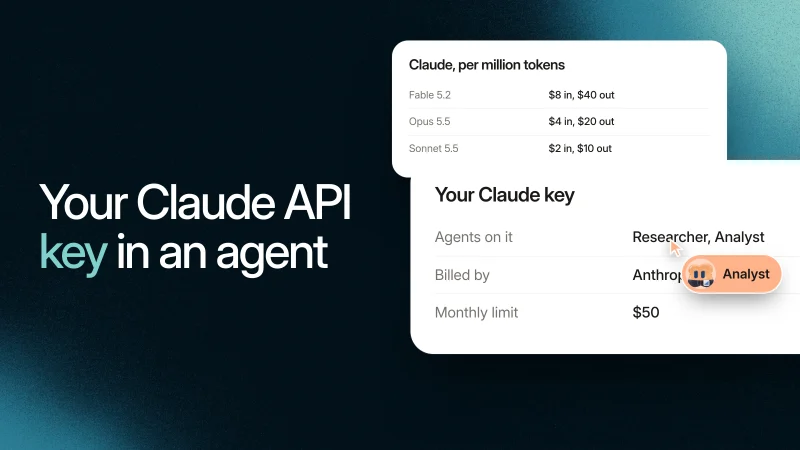
To run Claude inside an AI agent made by another company, use an API key from the Claude Console, billed per token and separate from any Claude subscription. In Construct, a Starter ($49 a month) or Pro ($259 a month) workspace adds a Console key in Settings, picks which agents run on it, and pays Anthropic’s API prices for those turns instead of drawing on the plan’s included usage.
How do you get a Claude API key?
- Sign in to the Claude Console, or create an account there.
- Add credits or a payment method in billing. API use is billed per token as you go.
- Create an API key, give it a name you’ll recognize, and store it in a password manager.
Make one key per tool. If Construct, a script and a coding tool share a key, you can’t tell which one spent the money, and revoking it breaks all three. An Admin API key won’t work for this: it manages an organization and can’t run models.
What does Claude cost through the API?
Prices per million tokens (MTok) from Anthropic’s pricing page, checked Nov 13, 2026:
| Model | Input | Output | Cache hits |
|---|---|---|---|
| Claude Fable 5.2 | $8 / MTok | $40 / MTok | $0.20 / MTok |
| Claude Opus 5.5 | $4 / MTok | $20 / MTok | $0.20 / MTok |
| Claude Sonnet 5.5 | $2 / MTok | $10 / MTok | $0.10 / MTok |
| Claude Haiku 5.5, prompts up to 100,000 tokens | $0.10 / MTok | $0.50 / MTok | $0.01 / MTok |
| Claude Haiku 5.5, prompts over 100,000 tokens | $0.50 / MTok | $2.50 / MTok | $0.05 / MTok |
What does one agent job cost?
Multiply the tokens read by the input price and the tokens written by the output price. Take a weekly research job that reads 200,000 tokens of pages and files and writes 20,000 tokens of notes. On Sonnet 5.5 that is 0.2 × $2 plus 0.02 × $10, or $0.60. On Opus 5.5 it’s $1.20.
Real runs can cost less than that sum, because an agent sends its instructions and the conversation so far again at every step, and the repeated part is read from the cache. A cache hit on Sonnet 5.5 costs $0.10 a million tokens against $2 for fresh input. These token counts are an example, not a measurement, so look at what the key spent after its first week and adjust the model per job.
How do you add your Claude key to Construct?
Own model keys come with Starter and Pro. In a team, the owner and admins add them.
- Open Settings, then Models, and choose Claude.
- Paste the Console key. Construct checks it by asking Anthropic which models it can run, and turns away a key that can’t run models, such as an Admin key.
- Once the key connects, choose which Claude model Construct runs on it, and set one for each agent under Model for each agent.
- Optionally give the key a Monthly limit in dollars. A key that reaches it isn’t called again that month.
The key is sealed in your workspace and only opened to make a call. Settings then shows what each key spent, by model and by which agent used it.
What changes once Claude runs on your key?
Turns an agent runs on your key are billed by Anthropic and don’t count against your plan’s included usage. Two switches in Settings decide how the key and the plan share the work:
| Setting | What it does |
|---|---|
| Use included usage first | Turns run on Construct’s own models while the plan’s included usage has room, and move to your key after |
| Use Construct’s models when a key fails | On by default. If the key fails before the reply starts, because it’s out of credit, revoked, rate limited or Anthropic is down, the turn moves to Construct’s models and the reply says so in one line, unless the plan’s usage is spent too |
With the second switch off, a failing key stops the turn and shows what went wrong instead, so nothing runs on Construct’s models at all. If a key fails after the reply has started, the reply ends with what came and the same line. A key at its monthly limit is skipped before it’s called.
What your key pays for is the model’s work. The plan still covers everything around it: the agents’ own computers and browser, connected apps, files, workflows and schedules, memory, and agent email. See pricing for what each plan includes.
Can you use other providers?
Yes. Starter and Pro workspaces can add keys from OpenAI, Google Gemini, xAI and Amazon Bedrock as well as Anthropic, and OpenRouter connects by signing in or with a key. Each agent can run on a different one: a research agent on Claude Opus 5.5 and an inbox agent on something cheaper, for example. A key from OpenAI is billed as API use, separate from ChatGPT Plus.
If your company already buys Claude through AWS, a Bedrock key runs Claude there and bills your AWS account.
Why put Claude in an agent rather than call the API yourself?
The API gives you a model. An agent that does recurring work also needs a computer to run code on, a browser, sign-ins to your apps, a scheduler, memory and a way to ask before it acts. Construct runs those parts, so your key pays for Claude’s thinking and nothing has to be built around it. If you’d rather build it, Construct vs DIY walks through what that takes, and how much an AI agent costs compares the bills.
Claude is a product of Anthropic. Construct is not affiliated with or endorsed by Anthropic.
More from the blog


Hand Construct its first job.
Start freeOpen Construct